I’ve been working on Orange, a simple frontend for ComfyUI workflows.
The idea came from a pretty basic problem:
What if you wanted to let your mom use your ComfyUI setup?
Or maybe you built a great local image-generation system and wanted to give your coworkers or teammates access to it, but you didn’t want to spend hours teaching everyone how ComfyUI works.
You probably don’t want to explain:
- Nodes and connections
- Checkpoints and VAEs
- Samplers and schedulers
- CFG and steps
- LoRAs
- Workflow JSON
- Why somebody accidentally disconnected a node and broke everything
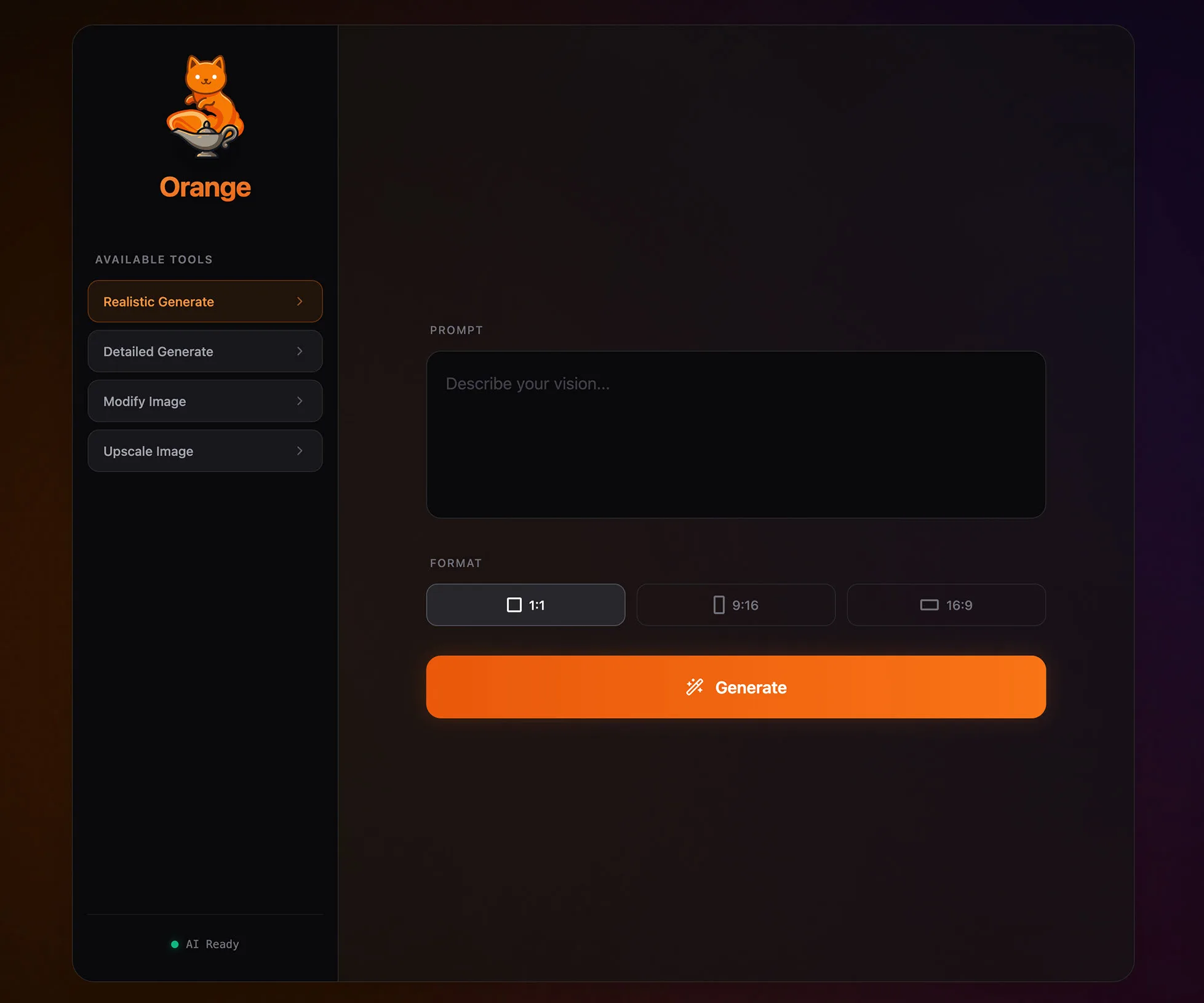
You just want them to see:
Prompt → Image → Generate
That’s what Orange is for.
The basic idea
You build the workflow in ComfyUI.
You decide the models, nodes, sampler settings, LoRAs, processing steps, and all the complicated stuff.
Then Orange turns that workflow into a simple purpose-built tool for everyone else.
The person using it only sees the things you actually want them to control.
For one workflow that might be:
- Prompt
- Reference image
- Aspect ratio
- Generate
For another it could be:
- Product photo
- Background description
- Generate
Or:
- Source video
- Character image
- Generate
The workflow engineer deals with ComfyUI. The user gets an app.
More than just an alternate ComfyUI UI
Orange isn't trying to replace ComfyUI.
It's meant to sit in front of it.
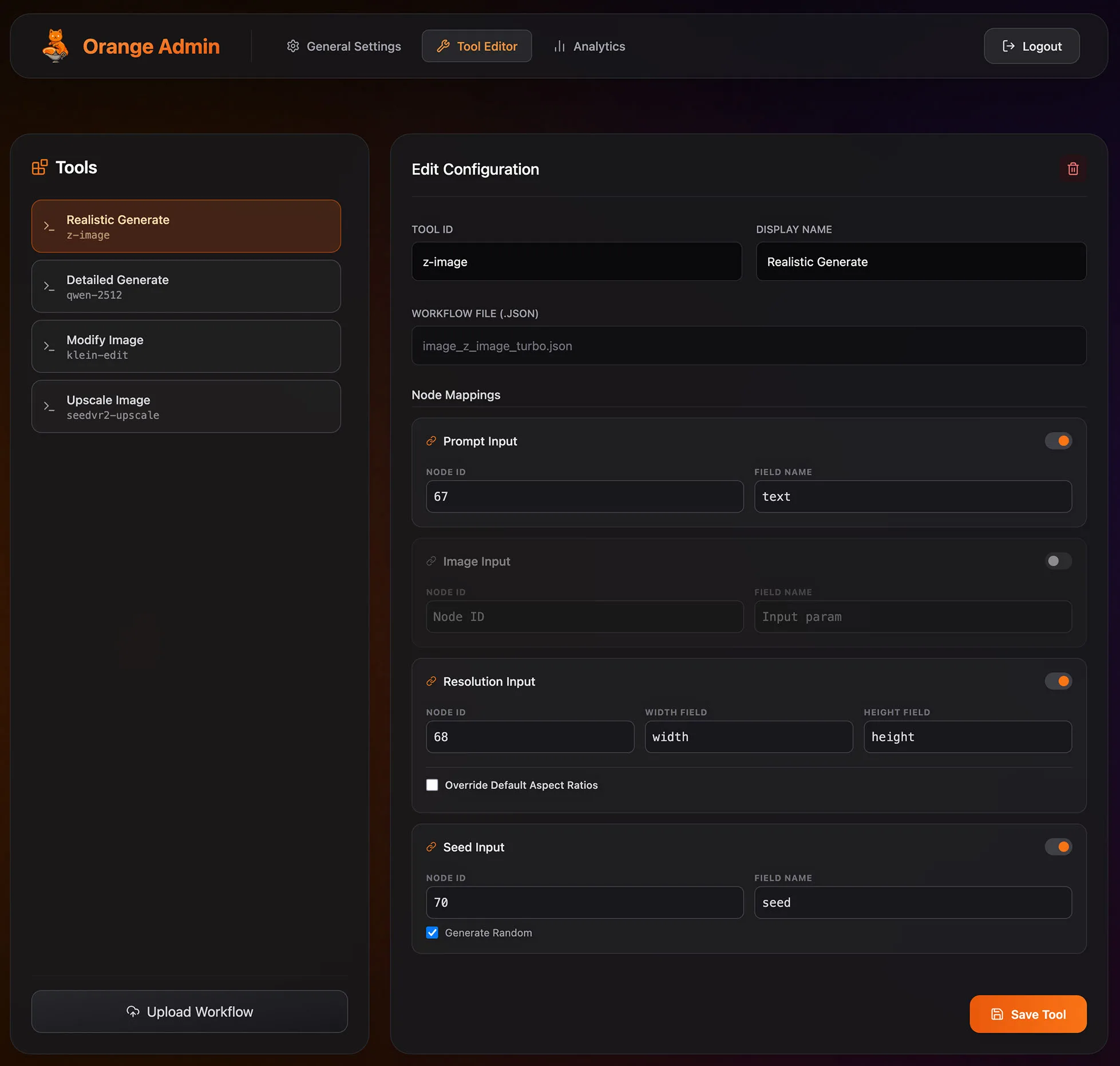
From the Admin panel, you upload a ComfyUI API workflow and map the inputs you want Orange to expose.
Orange currently supports workflows producing:
- 🖼️ Images
- 🎞️ Video
- 🎵 Audio
- 📝 Text
It also supports things like fixed workflow assets, reference images, prompt enhancement with an LLM, generation history, and custom branding.
Give a whole team access to your GPU boxes
Another big reason I built Orange is for shared environments.
At work, we have multiple ComfyUI machines. I wanted users to have one simple interface instead of needing to know which GPU machine to use, whether it's busy, or whether it even has the models required for their workflow.
Orange can manage multiple ComfyUI backends and route jobs based on:
- Server health
- Queue state
- Active jobs
- Priority
- Workflow compatibility
So you can have several GPU machines behind one Orange instance.
The user just presses Generate.
Workflow-aware routing
This was particularly important to me because ComfyUI machines don't always stay perfectly identical.
Maybe:
GPU 1 has SDXL + Flux
GPU 2 has Flux + Wan
GPU 3 has everything but is currently busy
Orange can check which servers are actually capable of running a particular workflow.
If a server is healthy but doesn't have the checkpoint that workflow needs, Orange can simply skip that server for that workflow while continuing to use it for other tools.
Workflow Preflight
Before handing a tool to users, Orange can also run a Preflight against your configured ComfyUI machines.
It checks for things like:
- Missing models/checkpoints
- Missing custom nodes
- Invalid input mappings
- Missing workflow assets
- Which backends can actually run the workflow
That means you can catch a lot of problems in the Admin interface instead of having someone discover them after clicking Generate.
Safe failover
If a machine goes down or rejects a workflow for a backend-specific reason, Orange can try another compatible machine.
It also distinguishes between failures that are safe to retry and failures where retrying could accidentally submit the same generation twice.
So the multi-machine support is intended to be useful for actual shared deployments, not just round-robin load balancing.
Make it look like your app
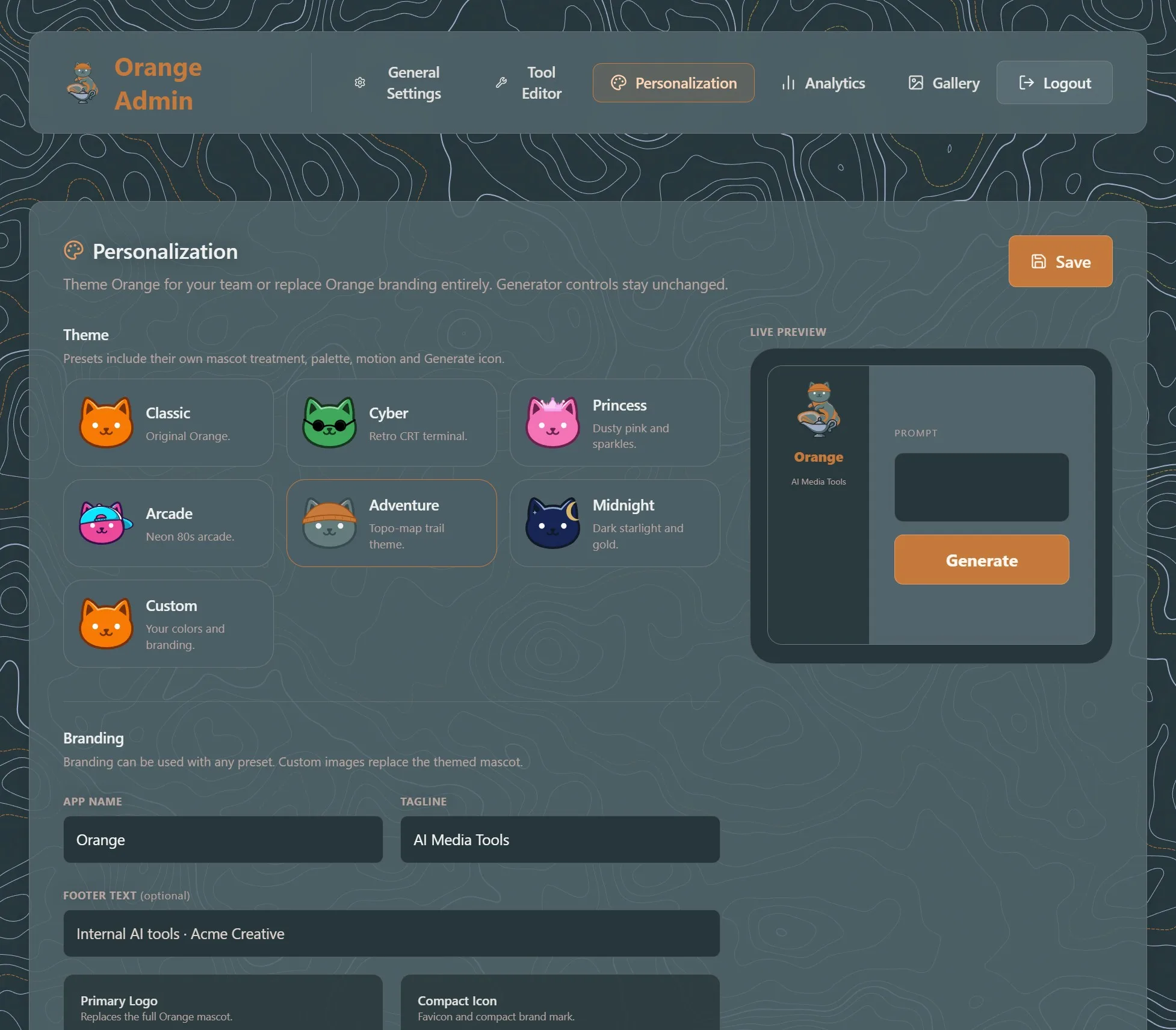
Orange also supports white-labeling and themes.
You can change things like:
- App name
- Logos and favicon
- Theme
- Colors
- Corner radius
- Motion
There are several built-in themes including Classic, Cyber, Princess, Arcade, Adventure, and Midnight.
So if you're deploying it internally, users don't necessarily even need to know that ComfyUI is behind it.
Pinokio support
I also made a Pinokio installer.
So instead of manually setting up the Python environment and dependencies, the intended experience is basically:
Install → Start → Open Orange
Main repo:
https://github.com/saintbrodie/Orange
Pinokio installer:
https://github.com/saintbrodie/orange-pinokio
The simplest way I can describe Orange is:
You've spent hours building an awesome ComfyUI workflow. Orange lets everyone else use it without spending hours learning ComfyUI.
Whether that's your mom, a coworker, a creative team, or just someone who absolutely does not need to know what a KSampler is.
The project is at a pretty solid first stable point now, so I'm starting to put it through more real-world use.
I'd love feedback from the Pinokio and ComfyUI community, especially from anyone building local AI tools for other people or running multiple GPU machines.



I’ve been working on Orange, a simple frontend for ComfyUI workflows.
The idea came from a pretty basic problem:
What if you wanted to let your mom use your ComfyUI setup?
Or maybe you built a great local image-generation system and wanted to give your coworkers or teammates access to it, but you didn’t want to spend hours teaching everyone how ComfyUI works.
You probably don’t want to explain:
You just want them to see:
Prompt → Image → Generate
That’s what Orange is for.
The basic idea
You build the workflow in ComfyUI.
You decide the models, nodes, sampler settings, LoRAs, processing steps, and all the complicated stuff.
Then Orange turns that workflow into a simple purpose-built tool for everyone else.
The person using it only sees the things you actually want them to control.
For one workflow that might be:
For another it could be:
Or:
The workflow engineer deals with ComfyUI. The user gets an app.
More than just an alternate ComfyUI UI
Orange isn't trying to replace ComfyUI.
It's meant to sit in front of it.
From the Admin panel, you upload a ComfyUI API workflow and map the inputs you want Orange to expose.
Orange currently supports workflows producing:
It also supports things like fixed workflow assets, reference images, prompt enhancement with an LLM, generation history, and custom branding.
Give a whole team access to your GPU boxes
Another big reason I built Orange is for shared environments.
At work, we have multiple ComfyUI machines. I wanted users to have one simple interface instead of needing to know which GPU machine to use, whether it's busy, or whether it even has the models required for their workflow.
Orange can manage multiple ComfyUI backends and route jobs based on:
So you can have several GPU machines behind one Orange instance.
The user just presses Generate.
Workflow-aware routing
This was particularly important to me because ComfyUI machines don't always stay perfectly identical.
Maybe:
GPU 1 has SDXL + Flux
GPU 2 has Flux + Wan
GPU 3 has everything but is currently busy
Orange can check which servers are actually capable of running a particular workflow.
If a server is healthy but doesn't have the checkpoint that workflow needs, Orange can simply skip that server for that workflow while continuing to use it for other tools.
Workflow Preflight
Before handing a tool to users, Orange can also run a Preflight against your configured ComfyUI machines.
It checks for things like:
That means you can catch a lot of problems in the Admin interface instead of having someone discover them after clicking Generate.
Safe failover
If a machine goes down or rejects a workflow for a backend-specific reason, Orange can try another compatible machine.
It also distinguishes between failures that are safe to retry and failures where retrying could accidentally submit the same generation twice.
So the multi-machine support is intended to be useful for actual shared deployments, not just round-robin load balancing.
Make it look like your app
Orange also supports white-labeling and themes.
You can change things like:
There are several built-in themes including Classic, Cyber, Princess, Arcade, Adventure, and Midnight.
So if you're deploying it internally, users don't necessarily even need to know that ComfyUI is behind it.
Pinokio support
I also made a Pinokio installer.
So instead of manually setting up the Python environment and dependencies, the intended experience is basically:
Install → Start → Open Orange
Main repo:
https://github.com/saintbrodie/Orange
Pinokio installer:
https://github.com/saintbrodie/orange-pinokio
The simplest way I can describe Orange is:
You've spent hours building an awesome ComfyUI workflow. Orange lets everyone else use it without spending hours learning ComfyUI.
Whether that's your mom, a coworker, a creative team, or just someone who absolutely does not need to know what a KSampler is.
The project is at a pretty solid first stable point now, so I'm starting to put it through more real-world use.
I'd love feedback from the Pinokio and ComfyUI community, especially from anyone building local AI tools for other people or running multiple GPU machines.