Probably something is off with your Windows Management Instrumentation.
systeminformation which pinokio uses to detect your hardware uses WMI in the background. If it's broke your GPU won't be detected.
Please open Windows Powershell as admin and execute the following commands. If it's working both commands will display your GPU.
get-CimInstance Win32_VideoController | Select-Object Name, AdapterRAM, DriverVersionget-wmiObject Win32_VideoController | Select-Object Name, AdapterRAM, DriverVersion
Please post a ascreenshot of your commands and the result.
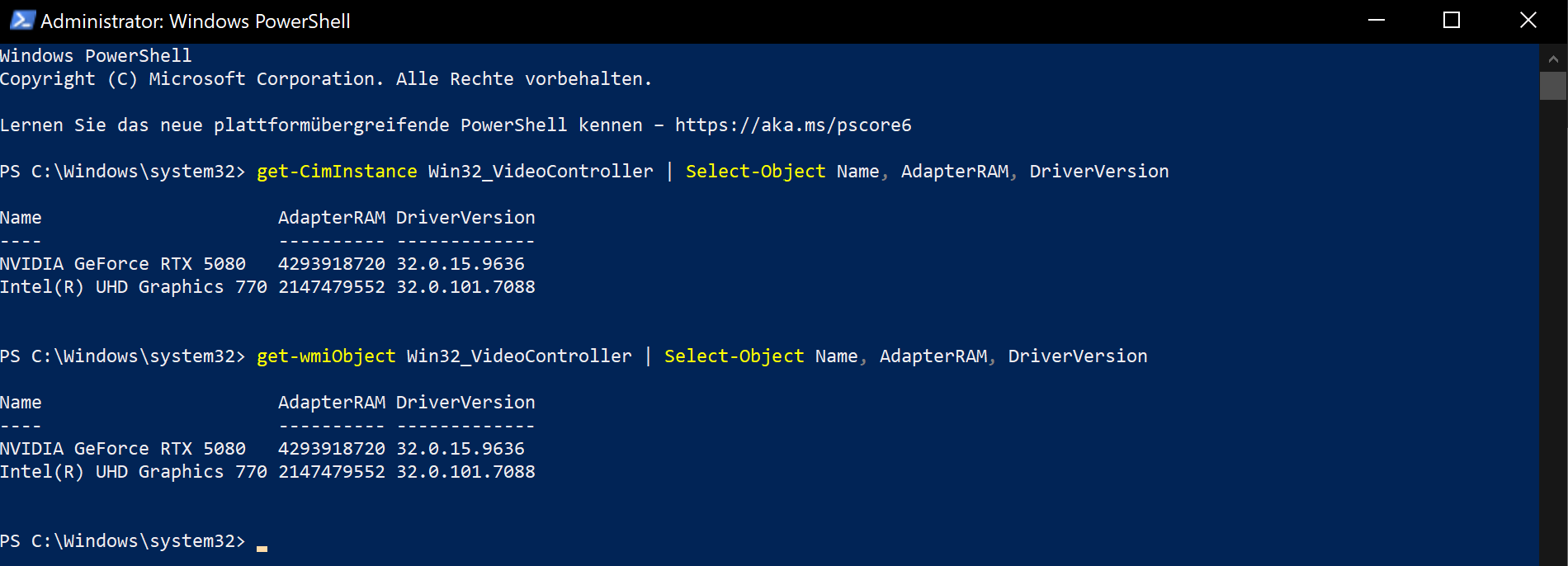
It should look like that:


Probably something is off with your Windows Management Instrumentation.
systeminformation which pinokio uses to detect your hardware uses WMI in the background. If it's broke your GPU won't be detected.
Please open Windows Powershell as admin and execute the following commands. If it's working both commands will display your GPU.
get-CimInstance Win32_VideoController | Select-Object Name, AdapterRAM, DriverVersionget-wmiObject Win32_VideoController | Select-Object Name, AdapterRAM, DriverVersionPlease post a ascreenshot of your commands and the result.
It should look like that: