Phosphene's new Remix mode fuses two things into a single local render:
1) a Character you trained - a LoRA of your own face
2) Ingredients - 2 to 8 reference images (a place, a prop, wardrobe)
The ingredients build the scene. The character drops YOUR face into it. And because the identity comes from a trained LoRA instead of one photo, it is the SAME face in every scene you build - tighter than a reference image alone, consistent from shot to shot.
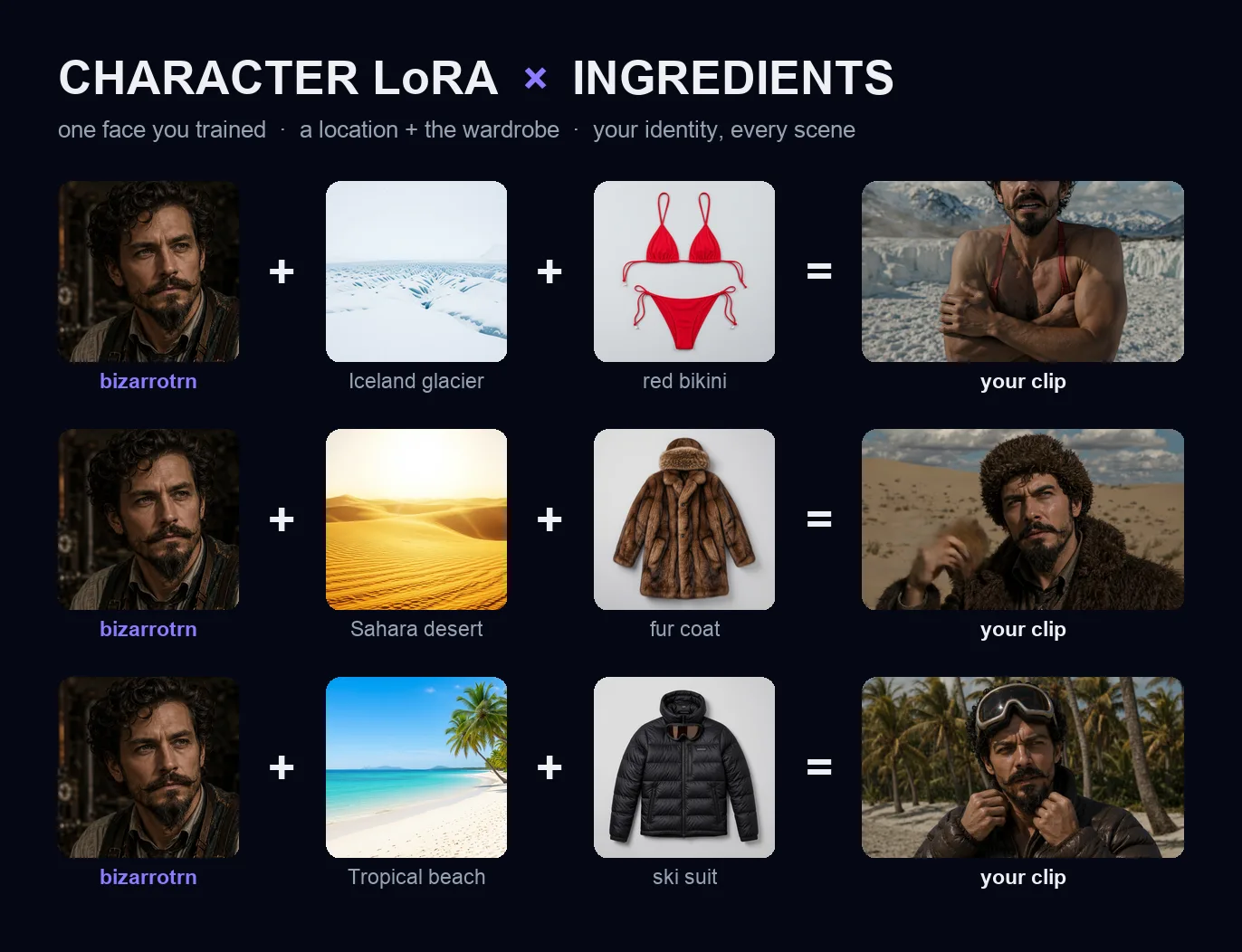
To prove the identity holds, I dressed my character "Bizarro" catastrophically wrong for three climates: a bikini on an Iceland glacier, a fur coat in the Sahara, and a full ski suit on a tropical beach.
Same face, every time. Every frame - the face AND the scenes - was generated locally on Apple Silicon with LTX 2.3. No cloud, no API, no per-image fee.
The one thing Remix needs: a Character.
The "same face every time" magic comes from a trained Character — a LoRA of a face. That's the piece that makes the identity hold across every scene, and it's the one thing you set up first. You train a Character once in the Character tab (a handful of photos), and from then on it's a dropdown in Remix.
Don't want to train one just to see if this works? I get it — nobody wants to spend an hour training before they know a feature is any good. So I'm shipping my own character so you can try Remix in the next two minutes:
That's the exact character from the clip above. Load it, drop in some ingredients, and you're remixing my face into your scenes immediately — then train your own once you've seen it work.
How it works in the app:

- Video -> Remix -> Ingredients
- Pick your Character from the dropdown (train one in the Character tab, or one-click the Bizarro sample above)
- Drop 2 to 8 reference images (a prop, a location, wardrobe)
- Identity strength ~1.3 is the sweet spot: higher tightens the face, lower keeps the motion natural
- Describe the shot, hit Generate
Your face, any scene, all on your machine. Apple Silicon only.



Phosphene's new Remix mode fuses two things into a single local render:
1) a Character you trained - a LoRA of your own face
2) Ingredients - 2 to 8 reference images (a place, a prop, wardrobe)
The ingredients build the scene. The character drops YOUR face into it. And because the identity comes from a trained LoRA instead of one photo, it is the SAME face in every scene you build - tighter than a reference image alone, consistent from shot to shot.
To prove the identity holds, I dressed my character "Bizarro" catastrophically wrong for three climates: a bikini on an Iceland glacier, a fur coat in the Sahara, and a full ski suit on a tropical beach.
Same face, every time. Every frame - the face AND the scenes - was generated locally on Apple Silicon with LTX 2.3. No cloud, no API, no per-image fee.
The one thing Remix needs: a Character.
The "same face every time" magic comes from a trained Character — a LoRA of a face. That's the piece that makes the identity hold across every scene, and it's the one thing you set up first. You train a Character once in the Character tab (a handful of photos), and from then on it's a dropdown in Remix.
Don't want to train one just to see if this works? I get it — nobody wants to spend an hour training before they know a feature is any good. So I'm shipping my own character so you can try Remix in the next two minutes:
That's the exact character from the clip above. Load it, drop in some ingredients, and you're remixing my face into your scenes immediately — then train your own once you've seen it work.
How it works in the app:
Your face, any scene, all on your machine. Apple Silicon only.