
Phosphene 4.14 is out. Three big things: it writes songs now, any clip gets a one-click face fix, and the Editor finally has proper sound tracks. Still free, still local, on your Apple Silicon Mac.
Audio -> Compose: write a whole song

- Type your lyrics (verse, chorus, bridge) and describe the style in plain words. You get a full song back, vocals and arrangement, as a WAV in your gallery.
- Draft for a quick listen, Final for the keeper. On an M4 Max a 3-minute song takes about 3 minutes at Final. A 2-minute Draft takes about 1 minute.
- Peaks at about 11 GB of memory, so 24 GB Macs and up can run it.
- Instrumental, score mode, max length and seed are all there. Drive video sends a song to the video side without starting a render.
- Install it from the sidebar: Install the music engine (YuE2, ~11 GB).
- Big thanks: YuE2 is by Multimodal Art Projection (M-A-P), and the MLX port is by vanch007 (mlx-Yue). Weights come straight from their repos. License: CC BY-NC 4.0 plus an individual-creator permission - creators can monetize their songs, companies need a license from M-A-P.
Upscale & Face Fix - one click on any clip
- The pass that doubles a clip's size and cleans up faces now has a name that says so, and it is one click from the player, an Outputs card, the queue history or the Editor.
- In the Editor, Swap it in puts the fixed clip on your timeline and keeps your trims, speed and fades. One undo. Your original is never overwritten.
- About 8 min for a 5 s High clip, about 2.5 min for a Draft (M4 Max).
- After an H3 draft it is now an optional checkbox, off unless you tick it.
The Editor gets sound
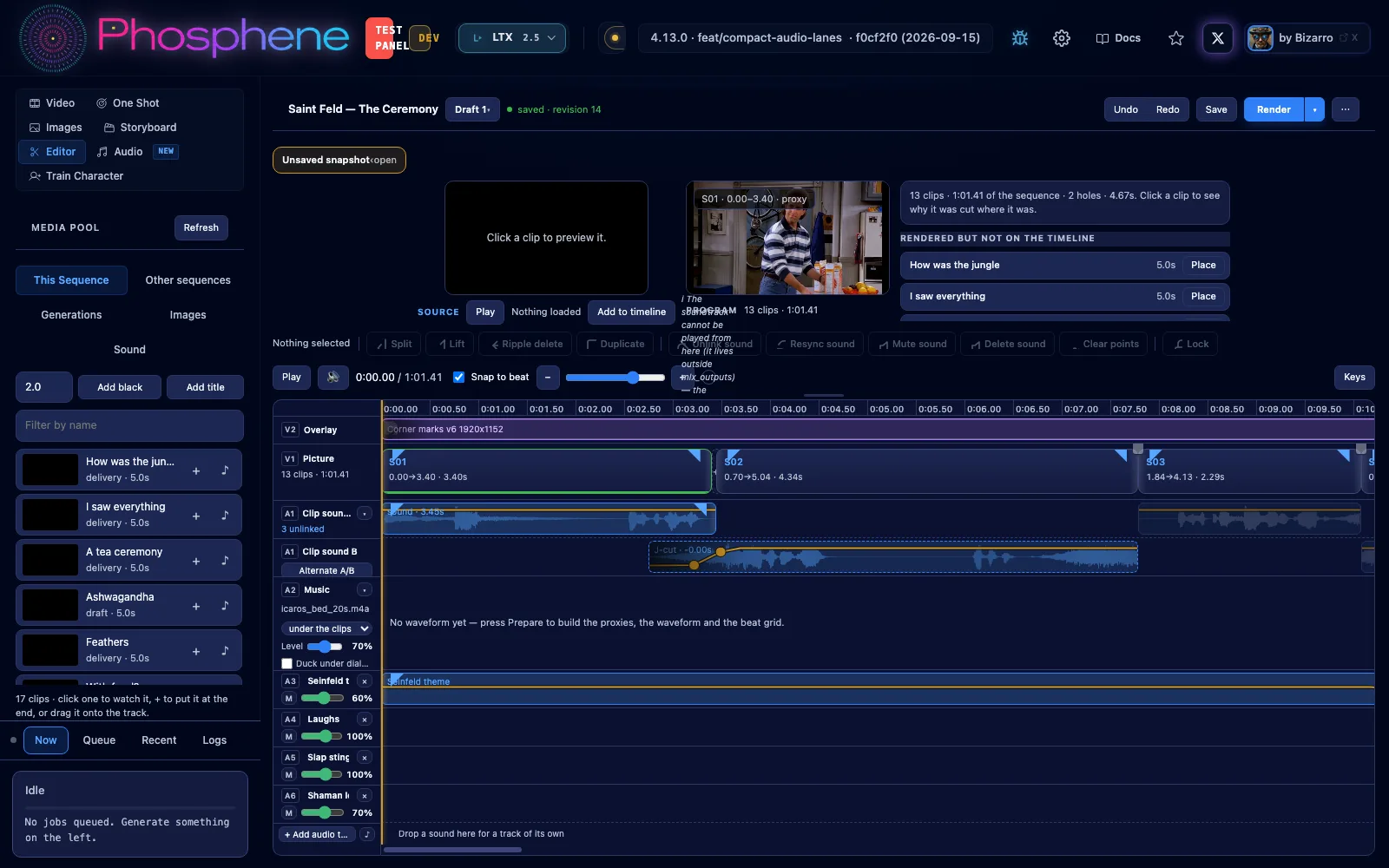
- Audio tracks A3, A4 and more. Drag sounds in, move them between tracks, trim, split, fade, set level points. They play in the preview, mix into the render and export to Premiere / Final Cut.
- Sound pool with every sound from your film and your outputs, plus Add sound file.
- Duplicate works on sound.
- Clip sound on two lanes (A/B) so neighbouring shots can overlap and crossfade.
Also fixed in 4.13.1 and 4.13.2
- Hailuo H3 High runs 15 steps - sharper faces and motion (a 5 s High clip now takes about 34 min).
- H3 clips keep their last frame, and Turbo uses its full adapter again.
- Upscale no longer flashes white at the end.
- Stop really stops, even while Turbo is still getting ready.
- Older H3 LoRAs are back at their trained strength.
- CivitAI search works properly again - thanks @Viktorminator (#82).
How to get it: press Update, then restart Phosphene. Compose shows up once you install the music engine from the sidebar.
Full notes: https://github.com/mrbizarro/Phosphene/releases/tag/v4.14.0



Phosphene 4.14 is out. Three big things: it writes songs now, any clip gets a one-click face fix, and the Editor finally has proper sound tracks. Still free, still local, on your Apple Silicon Mac.
Audio -> Compose: write a whole song
Upscale & Face Fix - one click on any clip
The Editor gets sound
Also fixed in 4.13.1 and 4.13.2
How to get it: press Update, then restart Phosphene. Compose shows up once you install the music engine from the sidebar.
Full notes: https://github.com/mrbizarro/Phosphene/releases/tag/v4.14.0