theDAW is a DJ, and VJ app interoperable w/Ableton, Reaper, Resolume & more. Stable Audio 3, Magenta RT2, Suno API, Chimera track fusion, Demucs stems, MIDI generate/notate, img > spectrogram > music, drawing > music, VST3 & .gan plugins, automix & key-lock, GLSL shaders, volumetric video, Quest 3 XR interface, MIDI auto-map, RAG assistant. A multitrack timeline with
clip editing, fades, per-track inserts and recorded automation. A mastering
chain of 25 effects with VST3 hosting, LUFS metering, macros. A piano
roll, a step sequencer, loudness and spectrum metering, and export to WAV,
MP3, FLAC, OGG, AIFF, Opus, M4A, MIDI, MusicXML and LRC.
It runs on your computer. There is no account and no subscription, and audio
you make never leaves the machine unless you send it somewhere yourself.
Then it keeps going.
Create a track from a text prompt, or record the old fashioned way, turn it into sheet music and play
along to it, sing to it with every word timed to the vocal, DJ it, launch it
from a clip grid, run reactive visuals behind it, conduct it with your hands
in front of a camera or in VR, design the plugin that processes it, and train
the model that generated it on your own recordings, on your own GPU, so nothing about the loop needs a datacenter, training included. The
generator is Stable Audio 3, trained on licensed, ethically sourced audio.
Supported
- NVIDIA, MPS, and CPU. Medium fits on as low as 6GB NVIDIA card. Small can run on
CPU. Apple silicon uses MPS.
- MIDI controllers: 110 device profiles ship with it, an unknown one can
be learned by capture, and Controller Vision identifies a controller from a
photo of it. The Audima Labs Sway motion controller is native.
- VST3 plugins from your normal plugin folders, in the same chain as the
built-in effects.
- Other DAW project files: it opens Ableton Live, Reaper, FL Studio, Audacity,
Audition, Bitwig and Resolume projects.
- A Meta Quest 3, through theDAW-XR: hand-tracked MIDI with nothing in
your hands, passthrough video piped into the visual engine, and colocated
multiplayer. There is a deploy path that pushes the APK to the headset over
ADB.
- Your phone or tablet as a remote for generation, transport, DJ and the
library, or as a camera feeding the visuals over the LAN.
- Depth cameras. Azure Kinect point clouds, and a Unity bridge that pushes
a Unity app's rendered frames into the VJ engine.
- Cloud models, when you want them. Suno and Google's Lyria 3 Pro sit in
the same model list as the local ones.
- Local LLMs. The assistant streams from Ollama, LM Studio, llama.cpp or
vLLM as readily as from the hosted providers, and answers out of theDAW's own
manual through a RAG index. Point it at a local model and the whole app is
offline. Magenta RealTime 2 runs through theDAW's own NVIDIA port on Windows via WSL2, native Linux, or cloud.
The studio you know
MAKE: music generation and fusion engine
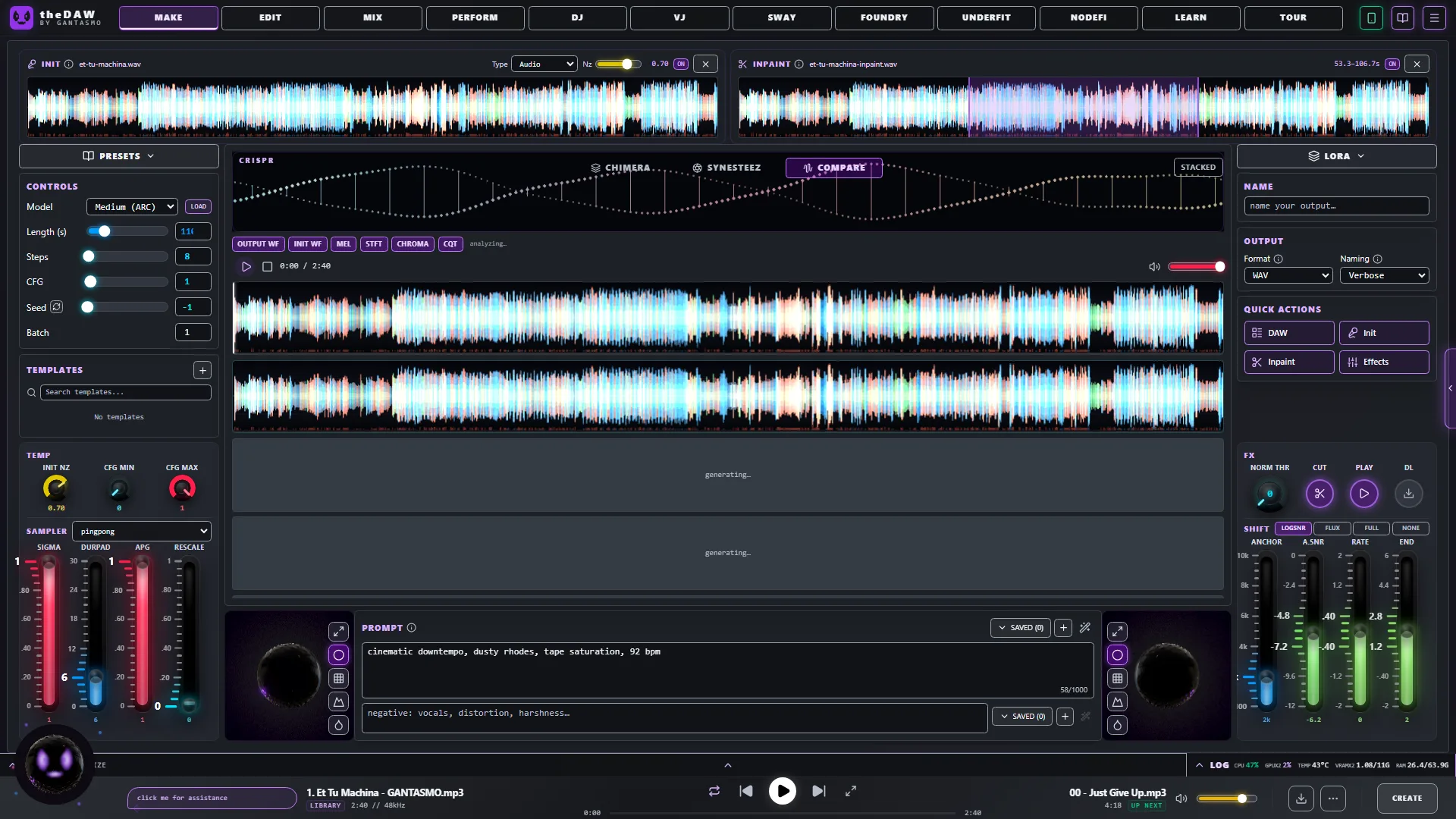
Type a prompt and press CREATE. Or drop your own audio on the INIT slot and set
how far to move from it. Or drop a track on INPAINT and paint the region you
want regenerated, leaving the rest alone. Templates save a whole control set;
every result lands in the library with its prompt, model and settings attached.
Chimera takes several clips and makes one track out of them. It analyses
each clip's tempo and key, cuts them on the beat grid, pitches them into one
key, arranges the pieces into a song, and asks the model to regenerate the
joins so the seams do not click.
EDIT: age old DAW with cutting edge tools
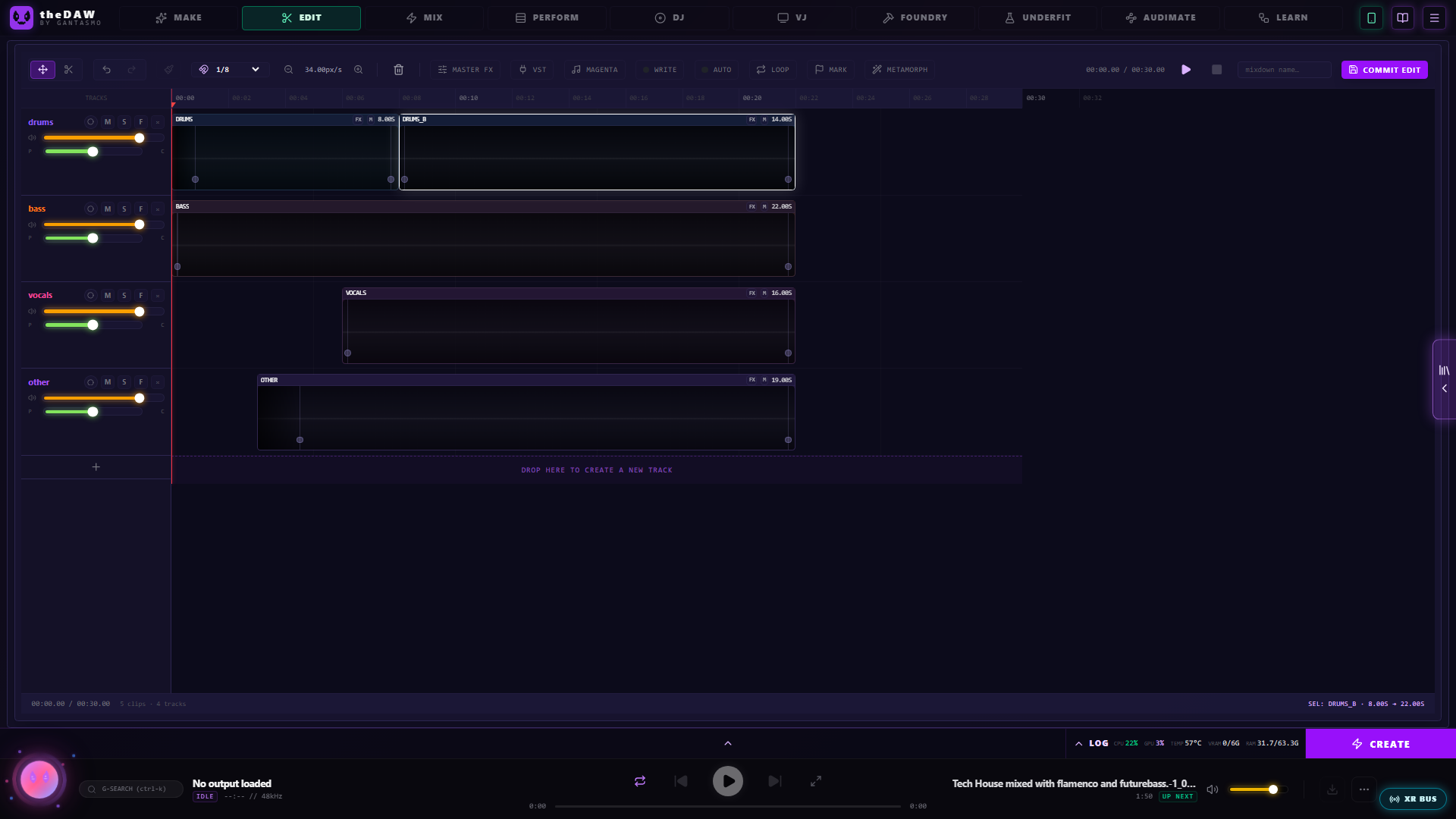
Move and split clips, drag corner handles for fades, give each track its own
mute, solo, pan and insert effects. Turn on WRITE and move a control while it
plays to record automation. COMMIT EDIT renders every audible track down to one stereo file.
MIX: finish it
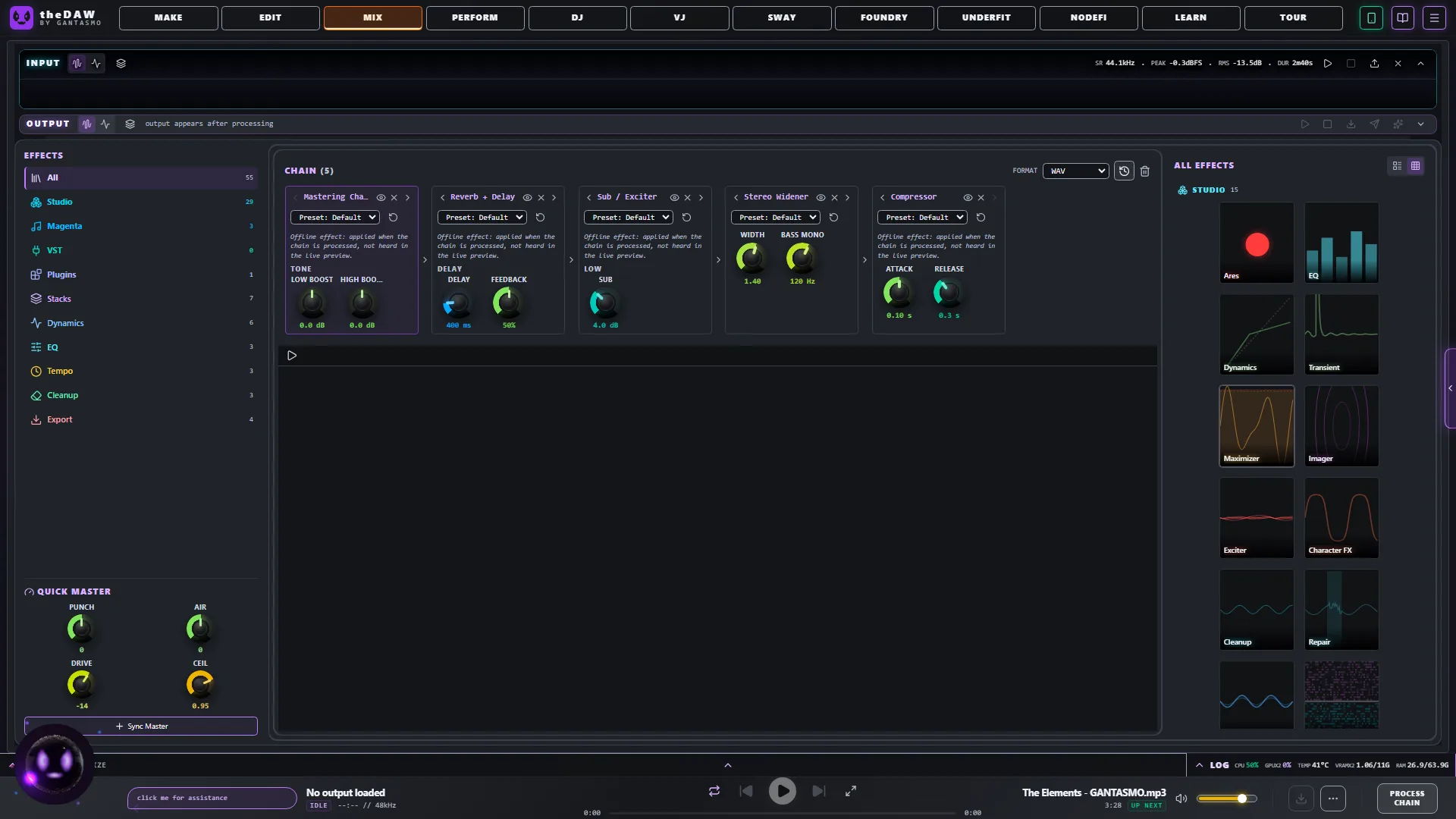
Effects chain running left to right, each opens its own panel: mastering, compression,
filters, vocal processing, lo-fi, widening, reverb, delay, LUFS normalisation,
pitch shift. Four QUICK MASTER knobs, PUNCH, AIR, DRIVE, CEIL, cover the
common moves in one place. VST3 plugins appear in the same list.
Underneath that sit the repair and enhancement tools: denoise, dereverb,
de-click, de-hum, de-ess, spectral repair, vocal isolation, audio
super-resolution, codec un-crush, and an analyser that listens to a track,
names what is wrong with it, and builds an effect stack to fix it.
SCORE: convert audio to notation
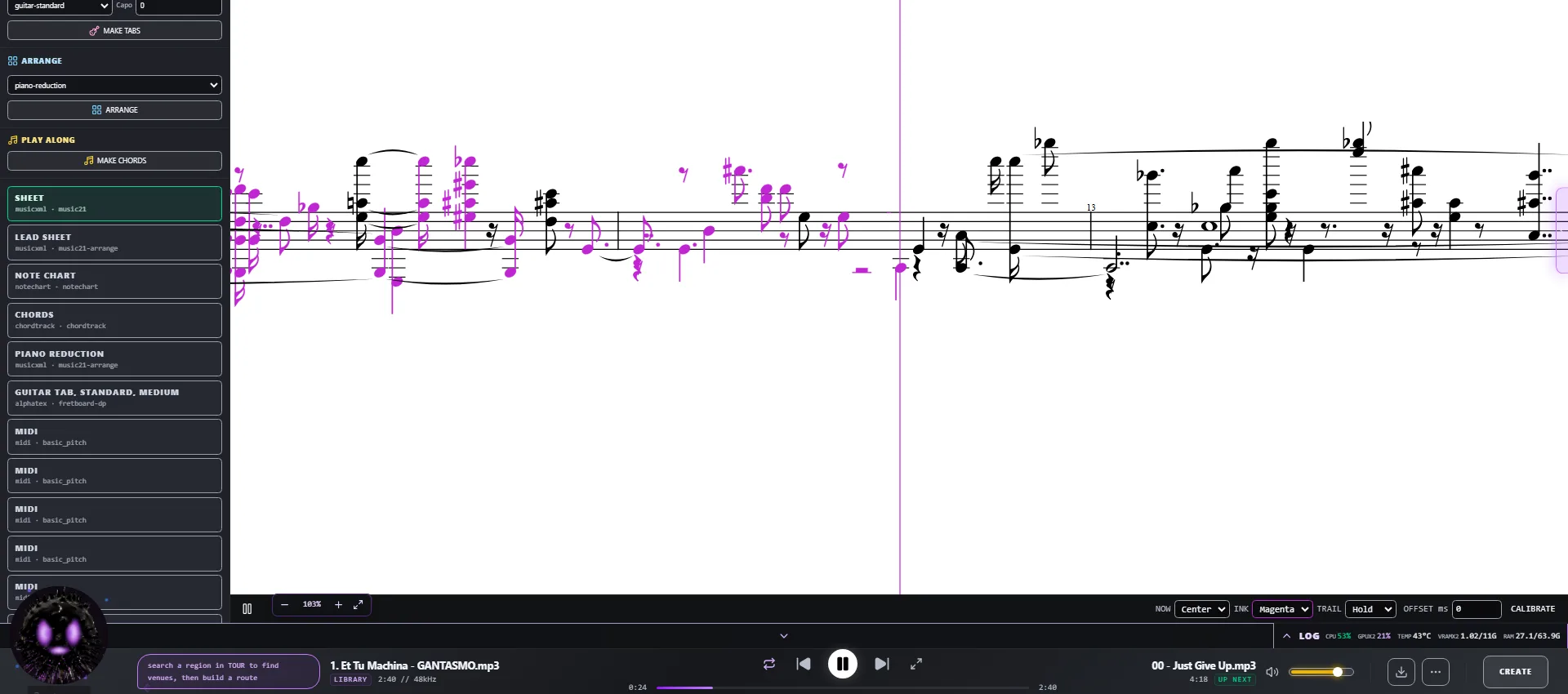
Convert a track to MIDI, a drum stem gets a real kit transcription, then
engrave it. Sheet music, guitar/bass/ukulele tablature for a given tuning and
capo, lead sheets, piano reductions, simplified parts, band scores with drums
on a percussion staff, chord tracks. Out to PDF, SVG, ABC and MusicXML. It
imports scores too: MusicXML, ABC, Humdrum and MIDI land in the piano roll.
Every score is also a play-along that follows the audio, in four views: a
cursor over engraved pages, one continuous staff scrolling under a now-line,
chord diagrams for your instrument, or notes travelling toward a hit line.
CALIBRATE measures your audio device's latency so the notation lines up with
what you hear. The same chart exports as a Beat Saber level pack.
SING: karaoke created from your own tracks
Paste your lyrics and a forced aligner places each word against the separated
vocal stem, so no word is ever replaced by a transcription guess. Whisper then
listens to the same vocal as a second opinion and underlines what it heard
differently, so you can check it. You can also tap the timing by
hand. It reads and writes LRC, and draws the pitch you sing against the melody
of the original.
DJ: play it out
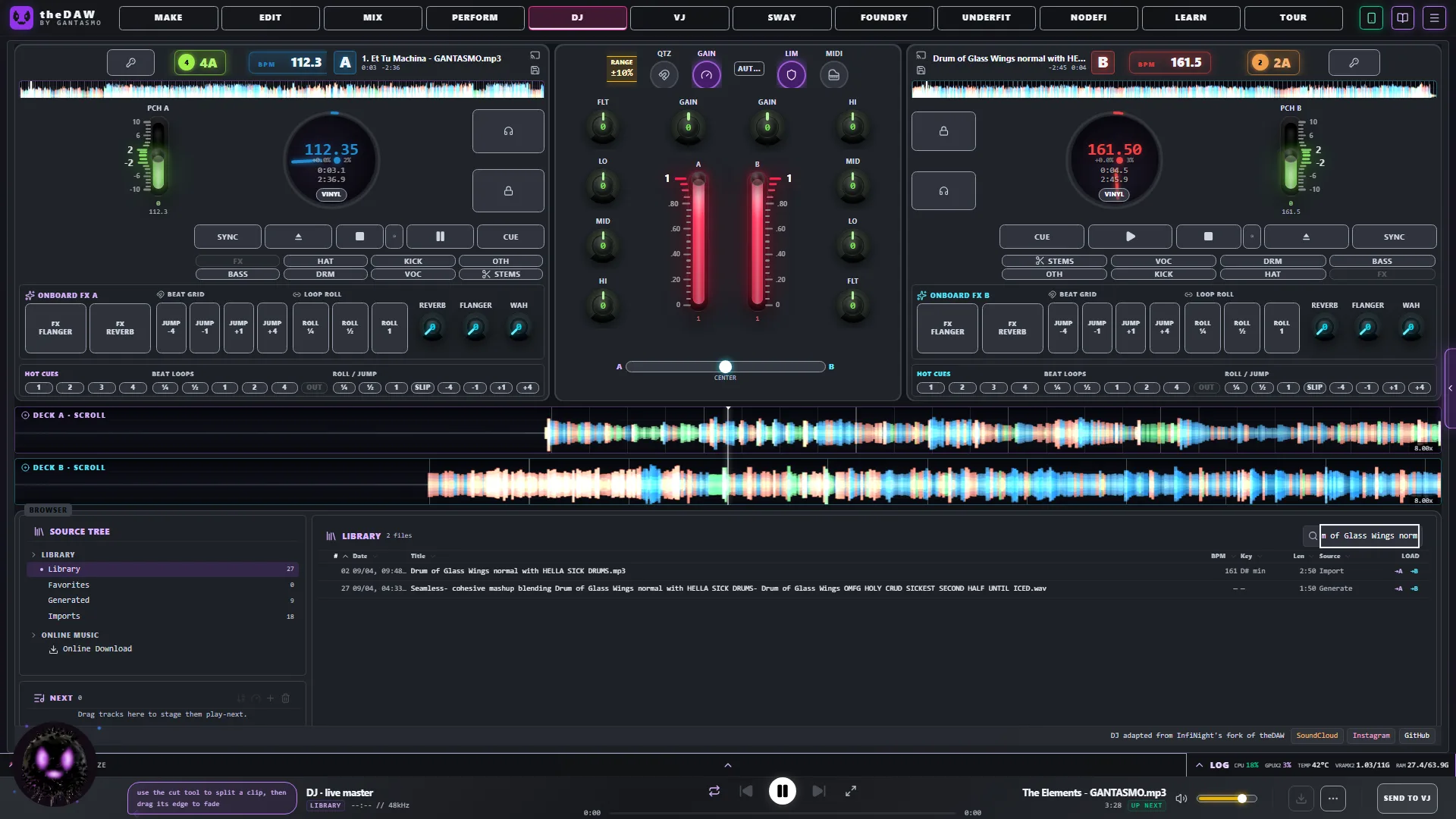
Two decks with sync, key lock, hotcues, beat loops, loop rolls, slip and
quantize, an FX rack per deck, and faders for live-separated stems. Automix
plays a prepared set with beat-matched crossfades, following each track's
cue-in, mix-out and transition length. Mid-show you can tell the assistant to
blend now, or move a track up the running order, and it does it.
LOOM: a colony that grows while it plays
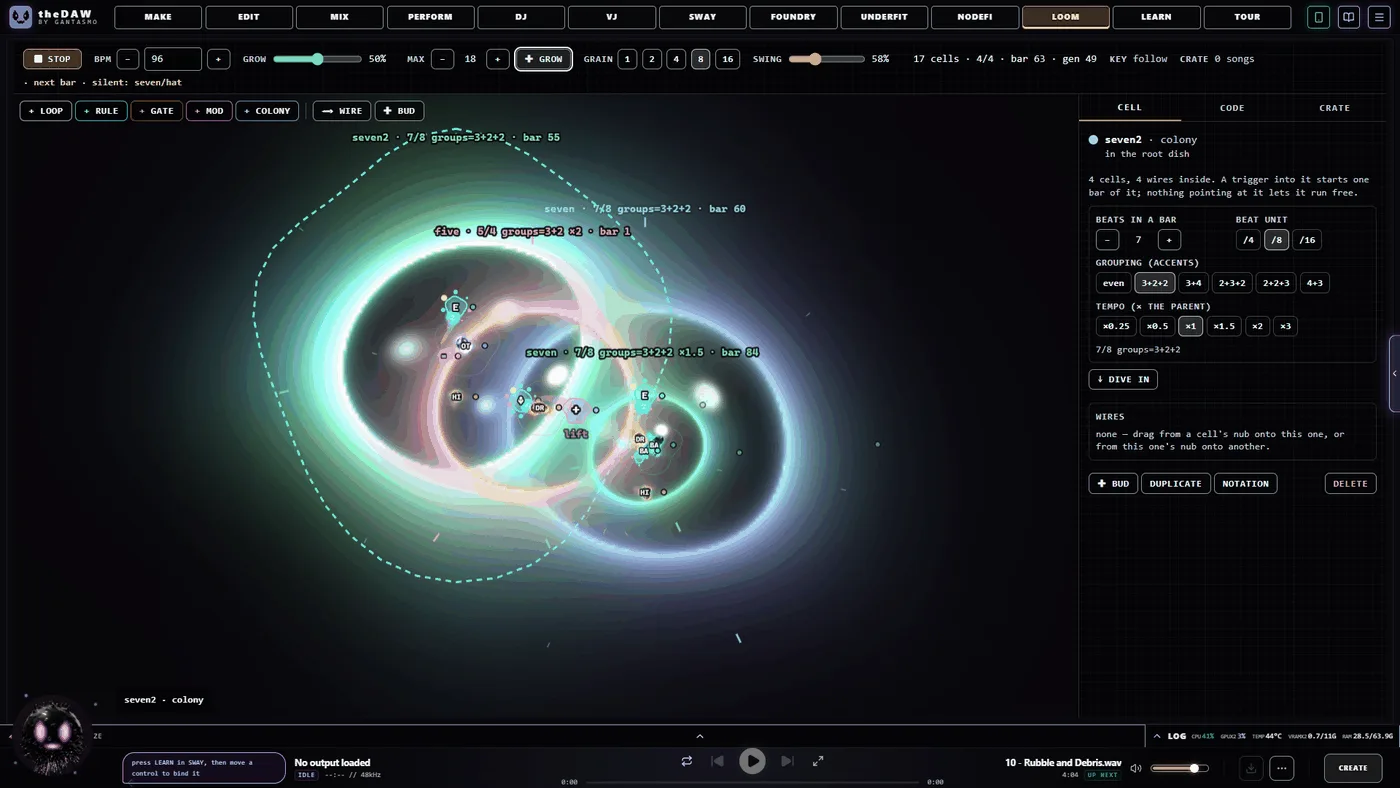
Every song in your library is torn into bar- and beat-aligned fragments of each
stem, indexed with its key, energy, rhythm, chords and words. LOOM plays that
index as a living colony.
It starts as one spore you click. From there it grows on its own, on the beat:
cells divide, a child born on its parent at zero vitality and ripening over
three bars; colonies form around existing loops rather than beside them; and
cells that go idle are hollowed out from the inside over two bars and removed.
Nothing appears from nowhere. Loops, rules, gates and mods wire to each other
with rope-physics tendrils, and a colony is itself a cell with its own meter,
so you can run 7/8 grouped 3+2+2 inside a 4/4 dish at half speed and dive into
it.
NODEFI: patch the whole studio together
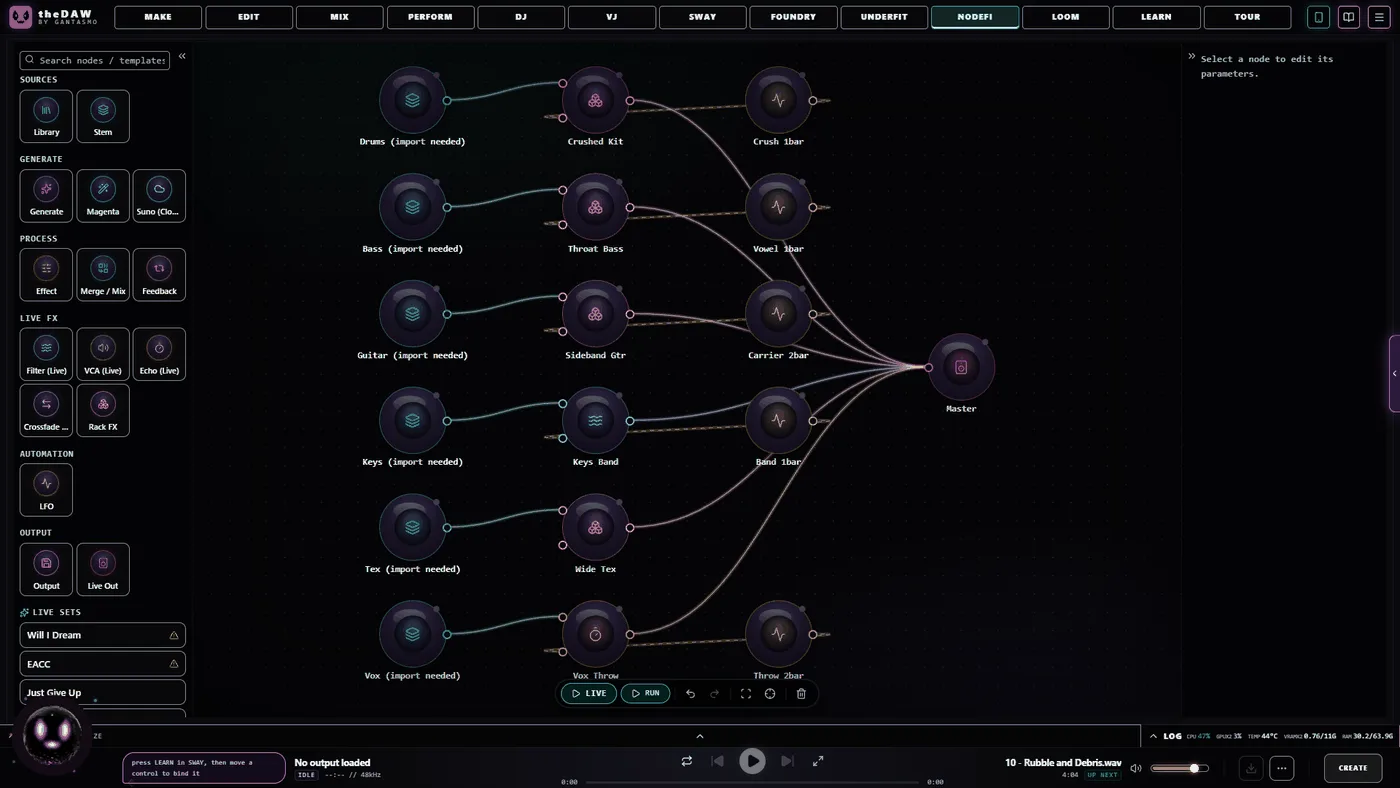
A node canvas where library, generation, effect, merge and feedback nodes wire
into a graph. In Run mode the graph executes through the AI stack and saves
the result. In Live mode the same canvas plays stems, racks and routes in
real time with no model involved at all; the shot above is a live set with six
stem lanes each running its own effect chain into a master node.
FOUNDRY: design the plugin, then use it
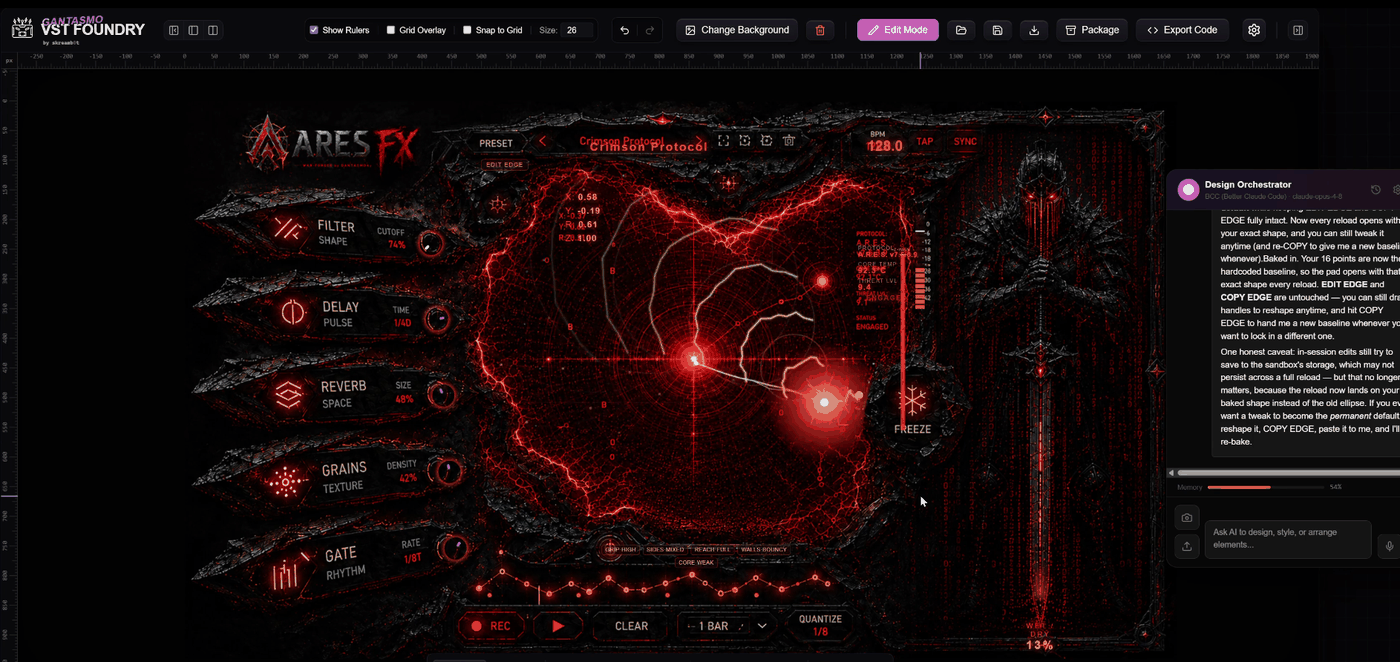
A canvas for plugin interfaces. Drag on knobs, sliders, meters, displays and
images, set a background, wire the controls, and export a .gan web-plugin
that loads in the MIX chain right next to your VST3s. There is an AI panel that
will design, style and arrange elements for you if you'd rather describe it.
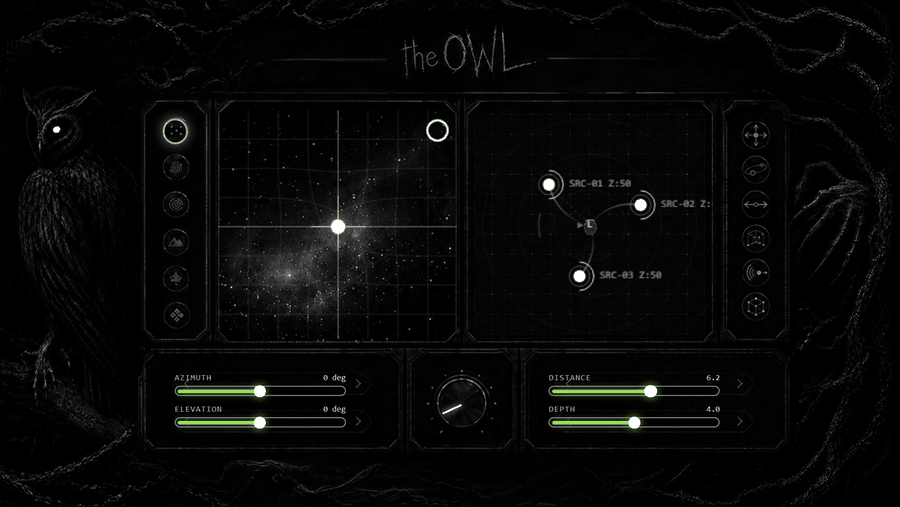
Two finished plugins ship in that format and open here as editable designs, so
there is a working reference to take apart: Ares, the multi-effect above,
and The Owl, an HRTF spatializer.
SWAY: conduct it with your hands
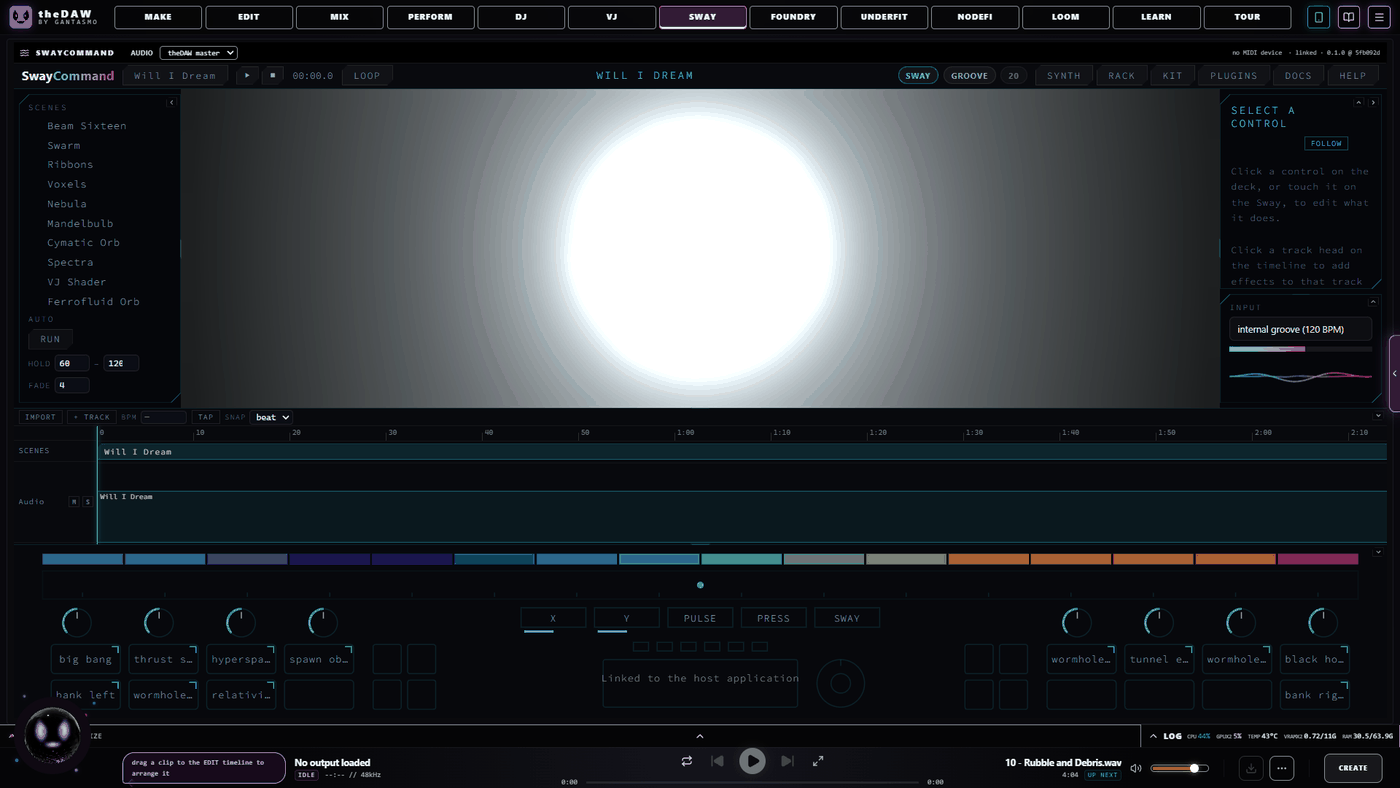
SwayCommand is a module for native use of the Audima Labs Sway whether you're remixing or doing visuals. theDAW installs the necessary drivers, instantly recognizes your controller once it's plugged in and powered on. It also comes with a cornucopia of litAF scenes, pairing original visuals with your favorite tracks by GANTASMO, and some unreleased tracks.
VJ: visuals, live
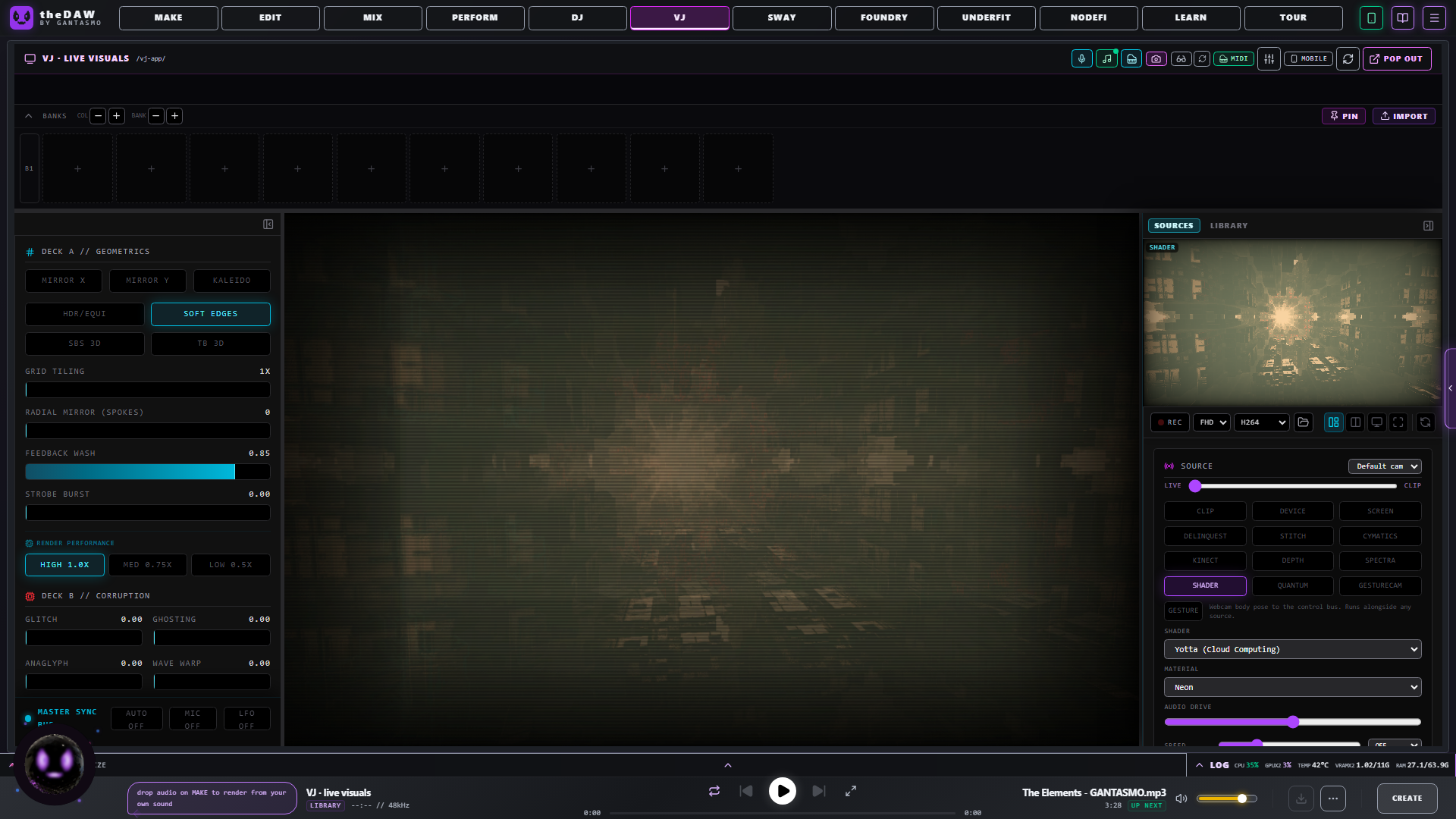
Shaders, cymatics, depth clouds, spectrum, screen capture, a webcam, or a
camera anywhere on your network. Geometry effects on one deck, corruption
effects on the other, BPM-synced, MIDI-mappable, recordable. A watch-link
broadcasts the live output peer-to-peer over WebRTC, so anyone on the venue
LAN opens a link and sees the visuals with audio; nothing routes through a
server, so it stays venue-grade.
PERFORM: the clip grid
Open an Ableton set or a .tasmo project as a grid of tracks and scenes. Clips
warp to tempo and launch by clip or by row, through the track mixer and
effects, with pad effect punches and a template per song.
UNDERFIT: train the model on yourself
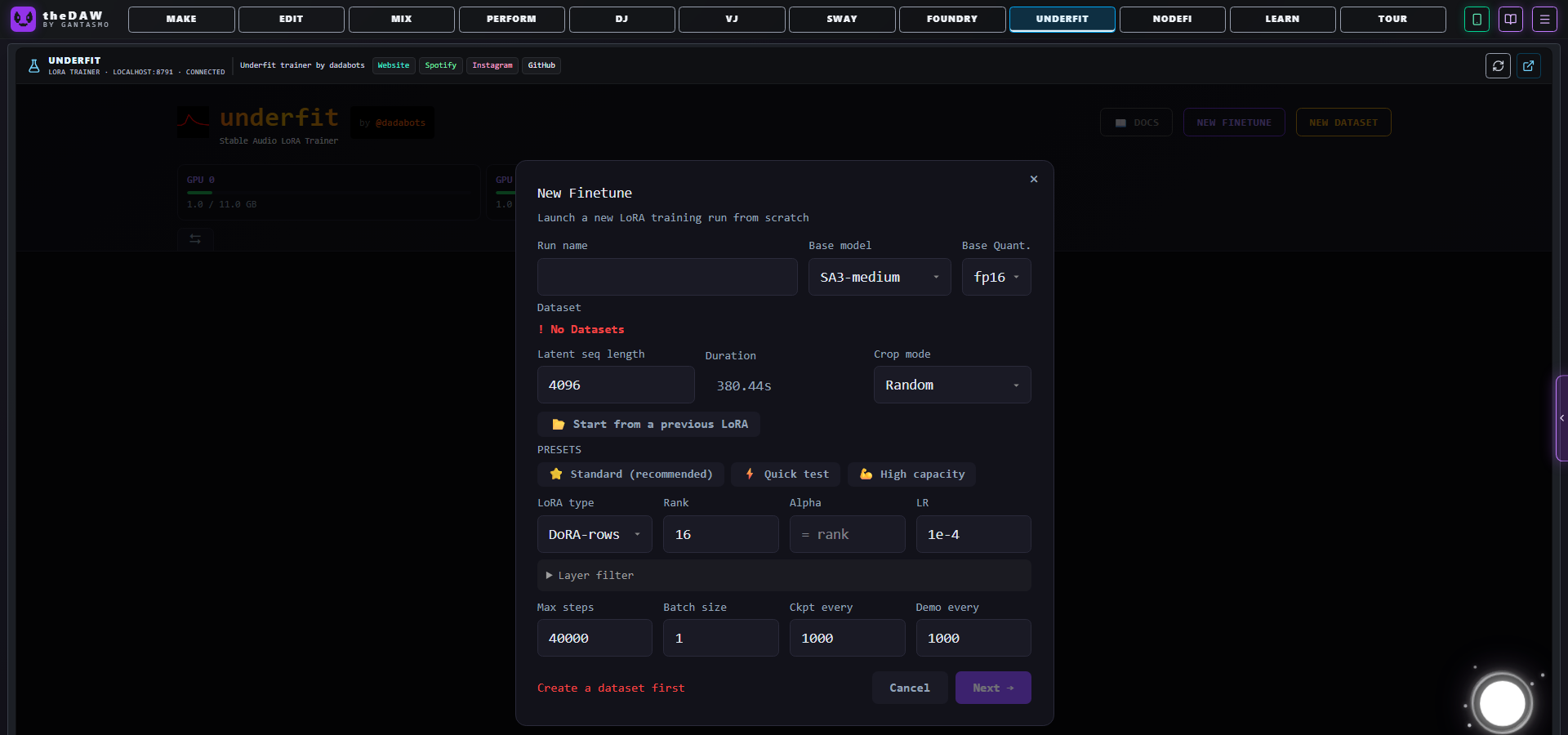
Build a dataset from your own audio and train a LoRA adapter against the
rectified-flow base checkpoints. Eight adapter types, a layer filter, an
interval gate and an SVD base are all on the form. Finished
adapters show up in MAKE, stack on each other, and each gets a strength control
you can change between generations. The trainer builds and repairs its own
environment.
TOUR: book the road
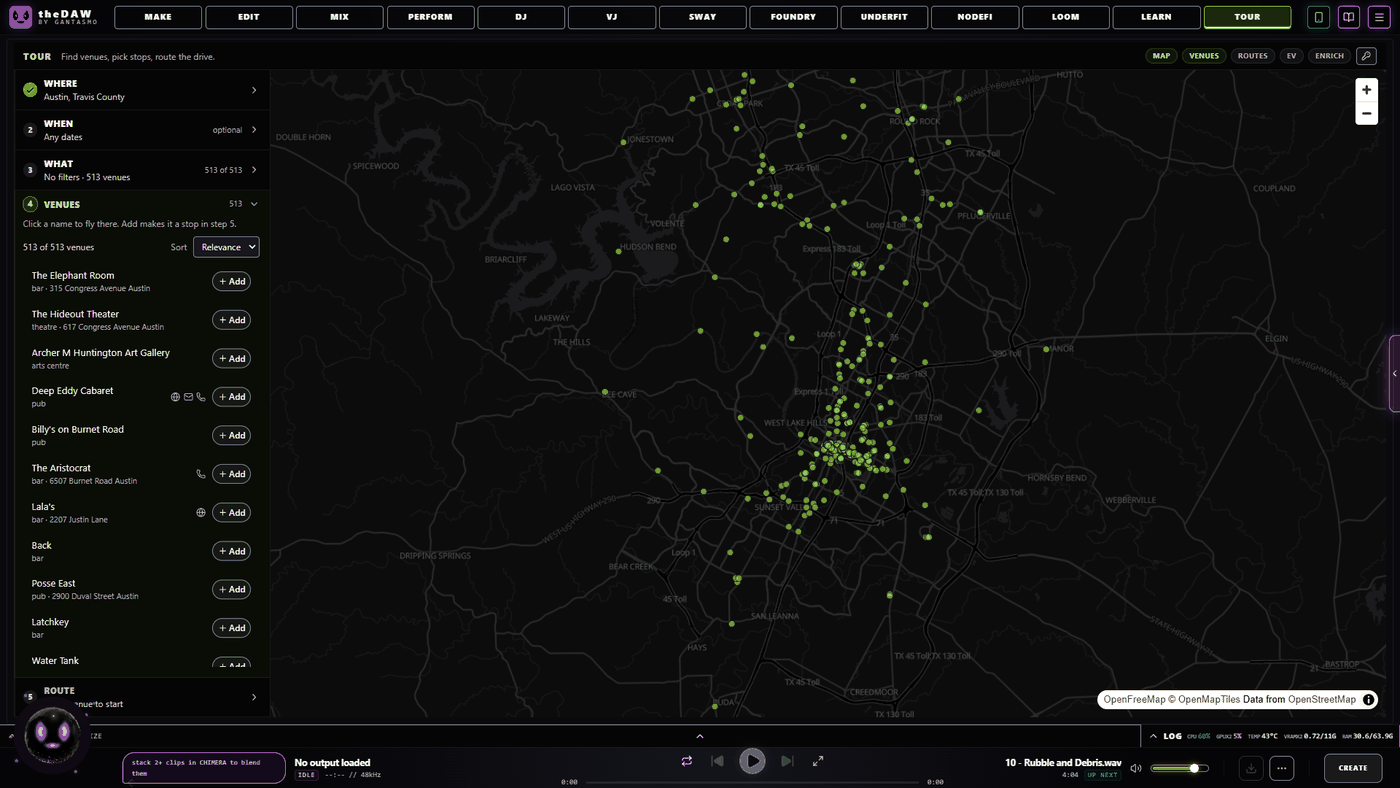
Search a city and it returns the venues, 513 of them in Austin, each with
type, address, and the website, email and phone to book it. Add the ones you
want as stops, and it works out the drive between them, with EV charging stops
if that is what you are driving.
LEARN: where everything came from
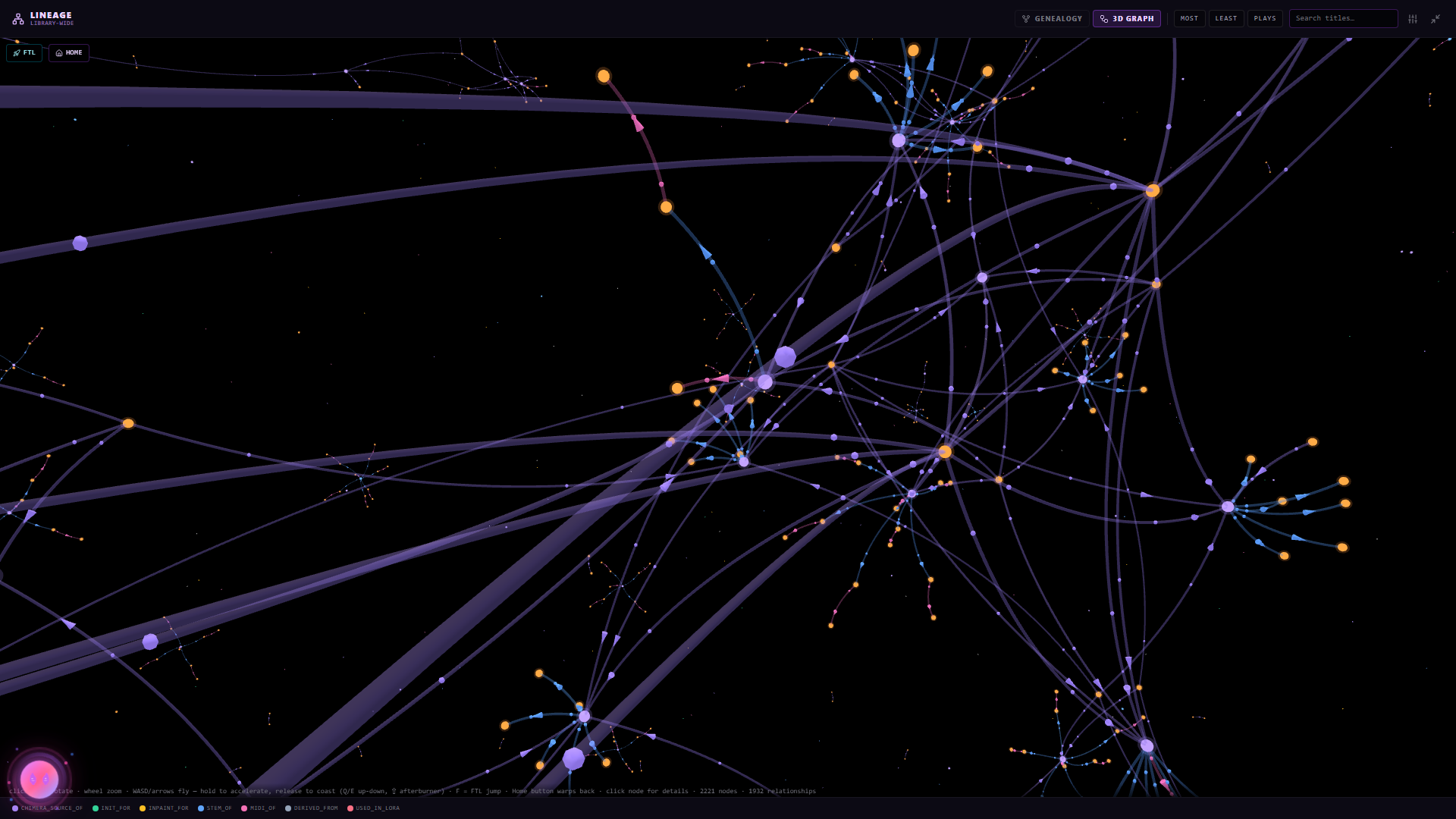
Every remix, inpaint, stem split, Chimera blend and cover links back to the
track it came from, drawn as a 3D graph, a 2D graph or a layered diagram.
The library
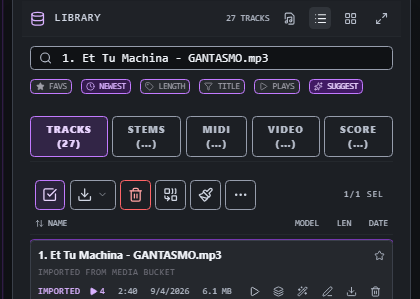
Everything you generate is saved with the prompt, model and settings that made
it; imported tracks keep their lyrics and tags. Each entry carries its stems,
MIDI, video and score files. SUGGEST orders a set into a playlist by Camelot
key and BPM. The Catalogue is the same library at full width with an inspector,
spectrograms on demand, and a lineage panel.
The panel along the bottom
It follows whatever song is selected, on every tab.
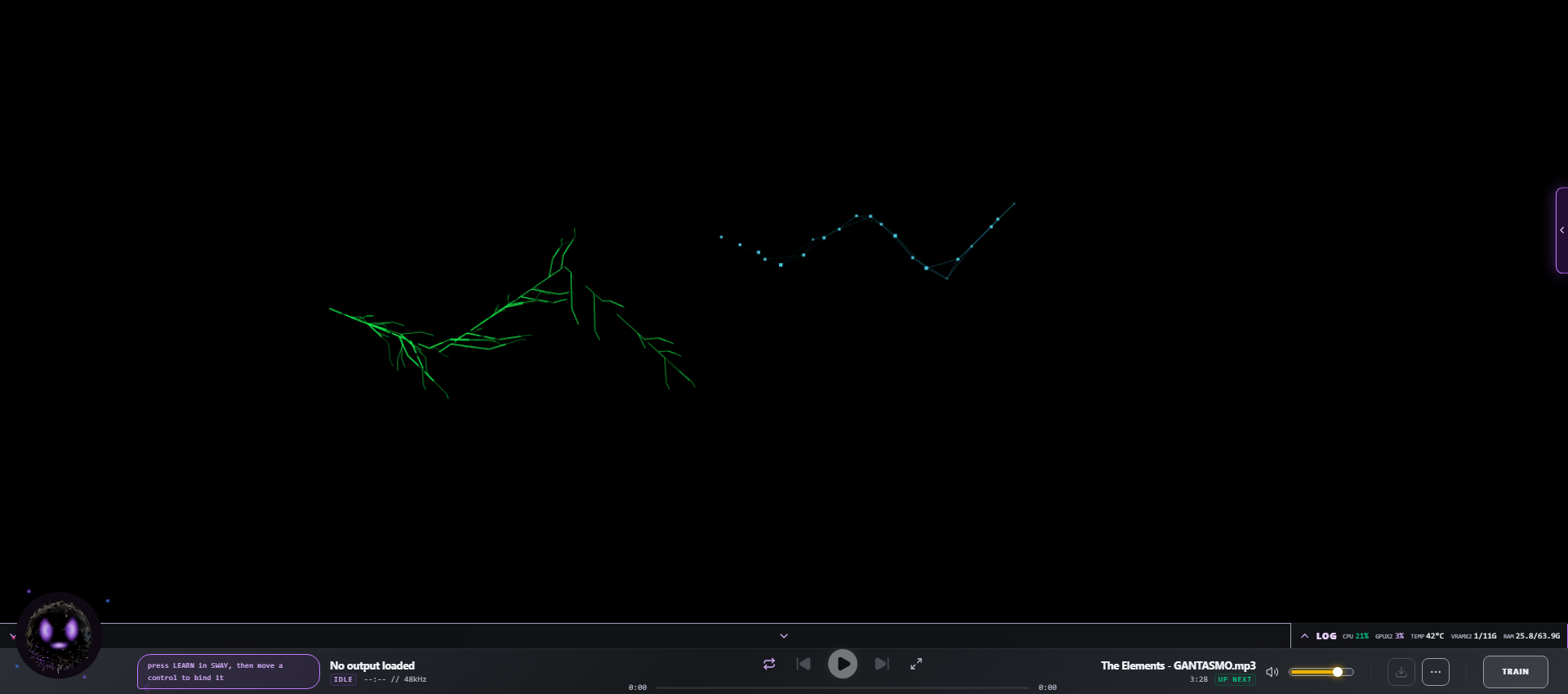
DRAW plays generative music from strokes on a canvas. SEQUENCE is an
eight-voice step sequencer. MIDI is a piano roll that sends notes into the
timeline. LEVELS meters loudness, true peak, dynamics and stereo image
against a delivery target. VISUALIZE is an oscilloscope, spectrum or radial
view. MEDIA catches dropped files and YouTube or SoundCloud imports.
SLIDE is a touch surface and SWAY drives the music from tracked
movement.
Making it look like yours
Sixteen themes across dark, metallic, paper, pastel and colour families, plus a
custom theme generated from any image you give it; every surface recoloured
through shared design tokens. The layout moves too: panels collapse and resize,
the graph goes fullscreen, and the DJ console rearranges in its own design mode.
How it runs
A FastAPI backend on port 8600 and a React frontend on 5173, with about forty
backend modules that load on first use rather than at startup. Models load one
at a time and are not re-run on a song that already has the result cached. The
whole surface is an HTTP API with interactive docs at /docs, and the Stable
Audio 3 inference library imports directly from Python if you want to script it.
Checkpoints are small (433M, CPU, up to 120s) and medium (1.4B, CUDA, up to
380s), plus the rectified-flow bases used for LoRA training and the standalone
autoencoders. Nothing downloads on its own; downloads stay off until you allow
them.
Install
Press Install, then Start.
Install pulls the repo, the Magenta submodule and the visual engine, sets up
FFmpeg and the Python environment with the right CUDA build for your platform,
builds the trainer environment, installs the frontend packages, and pre-fetches
the default model so your first generation does not wait on a download. Start
brings up the backend and the UI and opens the app.
Reset removes only the dependency trees. Your library, settings and audio under
app/data survive it.
theDAW was created by GANTASMO
gantasmo/theDAW.



theDAW is a DJ, and VJ app interoperable w/Ableton, Reaper, Resolume & more. Stable Audio 3, Magenta RT2, Suno API, Chimera track fusion, Demucs stems, MIDI generate/notate, img > spectrogram > music, drawing > music, VST3 & .gan plugins, automix & key-lock, GLSL shaders, volumetric video, Quest 3 XR interface, MIDI auto-map, RAG assistant. A multitrack timeline with
clip editing, fades, per-track inserts and recorded automation. A mastering
chain of 25 effects with VST3 hosting, LUFS metering, macros. A piano
roll, a step sequencer, loudness and spectrum metering, and export to WAV,
MP3, FLAC, OGG, AIFF, Opus, M4A, MIDI, MusicXML and LRC.
It runs on your computer. There is no account and no subscription, and audio
you make never leaves the machine unless you send it somewhere yourself.
Then it keeps going.
Create a track from a text prompt, or record the old fashioned way, turn it into sheet music and play
along to it, sing to it with every word timed to the vocal, DJ it, launch it
from a clip grid, run reactive visuals behind it, conduct it with your hands
in front of a camera or in VR, design the plugin that processes it, and train
the model that generated it on your own recordings, on your own GPU, so nothing about the loop needs a datacenter, training included. The
generator is Stable Audio 3, trained on licensed, ethically sourced audio.
Supported
CPU. Apple silicon uses MPS.
be learned by capture, and Controller Vision identifies a controller from a
photo of it. The Audima Labs Sway motion controller is native.
built-in effects.
Audition, Bitwig and Resolume projects.
your hands, passthrough video piped into the visual engine, and colocated
multiplayer. There is a deploy path that pushes the APK to the headset over
ADB.
library, or as a camera feeding the visuals over the LAN.
a Unity app's rendered frames into the VJ engine.
the same model list as the local ones.
vLLM as readily as from the hosted providers, and answers out of theDAW's own
manual through a RAG index. Point it at a local model and the whole app is
offline. Magenta RealTime 2 runs through theDAW's own NVIDIA port on Windows via WSL2, native Linux, or cloud.
The studio you know
MAKE: music generation and fusion engine
Type a prompt and press CREATE. Or drop your own audio on the INIT slot and set
how far to move from it. Or drop a track on INPAINT and paint the region you
want regenerated, leaving the rest alone. Templates save a whole control set;
every result lands in the library with its prompt, model and settings attached.
Chimera takes several clips and makes one track out of them. It analyses
each clip's tempo and key, cuts them on the beat grid, pitches them into one
key, arranges the pieces into a song, and asks the model to regenerate the
joins so the seams do not click.
EDIT: age old DAW with cutting edge tools
Move and split clips, drag corner handles for fades, give each track its own
mute, solo, pan and insert effects. Turn on WRITE and move a control while it
plays to record automation. COMMIT EDIT renders every audible track down to one stereo file.
MIX: finish it
Effects chain running left to right, each opens its own panel: mastering, compression,
filters, vocal processing, lo-fi, widening, reverb, delay, LUFS normalisation,
pitch shift. Four QUICK MASTER knobs, PUNCH, AIR, DRIVE, CEIL, cover the
common moves in one place. VST3 plugins appear in the same list.
Underneath that sit the repair and enhancement tools: denoise, dereverb,
de-click, de-hum, de-ess, spectral repair, vocal isolation, audio
super-resolution, codec un-crush, and an analyser that listens to a track,
names what is wrong with it, and builds an effect stack to fix it.
SCORE: convert audio to notation
Convert a track to MIDI, a drum stem gets a real kit transcription, then
engrave it. Sheet music, guitar/bass/ukulele tablature for a given tuning and
capo, lead sheets, piano reductions, simplified parts, band scores with drums
on a percussion staff, chord tracks. Out to PDF, SVG, ABC and MusicXML. It
imports scores too: MusicXML, ABC, Humdrum and MIDI land in the piano roll.
Every score is also a play-along that follows the audio, in four views: a
cursor over engraved pages, one continuous staff scrolling under a now-line,
chord diagrams for your instrument, or notes travelling toward a hit line.
CALIBRATE measures your audio device's latency so the notation lines up with
what you hear. The same chart exports as a Beat Saber level pack.
SING: karaoke created from your own tracks
Paste your lyrics and a forced aligner places each word against the separated
vocal stem, so no word is ever replaced by a transcription guess. Whisper then
listens to the same vocal as a second opinion and underlines what it heard
differently, so you can check it. You can also tap the timing by
hand. It reads and writes LRC, and draws the pitch you sing against the melody
of the original.
DJ: play it out
Two decks with sync, key lock, hotcues, beat loops, loop rolls, slip and
quantize, an FX rack per deck, and faders for live-separated stems. Automix
plays a prepared set with beat-matched crossfades, following each track's
cue-in, mix-out and transition length. Mid-show you can tell the assistant to
blend now, or move a track up the running order, and it does it.
LOOM: a colony that grows while it plays
Every song in your library is torn into bar- and beat-aligned fragments of each
stem, indexed with its key, energy, rhythm, chords and words. LOOM plays that
index as a living colony.
It starts as one spore you click. From there it grows on its own, on the beat:
cells divide, a child born on its parent at zero vitality and ripening over
three bars; colonies form around existing loops rather than beside them; and
cells that go idle are hollowed out from the inside over two bars and removed.
Nothing appears from nowhere. Loops, rules, gates and mods wire to each other
with rope-physics tendrils, and a colony is itself a cell with its own meter,
so you can run 7/8 grouped 3+2+2 inside a 4/4 dish at half speed and dive into
it.
NODEFI: patch the whole studio together
A node canvas where library, generation, effect, merge and feedback nodes wire
into a graph. In Run mode the graph executes through the AI stack and saves
the result. In Live mode the same canvas plays stems, racks and routes in
real time with no model involved at all; the shot above is a live set with six
stem lanes each running its own effect chain into a master node.
FOUNDRY: design the plugin, then use it
A canvas for plugin interfaces. Drag on knobs, sliders, meters, displays and
images, set a background, wire the controls, and export a
.ganweb-pluginthat loads in the MIX chain right next to your VST3s. There is an AI panel that
will design, style and arrange elements for you if you'd rather describe it.
Two finished plugins ship in that format and open here as editable designs, so
there is a working reference to take apart: Ares, the multi-effect above,
and The Owl, an HRTF spatializer.
SWAY: conduct it with your hands
SwayCommand is a module for native use of the Audima Labs Sway whether you're remixing or doing visuals. theDAW installs the necessary drivers, instantly recognizes your controller once it's plugged in and powered on. It also comes with a cornucopia of litAF scenes, pairing original visuals with your favorite tracks by GANTASMO, and some unreleased tracks.
VJ: visuals, live
Shaders, cymatics, depth clouds, spectrum, screen capture, a webcam, or a
camera anywhere on your network. Geometry effects on one deck, corruption
effects on the other, BPM-synced, MIDI-mappable, recordable. A watch-link
broadcasts the live output peer-to-peer over WebRTC, so anyone on the venue
LAN opens a link and sees the visuals with audio; nothing routes through a
server, so it stays venue-grade.
PERFORM: the clip grid
Open an Ableton set or a
.tasmoproject as a grid of tracks and scenes. Clipswarp to tempo and launch by clip or by row, through the track mixer and
effects, with pad effect punches and a template per song.
UNDERFIT: train the model on yourself
Build a dataset from your own audio and train a LoRA adapter against the
rectified-flow base checkpoints. Eight adapter types, a layer filter, an
interval gate and an SVD base are all on the form. Finished
adapters show up in MAKE, stack on each other, and each gets a strength control
you can change between generations. The trainer builds and repairs its own
environment.
TOUR: book the road
Search a city and it returns the venues, 513 of them in Austin, each with
type, address, and the website, email and phone to book it. Add the ones you
want as stops, and it works out the drive between them, with EV charging stops
if that is what you are driving.
LEARN: where everything came from
Every remix, inpaint, stem split, Chimera blend and cover links back to the
track it came from, drawn as a 3D graph, a 2D graph or a layered diagram.
The library
Everything you generate is saved with the prompt, model and settings that made
it; imported tracks keep their lyrics and tags. Each entry carries its stems,
MIDI, video and score files. SUGGEST orders a set into a playlist by Camelot
key and BPM. The Catalogue is the same library at full width with an inspector,
spectrograms on demand, and a lineage panel.
The panel along the bottom
It follows whatever song is selected, on every tab.
DRAW plays generative music from strokes on a canvas. SEQUENCE is an
eight-voice step sequencer. MIDI is a piano roll that sends notes into the
timeline. LEVELS meters loudness, true peak, dynamics and stereo image
against a delivery target. VISUALIZE is an oscilloscope, spectrum or radial
view. MEDIA catches dropped files and YouTube or SoundCloud imports.
SLIDE is a touch surface and SWAY drives the music from tracked
movement.
Making it look like yours
Sixteen themes across dark, metallic, paper, pastel and colour families, plus a
custom theme generated from any image you give it; every surface recoloured
through shared design tokens. The layout moves too: panels collapse and resize,
the graph goes fullscreen, and the DJ console rearranges in its own design mode.
How it runs
A FastAPI backend on port 8600 and a React frontend on 5173, with about forty
backend modules that load on first use rather than at startup. Models load one
at a time and are not re-run on a song that already has the result cached. The
whole surface is an HTTP API with interactive docs at
/docs, and the StableAudio 3 inference library imports directly from Python if you want to script it.
Checkpoints are
small(433M, CPU, up to 120s) andmedium(1.4B, CUDA, up to380s), plus the rectified-flow bases used for LoRA training and the standalone
autoencoders. Nothing downloads on its own; downloads stay off until you allow
them.
Install
Press Install, then Start.
Install pulls the repo, the Magenta submodule and the visual engine, sets up
FFmpeg and the Python environment with the right CUDA build for your platform,
builds the trainer environment, installs the frontend packages, and pre-fetches
the default model so your first generation does not wait on a download. Start
brings up the backend and the UI and opens the app.
Reset removes only the dependency trees. Your library, settings and audio under
app/datasurvive it.theDAW was created by GANTASMO
gantasmo/theDAW.