If you like the simplicity of Fooocus but want to use newer models like Flux or Z-Image, FooocusPlus might be the right tool for you. Unlike other image generation apps like Comfyui or Forge, FooocusPlus focuses on pure image generation. You don't need to bother about downloading model, where to get them, where to put them. You can just start generating and all models you need will be automatically downloaded on first generation.
FooocusPlus comes with different presets. Each of them is using a specific model ddesigned for speed and creativity.
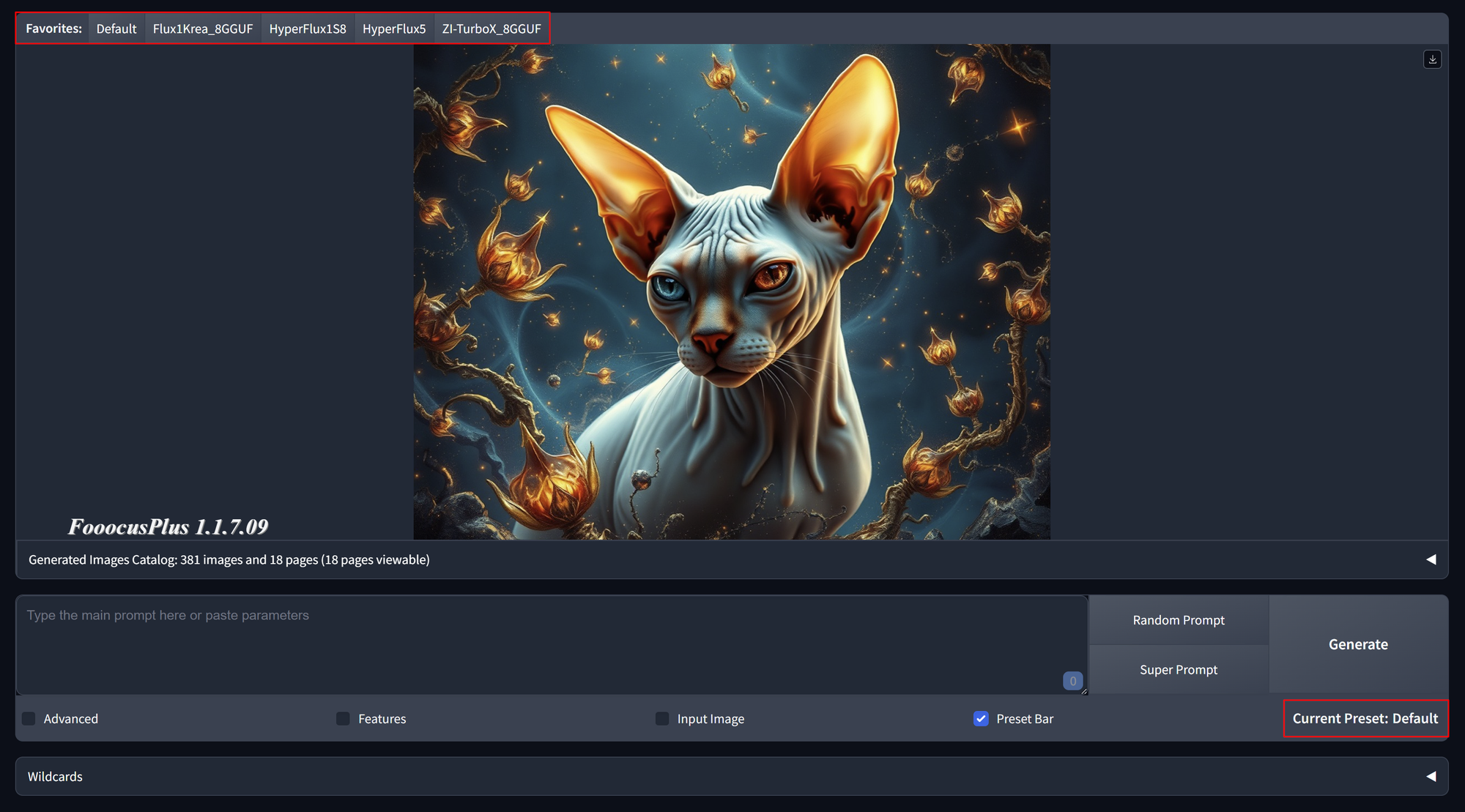
In Advanced - Extras you can create new presets with your desired models to speed up your workflows.
Supported models:
- Stable Diffusion XL (SDXL) and a large number of SDXL variants
- Pony Diffusion XL
- Flux from Black Forest Labs
- Hunyuan-DiT
- Kwai Kolors
- Playground 2.5
- Segmind-Vega (coming soon)
- Stable Diffusion 1.5 (SD1.5)
- Stable Diffusion 3.5 Large & Medium
- Z-Image Base & Turbo
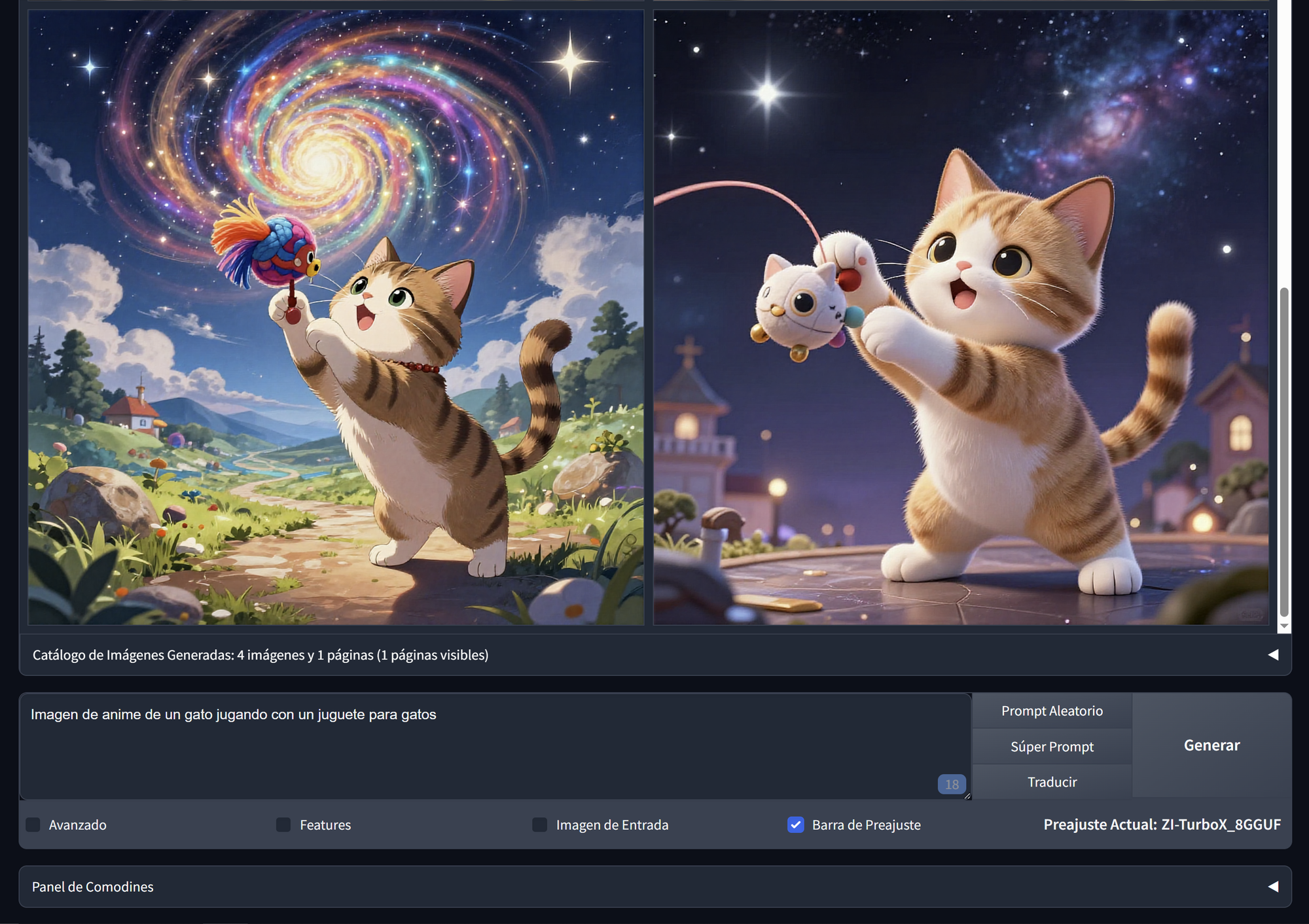
On top of that you can use FooocusPlus in your native language. After the installation you are prompted to select your desired language. You can pick one of 47 differnet languages. After that, the Terminal messages, and for many languages also the user interface will appear in your selected language. You can write your prompts in your language and they will be translated automatically into English for the model you are using.
You can change the language anytime on the left side menu after you stopped FooocusPlus.
Here an Example in Spanish
FooocusPlus contains all the features you know from Fooocus, including but not limited to dozens of FooocusPlus Styles, Image Resloution / Aspect Ratio, Wildcards, img2img, IP Adapter, Inpainting, Outpainting, Model selection, Multi Lora selection, Seed Variation (useful to only modify small details in an image).
But it also comes with new features like IC Light, Face swapping, Background removal, VAE Control (pick different VAEs for certain effects), Image Enhancement, Detail Enhancement (Improve eyes, faces, hands and more) and a Realtime Image Editor.
You can upload any image you want and edit it. The modification will be visible instantly. This is especially useful when integrated in your workflow to generate upon or to improve your finished image.
For advanced users
You can also use models you still downloaded with one of the other stable diffusion based apps like Forge, Comfyui, Foocus and so on...
Therefore simply go to your UserDir in FooocusPlus.git
In there you'll find the models folder with subfolders of the different model types .\FooocusPlus.git\UserDir\models\checkpoints. The models folder is symlinked with pinokio/drive and shares its models with all other stable diffusion based apps. So you will find all your still downloaded models in there. SDXL models can directly used from the checkpoints folder. All you need to do is selecting them in FooocusPlus. All other models you want to use need to be dragged into the according models folder. They will be still present for your other apps.
Now you can refresh the models in FooocusPlus and select it.
Right now only UNET models are supported. The according VAE and TExt encoder will be downloaded by FooocusPlus.
If you want to use your own VAE and text encoder, you can also drag them into the .\models\vae and .\models\clip folder.
If you have questions to any of the functions or if something isn't working just ask or send a bug report.
Happy creating and stay Fooocused.


If you like the simplicity of Fooocus but want to use newer models like Flux or Z-Image, FooocusPlus might be the right tool for you. Unlike other image generation apps like Comfyui or Forge, FooocusPlus focuses on pure image generation. You don't need to bother about downloading model, where to get them, where to put them. You can just start generating and all models you need will be automatically downloaded on first generation.
FooocusPlus comes with different presets. Each of them is using a specific model ddesigned for speed and creativity.
In Advanced - Extras you can create new presets with your desired models to speed up your workflows.
Supported models:
On top of that you can use FooocusPlus in your native language. After the installation you are prompted to select your desired language. You can pick one of 47 differnet languages. After that, the Terminal messages, and for many languages also the user interface will appear in your selected language. You can write your prompts in your language and they will be translated automatically into English for the model you are using.
You can change the language anytime on the left side menu after you stopped FooocusPlus.
Here an Example in Spanish
FooocusPlus contains all the features you know from Fooocus, including but not limited to dozens of FooocusPlus Styles, Image Resloution / Aspect Ratio, Wildcards, img2img, IP Adapter, Inpainting, Outpainting, Model selection, Multi Lora selection, Seed Variation (useful to only modify small details in an image).
But it also comes with new features like IC Light, Face swapping, Background removal, VAE Control (pick different VAEs for certain effects), Image Enhancement, Detail Enhancement (Improve eyes, faces, hands and more) and a Realtime Image Editor.
You can upload any image you want and edit it. The modification will be visible instantly. This is especially useful when integrated in your workflow to generate upon or to improve your finished image.
For advanced users
You can also use models you still downloaded with one of the other stable diffusion based apps like Forge, Comfyui, Foocus and so on...
Therefore simply go to your UserDir in FooocusPlus.git
In there you'll find the models folder with subfolders of the different model types
.\FooocusPlus.git\UserDir\models\checkpoints. The models folder is symlinked with pinokio/drive and shares its models with all other stable diffusion based apps. So you will find all your still downloaded models in there. SDXL models can directly used from the checkpoints folder. All you need to do is selecting them in FooocusPlus. All other models you want to use need to be dragged into the according models folder. They will be still present for your other apps.Now you can refresh the models in FooocusPlus and select it.
Right now only UNET models are supported. The according VAE and TExt encoder will be downloaded by FooocusPlus.
If you want to use your own VAE and text encoder, you can also drag them into the
.\models\vaeand.\models\clipfolder.If you have questions to any of the functions or if something isn't working just ask or send a bug report.
Happy creating and stay Fooocused.