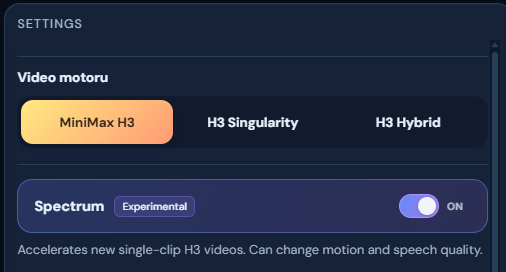
Enable it under Settings → Video engine → Spectrum. It’s optional, experimental, and requires no additional LoRA.
In our matched 608p test, total render time dropped from 26:15 to 16:06 — 38.65% less time.
Recent 1088p clips rendered in around 35 minutes. Compared with my previously observed roughly one-hour renders, that suggests about 42% less time, although this 1088p comparison is approximate.
My system: RTX 5060 Ti 16 GB, Ryzen 5 5600X, 32 GB RAM, Windows.
Results vary by workload. Spectrum can affect motion and speech, so test a short clip first.
H3 Studio now offers three video engines:
- MiniMax H3 — the standard engine.
- H3 Singularity — an alternative H3 checkpoint.
- H3 Hybrid — an experimental H3 checkpoint.
Switch between them under Settings → Video engine. Optional engines require their model files to be installed.
The Spectrum benchmark above was measured with MiniMax H3 Ref2VA INT8. It does not establish the same speedup for Singularity or Hybrid.


Enable it under Settings → Video engine → Spectrum. It’s optional, experimental, and requires no additional LoRA.
In our matched 608p test, total render time dropped from 26:15 to 16:06 — 38.65% less time.
Recent 1088p clips rendered in around 35 minutes. Compared with my previously observed roughly one-hour renders, that suggests about 42% less time, although this 1088p comparison is approximate.
My system: RTX 5060 Ti 16 GB, Ryzen 5 5600X, 32 GB RAM, Windows.
Results vary by workload. Spectrum can affect motion and speech, so test a short clip first.
H3 Studio now offers three video engines:
Switch between them under Settings → Video engine. Optional engines require their model files to be installed.
The Spectrum benchmark above was measured with MiniMax H3 Ref2VA INT8. It does not establish the same speedup for Singularity or Hybrid.