Yesterday OpenAI released GPT Images 2.6. Among other things, what caught my attention was their animated GIF feature.
It generates around 2 seconds of animated gif by default.
You might say this is useless for making an actual video, but turns out you can do a lot more!
Step 1. Make an Animated GIF
I used the following prompt:
Generate a 5-second animated GIF consisting of 10 evenly spaced animation frames. Make it look like a crude gray Blender viewport animation, not cinematic footage. A single continuous shot inside a rectangular hallway with a tiled floor and simple gray walls. The camera slowly advances toward a doorway. A black humanoid mannequin with unusually long arms emerges from behind the doorway. The camera suddenly whips right, falls onto its side, and stops. The mannequin slowly walks toward and past the fallen camera. Maintain consistent 3D geometry, character proportions, doorway placement, and spatial relationships. No cuts, no teleportation, no scene changes, no added props. Focus on exact camera movement, depth, and timing. The animation should play once as a complete sequence, not return to its starting pose.
and it generated:
Step 2. Extending the Animated GIF
But this is too short! How do we make a longer GIF? Simple! You just ask ChatGPT to extend the GIF!
There are two parts to this, as shown in the video above:
- It can extend to certain point, but after that, it seems to just generate a new gif starting from the last frame of the previous generation
- But that's OK because ChatGPT is AGI. You can ask it to keep generating, and then at the end ask it to merge all the GIFs together to create a merged GIF!
Then you end up with a 15 second GIF:
Step 3. Generating an Actual Video
Now you can take this rough "storyboard" and use it as a reference video to generate an actual video. I wanted to turn this into a DOOM video.
You can use various AI apps on pinokio, but here I will demonstrate with Maestro:
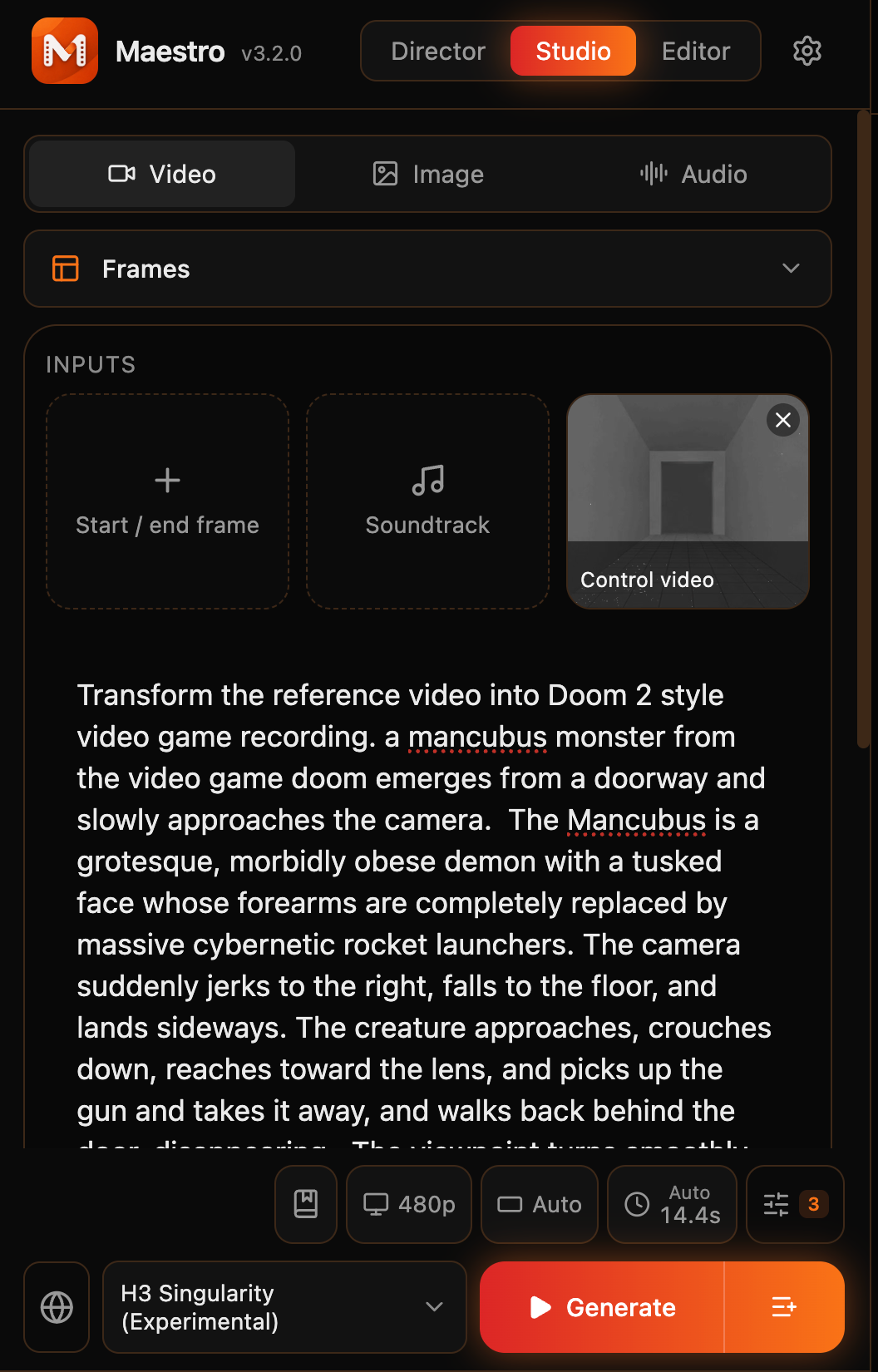
I selected H3 Singularity, and then used the 15 second GIF as reference video. Then entered the prompt:
Transform the reference video into Doom 2 style video game recording. a mancubus monster from the video game doom emerges from a doorway and slowly approaches the camera. The Mancubus is a grotesque, morbidly obese demon with a tusked face whose forearms are completely replaced by massive cybernetic rocket launchers. The camera suddenly jerks to the right, falls to the floor, and lands sideways. The creature approaches, crouches down, reaches toward the lens, and picks up the gun and takes it away, and walks back behind the door, disappearing.. The viewpoint turns smoothly to left, revealing an impossibly enormous pool of lava stretching endlessly into darkness, repetitive pillars, and hell scape, with grotesque hell sound. Everything should feel unsettlingly real, with authentic analog tape noise, imperfect autofocus, natural handheld movement, eerie fluorescent humming, echoing footsteps, and distant water sounds. Preserve the exact camera movements, character actions, spatial relationships, and sequence of events from the reference video in one continuous, uninterrupted shot, with no cuts, dialogue, music, or jump scares.
Then I got:
Compare with the animated gif side by side:
Conclusion
This animated gif feature is an amazing way to prototype your video quickly in ChatGPT to get the exact rough sequence, and then feed it to an actual video generation model to get a high quality video with sound.


Yesterday OpenAI released GPT Images 2.6. Among other things, what caught my attention was their animated GIF feature.
It generates around 2 seconds of animated gif by default.
You might say this is useless for making an actual video, but turns out you can do a lot more!
Step 1. Make an Animated GIF
I used the following prompt:
and it generated:
Step 2. Extending the Animated GIF
But this is too short! How do we make a longer GIF? Simple! You just ask ChatGPT to extend the GIF!
There are two parts to this, as shown in the video above:
Then you end up with a 15 second GIF:
Step 3. Generating an Actual Video
Now you can take this rough "storyboard" and use it as a reference video to generate an actual video. I wanted to turn this into a DOOM video.
You can use various AI apps on pinokio, but here I will demonstrate with Maestro:
I selected H3 Singularity, and then used the 15 second GIF as reference video. Then entered the prompt:
Then I got:
Compare with the animated gif side by side:
Conclusion
This animated gif feature is an amazing way to prototype your video quickly in ChatGPT to get the exact rough sequence, and then feed it to an actual video generation model to get a high quality video with sound.