

Pinokio
FeedAppsRemoteCreate
Author@cocktailpeanut
Download Pinokio
Sign inCreate accountJoin

cocktailpeanut

@cocktailpeanut

creator of pinokio https://x.com/cocktailpeanut

GitHubXHugging FaceDiscordYouTube

Joined January 2026

25 Following1,073 Followers134 Apps
PostsRepliesApps
More
ActivityCheckpointsFollowed appsGitHub creations

Published apps

  • AceJAMDescribe any song in plain English, compose it locally with an embedded Qwen GGUF model, and generate it with ACE-Step v1.5.
  • MiniJamDescribe any song in plain English, compose a structured caption and lyrics locally, and generate it with MiniMax Music 3.
  • CropperCrop/trim any media
  • SearXNGA privacy-respecting metasearch engine that runs locally.
  • Overworld[NVIDIA GPU REQUIRED] Realtime world generator by Overworld Waypoint world model
  • StripperStrip image metadata locally in the browser.
View all apps
Posts · 223
Pinned
cocktailpeanut@cocktailpeanut·4mo ago

Transcribe any audio into MIDI

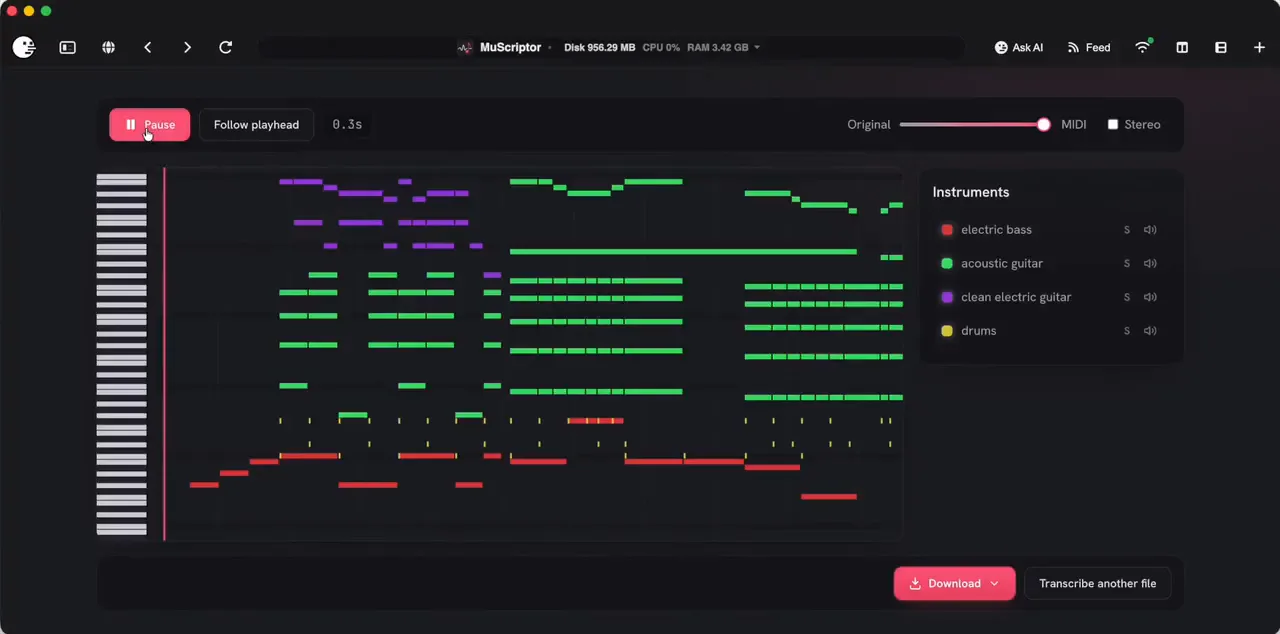
MuScriptor is a multi-instrument music transcription model developed by Kyutai and Mirelo. MuScriptor is the first music transcription model that has been trained on a large scale dataset of 170k songs from classical music to heavy metal. It automatically detects all the instruments and separates them into multiple tracks. Here's an example where I turn the ending credit song from "Curb your enthusiasm" into MIDI: When i import the MIDI into garageband:

MuScriptorcocktailpeanut/muscriptor.pinokio633 followers
0
cocktailpeanut@cocktailpeanutFrom Pinokio·1d

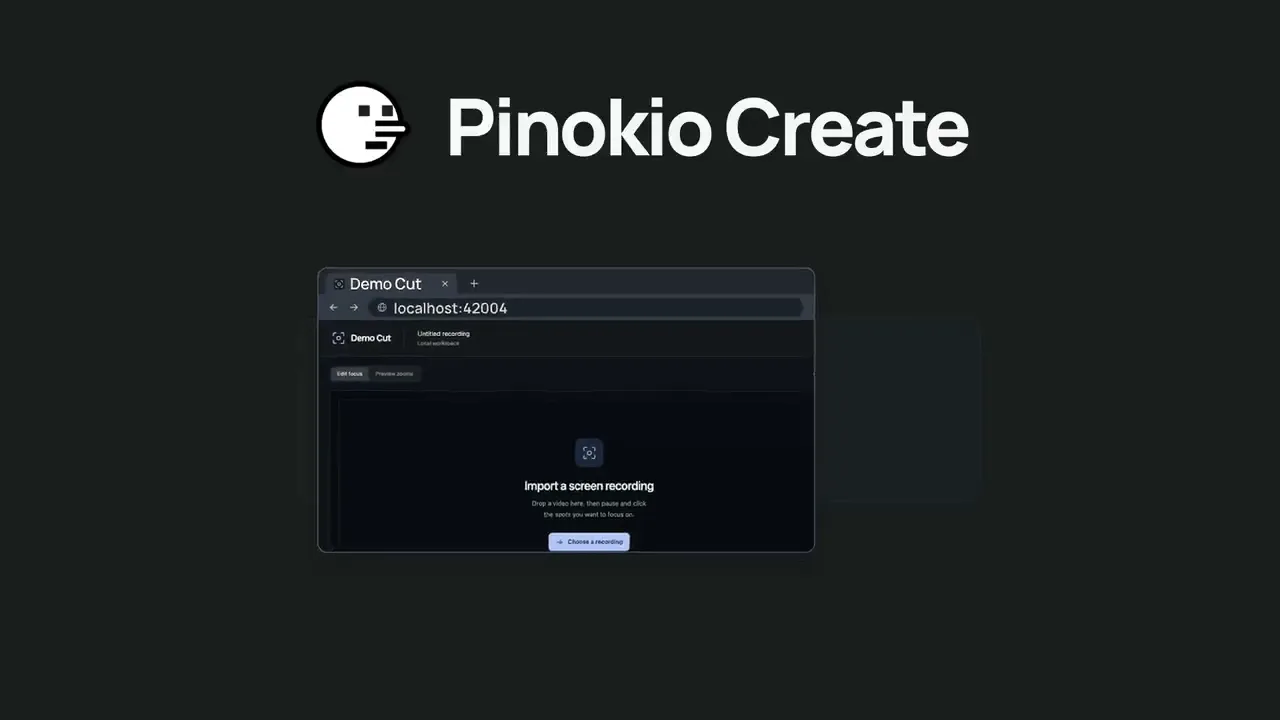
Pinokio Create: Turn Anything into a 1-Click Launcher, Automatically.

Pinokio now talks to your AI agent to package anything into a 1-click launcher, publish to github, and list on pinokio, automatically. Just click the "Create" button at the top, select a template, enter what you want, and open in pinokio. Pinokio will hand off all the instructions needed to your own AI agent, and your agent will take it from there, taking care of everything automatically: Build a new app: Build a new app with 1-click launcher built-in, publish to github, and list to pinokio Publish your own app: Take your existing project, package it as a 1-click launcher, publish to github, a

pinokiopinokiocomputer/pinokio
#announcement#guide
cocktailpeanut@cocktailpeanut·2d
Pinokio activity

New on Pinokio

Automatically discovered via GitHub

idolcocktailpeanut/idol.pinokio
cocktailpeanut@cocktailpeanut·2d
Pinokio activity

New on Pinokio

Automatically discovered via GitHub

SuperSplatcocktailpeanut/supersplat.pinokio
cocktailpeanut@cocktailpeanut·2dEdited

Haru: HER is here. Realtime voice chat with an AI friend

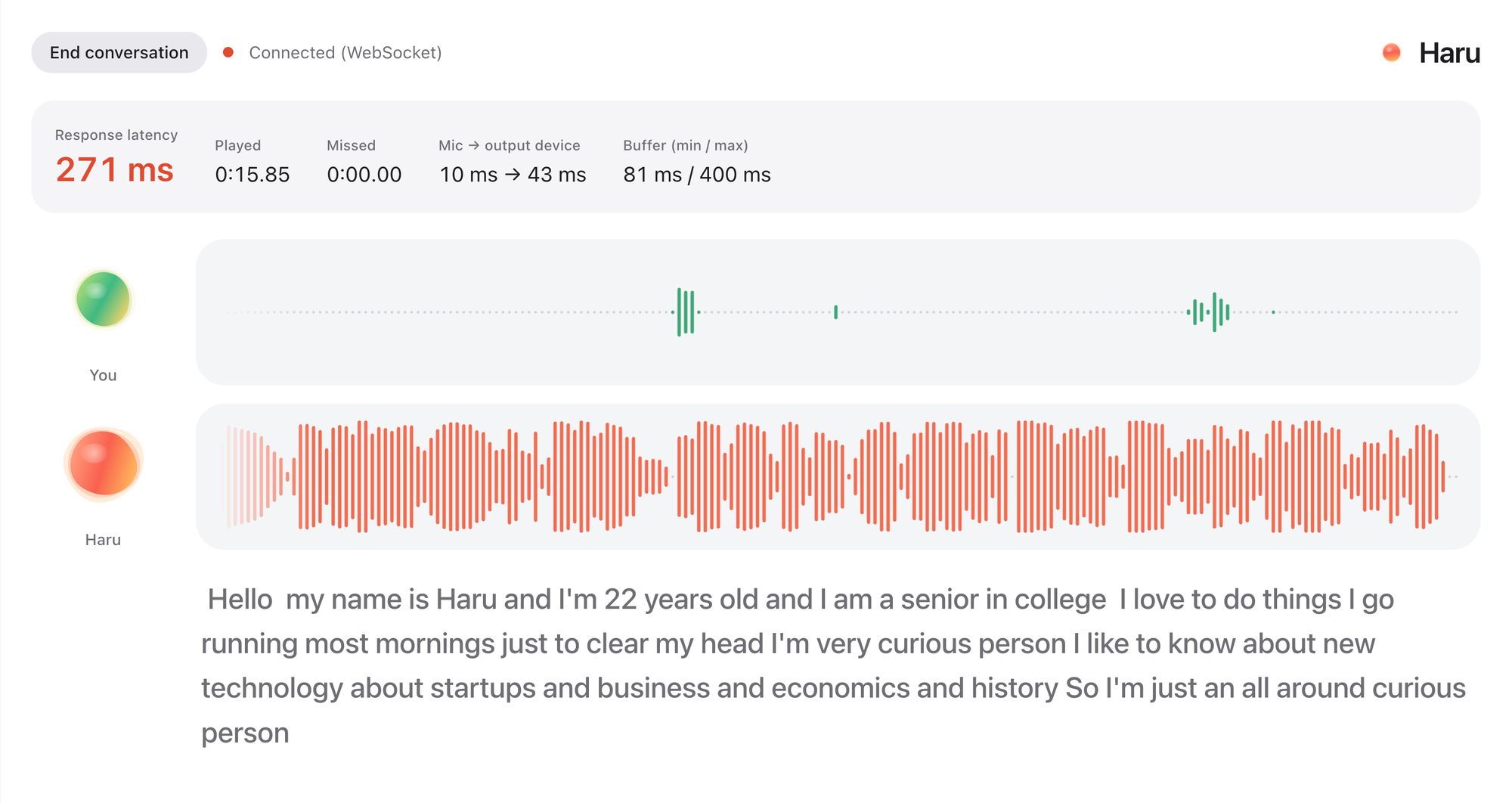
Remember the movie HER? You talk to an AI like talking to a friend. It's not an assistant. It's your friend. You can just chat about anything, you can even interrupt while they're talking. Well, now you can actually experience the same thing with Haru. It's fully open source and open weight. It's completely free to use forever. More on X: And here's what the UI looks like. When you start the chat (which can continue up to 60 minutes) and turn on the microphone, haru introduces himself/herself and you just start chatting. You can even interrupt while haru is speaking, just like chatting with a

Harucocktailpeanut/Haru.pinokio
#guide
cocktailpeanut@cocktailpeanut·3d
Pinokio activity

New on Pinokio

Automatically discovered via GitHub

Harucocktailpeanut/Haru.pinokio
cocktailpeanut@cocktailpeanut·3d
Pinokio activity

New on Pinokio

Automatically discovered via GitHub

Demo Cutcocktailpeanut/demo-cut
cocktailpeanut@cocktailpeanut·3d
Use your own AI agent to build and publish any app, so anyone can use it on their computer!
Prompt templateTurn Your Idea into an AppTurn your idea into a working app with a 1-click Pinokio launcher. Build it for yourself, then optionally publish it for others.
cocktailpeanut@cocktailpeanut·3d
Pinokio activity

New on Pinokio

Automatically discovered via GitHub

Elevation Atlascocktailpeanut/elevation_atlas.pinokio
cocktailpeanut@cocktailpeanut·3d

Zonos3-Mini Voice Studio: Realtime voice hacking studio

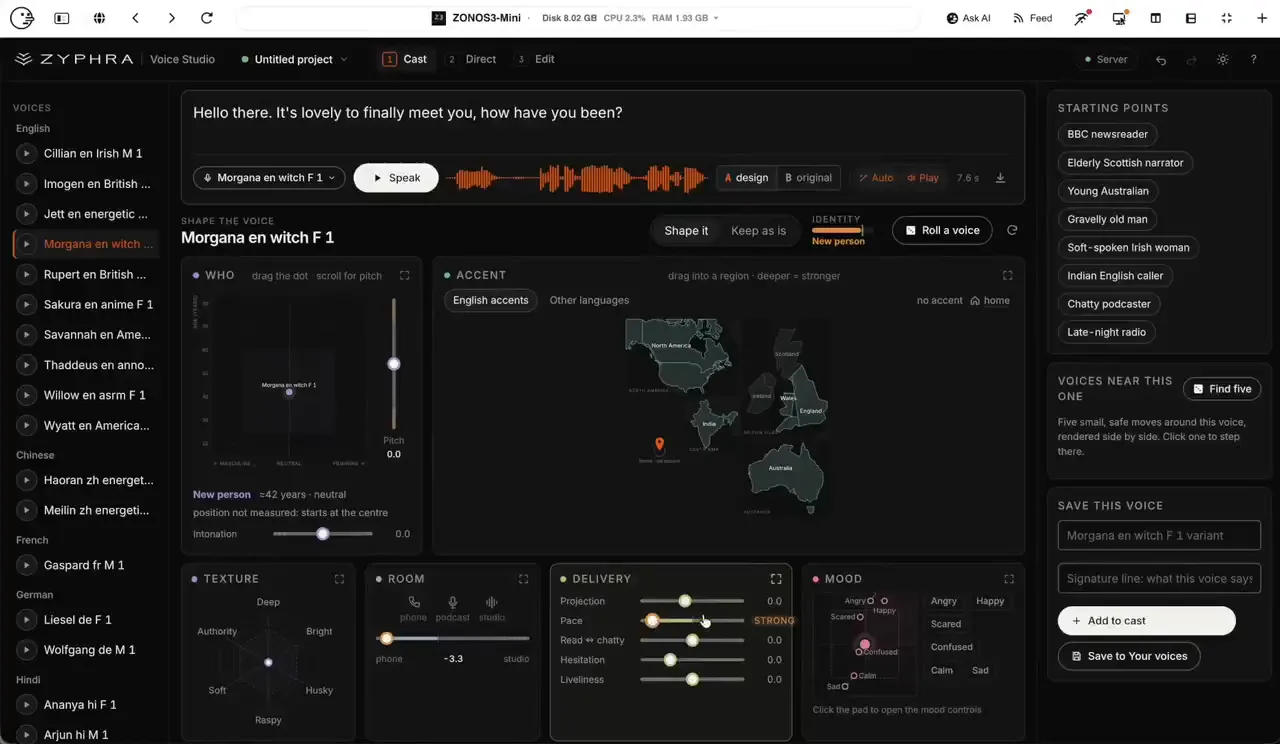
Voice Studio Zonos Voice Studio lets you speak text in a chosen voice and shape how that voice sounds. Speak a line with one of 30 built-in voices, or clone a voice from a short recording or upload. Shape it: gender, age, pitch, intonation, accent, texture, room, pace, loudness, and mood. Start from a preset such as BBC newsreader, gravelly old man, or late-night radio, then compare the result with the original voice. Perform a script: a different voice per line, delivery painted onto words, several takes, then export one WAV. Save the voice, cast, and script in a project you can export and im

ZONOS3-Minicocktailpeanut/zonos3-mini
#guide
cocktailpeanut@cocktailpeanut·4d
Pinokio activity

New on Pinokio

Automatically discovered via GitHub

ZONOS3-Minicocktailpeanut/zonos3-mini
cocktailpeanut@cocktailpeanut·4d
Have an open source project you want to package up for 1-click launch? Just use this starter kit. Enter the GitHub URL and open on your pinokio desktop, select your favorite AI agent, and it will take care of everything from building, packaging, publishing to github, and listing automatically on pinokio.co
Prompt templateBuild a 1-Click LauncherTurn any open-source project into a 1-click app you can install and run with Pinokio.
cocktailpeanut@cocktailpeanut·4d
Audio.cpp is a very well maintained project for running audio generation AI models on low VRAM machines, powered by GGUF, and is a perfect backend to build all kinds of local song generation apps. Just take open this recipe on your local pinokio to run your favorite AI agent (codex, claude code, grok, opencode, antigravity, etc.) It will interview you on what you want to build, then go on to build and even help you publish to GitHub, which will automatically be listed on pinokio.co
Prompt templateBuild a cross platform, low VRAM song generation appBuild a song generation app using audio.cpp, supporting low VRAM machines
cocktailpeanut@cocktailpeanut·5d
All the models derived from Minimax H3 as of today
cocktailpeanut@cocktailpeanut·5d
Just asked my agent to list all the supported models. Here's what it listed
PotionUIPotionUI/potionui-pinokio
cocktailpeanut@cocktailpeanut·7d
DJ Peanut in the house youtube.com/watch?v=KSene4Mzu8M
www.youtube.comInfinite Radio 1 - Citypop edition
@cocktailpeanut·8d ago

New on Pinokio

Automatically discovered via GitHub

Infinite Radiococktailpeanut/infinite-radio
cocktailpeanut@cocktailpeanut·8d
one shotted
@cocktailpeanut·8d ago

New on Pinokio

Automatically discovered via GitHub

Infinite Radiococktailpeanut/infinite-radio
cocktailpeanut@cocktailpeanut·8d
Pinokio activity

New on Pinokio

Automatically discovered via GitHub

Infinite Radiococktailpeanut/infinite-radio
cocktailpeanut@cocktailpeanut·10d

Using GPT Images 2.6 Animated GIF to Prototype an AI Video

Yesterday OpenAI released GPT Images 2.6. Among other things, what caught my attention was their animated GIF feature. It generates around 2 seconds of animated gif by default. You might say this is useless for making an actual video, but turns out you can do a lot more! Step 1. Make an Animated GIF I used the following prompt: Generate a 5-second animated GIF consisting of 10 evenly spaced animation frames. Make it look like a crude gray Blender viewport animation, not cinematic footage. A single continuous shot inside a rectangular hallway with a tiled floor and simple gray walls. The camera

MaestroBlizaine/Maestro
#guide
cocktailpeanut@cocktailpeanutFrom Pinokio·10dEdited

Pinokio: Building a Security-First Platform for Local Apps

Today Pinokio 8.3.7 is released. Combined with the last version (v8.3.1), these updates lay the foundation for a security-first approach to Pinokio, with more of the ongoing security maintenance handled by Pinokio itself, so app developers don't have to worry about the infrastructure and system dependencies, and focus on making their apps useful for the users. To make sure your pinokio is secure, please update to 8.3.7 (if you haven't autoupdated yet) here: Security-First Approach A shared security foundation. Certificate checks, runtime updates, and repairs can be managed centrally, reducing

pinokiopinokiocomputer/pinokio
#announcement
cocktailpeanut@cocktailpeanut·12d

Mac/Linux launcher bug

Hey! On macOS/Linux, start.js fails to properly capture the url local variable, and as a result: No "Open Web UI" button after launching Does not show up on the new Pinokio Remote list (Pinokio remote displays apps that have the url variable set) Problem The reason is: Pinokio clears input when skipping a step, so after step 0, so the final local.set loses the capture and local.url never gets set. Solution The solution is simple. Just adding next: 2 to step 0 (seen on line 11 below) jumps directly to step 2 where it says local.set, preserving the URL. Here’s the full replacement start.js: modu

YUE2 // GROOVEdeadjoe/yue2-groove-pinokio
Pinokio
PrivacyTerms
FeedAppsCreateRemote