Pinokio
FeedAppsRemote
Download Pinokio
Sign inCreate accountJoin

Apps

Announcements

View all

Official updates.

Mumblebox 3D Asset Foundry
@mumblebox•2h ago
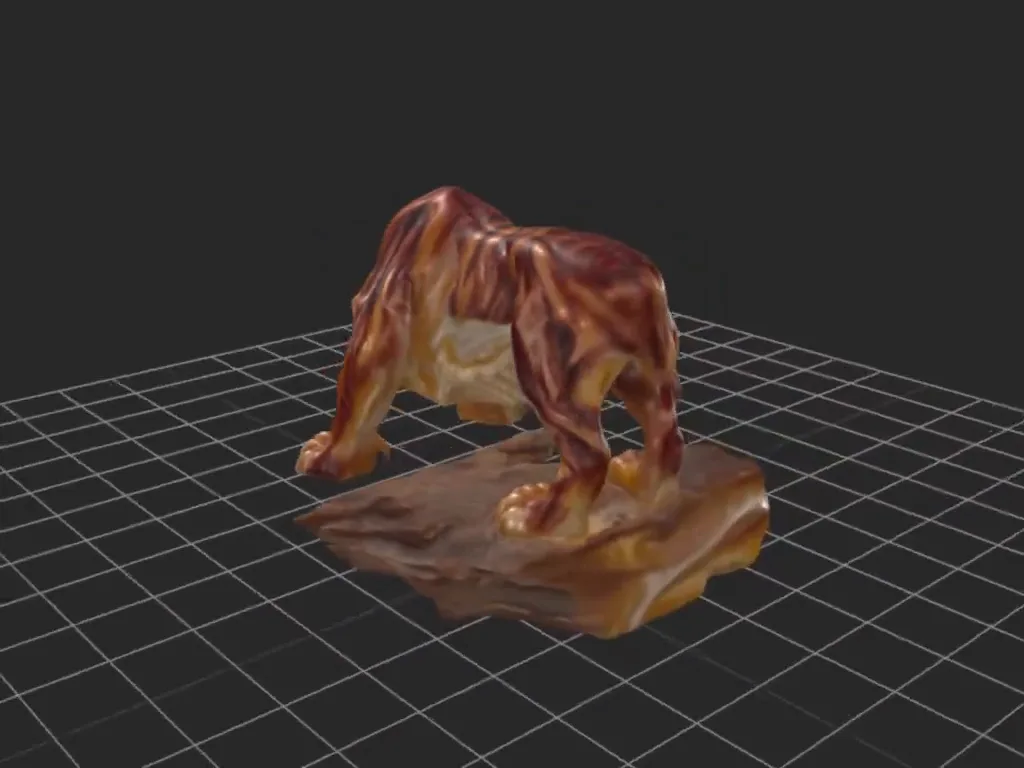
From one image to a 4K textured tiger — Foundry + MCPFace detail from the agate tiger reference. One picture of an agate tiger became a turnaround sheet, a moving camera orbit, and then a textured 3D model. Here's the whole trip through Mumblebox 3D Asset Foundry, including what I checked along the way—and how you can work with your agent from your phone. The actual exported 3D mesh, rotating in Foundry's viewer. The AI-generated orbit used to build it appears below. This walkthrough uses Preview 28 and the Orbit to Mesh wizard. The result has 4096 × 4096 textures, a detailed GLB, and a reduced GLB for further game development. It's a useful starting asset: the mineral bands and overall form came through, while the tail and some paw-to-log details still need cleanup. Those are exactly the kinds of things worth catching during review. Start here Install and start Mumblebox 3D Asset Foundry through Pinokio. Open Choose a Workflow → Create a Mesh from an Image → Orbit to Mesh. Let any required model preparation finish before starting a generation. The route is reference → turnaround and orbit → selected views → mesh → finish and export. You can follow the wizard yourself or work alongside an agent connected through MCP. For a first run, I like going stage by stage so I can inspect the result before moving on. 1. Give it a clear reference Name the asset and choose Upload an image. You can also create an image in Foundry or choose one from Gallery. Keep the whole subject in frame, including thin parts such as tails, handles, and accessories. I used Agate Tiger and the Full steps · 3 seconds preset: 768 × 768, 28 steps, Turbo off, and 73 frames at 24 fps. The Subject direction field is where I described the important details: the tiger and log should stay one rigid carving, with the paws, tail, expression, and mineral bands preserved. Keep the built-in camera instructions and add what matters about your subject. 2. Review the turnaround and the orbit Generate the turnaround first. This gives H3 four views to work from: front, side, three-quarter, and back. Check that the shape, pose, colors, and small details stay consistent across them. Then generate the orbit. The camera should travel around the stationary subject at a steady height and distance. Watch the complete turn before moving on. This is the generated camera-orbit video used as reconstruction input. It is an earlier stage than the finished mesh shown at the top. Look for parts that bend, disappear, change sides, or drift as the camera moves. Also check the framing and the return to the opening view. A smooth video can still contain inconsistent geometry, so pause on the awkward angles. If something important changes, revise the direction or regenerate before spending time on reconstruction. 3. Choose the views that will build the mesh Continue to Choose mesh views. Foundry aligns the cameras and presents views from around the subject for Pixal3D. I used 4 views · Recommended default and 1024 shape resolution. Inspect each selected frame. Uncheck a view if it is blurred, warped, or missing an important part; keep the front and at least one other view. More views are an option, but consistency matters more than simply increasing the count. 4. Inspect the rough shape Build the mesh, then rotate it in Review the mesh. Check the silhouette, face, underside, gaps between limbs, and the contact with the base. This is the place to decide whether the starting shape is good enough to finish. Hi3D uses the original reference for refinement; Foundry then cleans the geometry and applies TRELLIS.2 texturing. Later processing can improve the result, but it does not guarantee that every missing detail will return. 5. Finish with 4K textures and export In Finish and export, I chose 4096 for texture size and kept the 500,000 triangle limit for texturing. That limit controls the mesh sent to texturing and UV unwrapping; Foundry retains the clean master separately. Choose only the output versions and formats you need, then use Prepare asset package. This run produced: Detailed GLB: 499,844 triangles with 4K material maps. Balanced GLB: 250,000 triangles with 4K maps and baked normal maps. An asset ZIP containing the models, textures, README, measurements, and model credits. Download the ZIP and review the model from all sides. The two exported GLBs also imported successfully in Blender during this run. The tail and some intersections still need attention before I'd call this particular asset finished for a project. Texturing, topology cleanup, rigging, and testing in your target application are different jobs; choose the next one to suit what you're making. Work with Foundry from your phone 📱 With MCP, you can work with Foundry from your phone through your agent's connected app—giving instructions in plain language, checking progress, and viewing results wherever you are. This is one of the parts I'm most excited about. You can discuss the result, ask for another view, or decide what to do next while you're away from the PC. Your PC runs Foundry and the models; your compatible agent app carries the conversation and connects to that work. To get started, open Connect your agent in Foundry. Choose any optional Blender skill repositories you want, copy the setup prompt, and paste it into your coding agent. The setup connects the MCP and Foundry's companion skill, which helps the agent understand the workflows. Keep the app, MCP, and companion skill current so the agent sees the available controls. Once connected, an instruction can be as simple as: Use Foundry's Orbit to Mesh workflow with this image. Name it Agate Tiger. Start with the full-steps, three-second preset. Show me the turnaround and orbit before building the mesh, then help me review the result and export a detailed GLB with 4K textures. The agent should check Foundry's available capabilities and use your existing workflow. Phone access depends on your agent app's connection to the PC; keep Foundry's local service private. Agent setup details are available if you want the configuration steps. You still decide what looks right. MCP makes it easier to keep that conversation going while the tools do the work. A quick hello in every supported language Foundry now supports **English, Simplified Chinese, Latin American Spanish, French, and Braz

RE-USE Speech Enhancement
@jmw_studio_film•9h ago
This may be going on a cool direction...I still have to do some work if I fully commit to this, but I needed to update the overall speed of this app, so... I added 5 new flavours to RE-USE, thanks to this awesome community we have on Hugginface! Props to the people who fine-tuned all of these options. (This also means that MLX support CAN be possible! I pin-pointed those models, but I don't have a Mac available, so if anyone wants to copy this one repo and do that version, feel free to do it). Added a bunch more of knobs to really tweak the output and overall speed of the recovered result (with an easy explanation to know what to tweak). Also added batch processing for people that need a "run-and-leave" solution for several broken audio. This may be a really small project for you to play with, but it is no more a "cheap clone". And maybe in the future it is much more...
PotionUI
@oroborus•10h ago
Fixed a bug in the Pinokio startup script that caused a blank white screen until you manually refreshed. The UI should now load immediately on launch! Let me know if you run into any issues—reach out here, on Discord, or on Reddit. I want to make sure this runs smoothly in Pinokio, so don't hesitate to ask for help! Cheers!
ZONOS3-Mini
@cocktailpeanut•11h ago
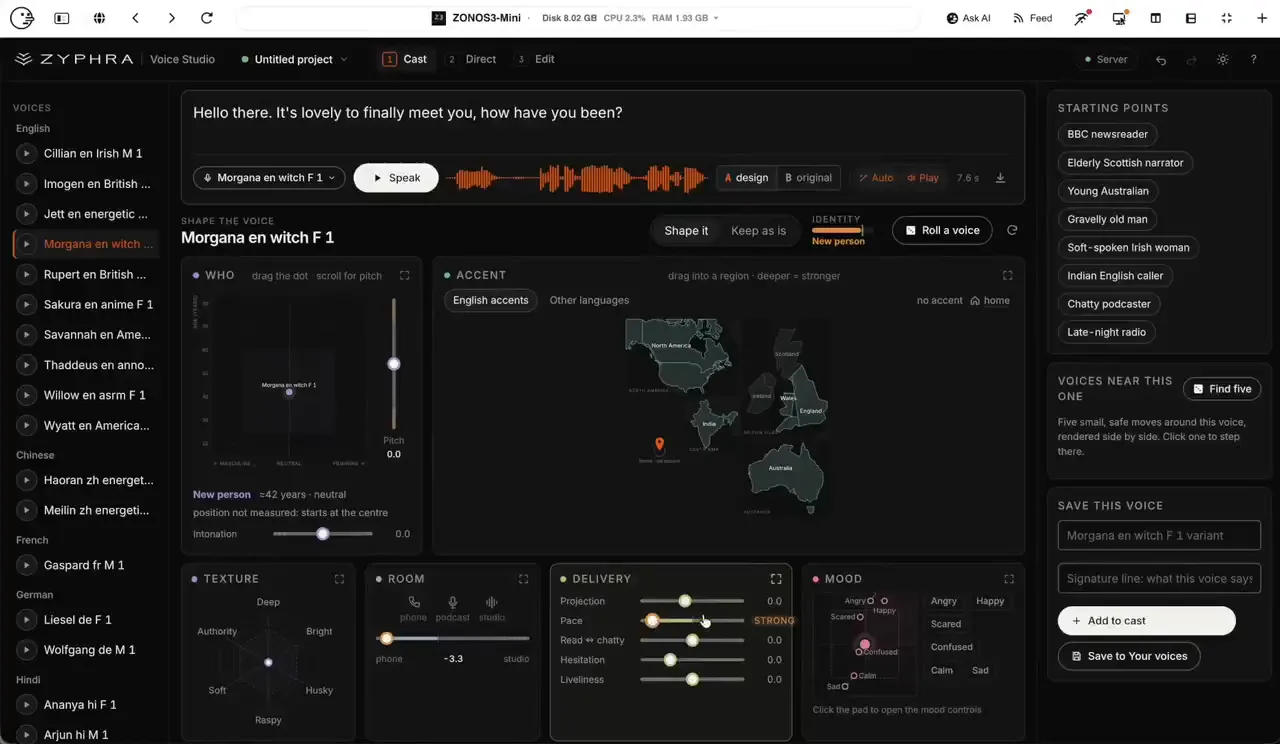
Zonos3-Mini Voice Studio: Realtime voice hacking studioVoice Studio Zonos Voice Studio lets you speak text in a chosen voice and shape how that voice sounds. Speak a line with one of 30 built-in voices, or clone a voice from a short recording or upload. Shape it: gender, age, pitch, intonation, accent, texture, room, pace, loudness, and mood. Start from a preset such as BBC newsreader, gravelly old man, or late-night radio, then compare the result with the original voice. Perform a script: a different voice per line, delivery painted onto words, several takes, then export one WAV. Save the voice, cast, and script in a project you can export and import. Zonos3-mini Model Performance Very fast generation: once you clone a voice, you just enter text and it almost instantly generates the speech and starts streaming High fidelity: I've tried to clone Christopher Walken's voice with all kinds of voice cloning models in the past but this one does it the best It has two modes: Basic mode Full mode Here's what the basic voice cloning mode looks like. I don't know how they did it but this thing generates voice in realtime. The following is on my Mac M1 Max 64G: Tested on Mac and NVIDIA A4500 (Both realtime generation)
EmberWriter
@grumpystrongman•15h ago
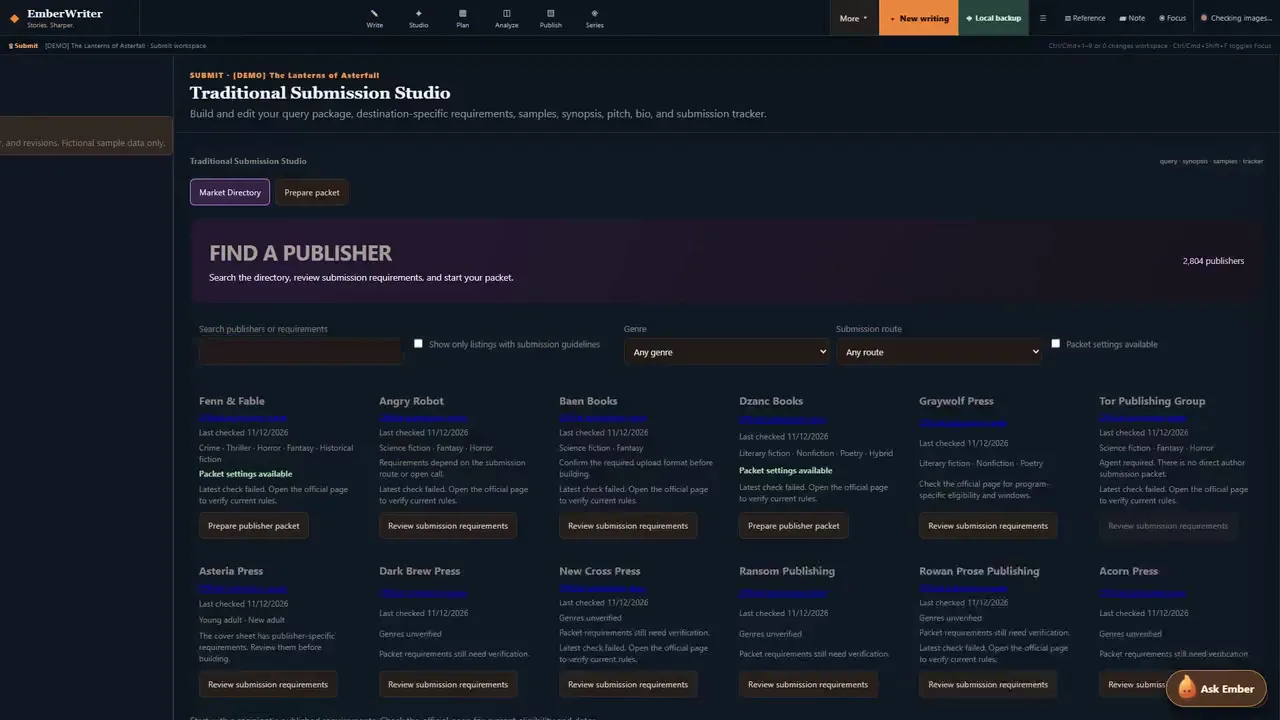
EmberWriter has come a long way since my last Pinokio post.I started building it because I wanted one place to write a novel, keep track of the world I was creating, and do something with the book when it was ready. The new feature tour follows one fictional project through that process, from a lantern going dark in the opening chapter to a submission packet you can download. Watch the updated EmberWriter feature tour (9:01, 1080p) Write the book and keep the world straight. The manuscript, character notes, and research live together. Story Atlas helps you work out whether a route or location makes sense in the next scene. Series tools help you carry established facts across books, and version history and the Recovery Center give you a way back when you need an earlier draft or a project backup. Direct the audiobook line by line. Audio Director gives you a separate performance manuscript where you can correct who’s speaking, assign character voices, and give a line its own delivery cue. You can audition a take, flag a pronunciation or performance issue, and listen again before approving it. The tour includes a multi-character excerpt rendered with EmberWriter’s Kokoro voices. Find a publisher and build the packet they ask for. The Market Directory includes 2,804 searchable book publisher records. Where we’ve researched the requirements, you can filter by genre, submission route, and packet availability. EmberWriter flags entries that still need research or require an agent, so you know where to check before spending time on a submission. In the tour, I use a publisher’s bundled settings to prepare a query and a Word attachment with the synopsis and opening chapters. Then I review the files and download the ZIP. The private authorship review lets you inspect matches against recorded AI wording, and that review stays outside the submission ZIP. Already using EmberWriter? Click Update in Pinokio, then choose DEMO to try it with fictional material. If you give it a spin, I’d like to hear which part of your writing, audiobook, or submission workflow it helped with and where you still had to reach for another tool. Install EmberWriter for Pinokio · Download all eight screenshots
Ruach Studio
@ruachstudio•15h ago
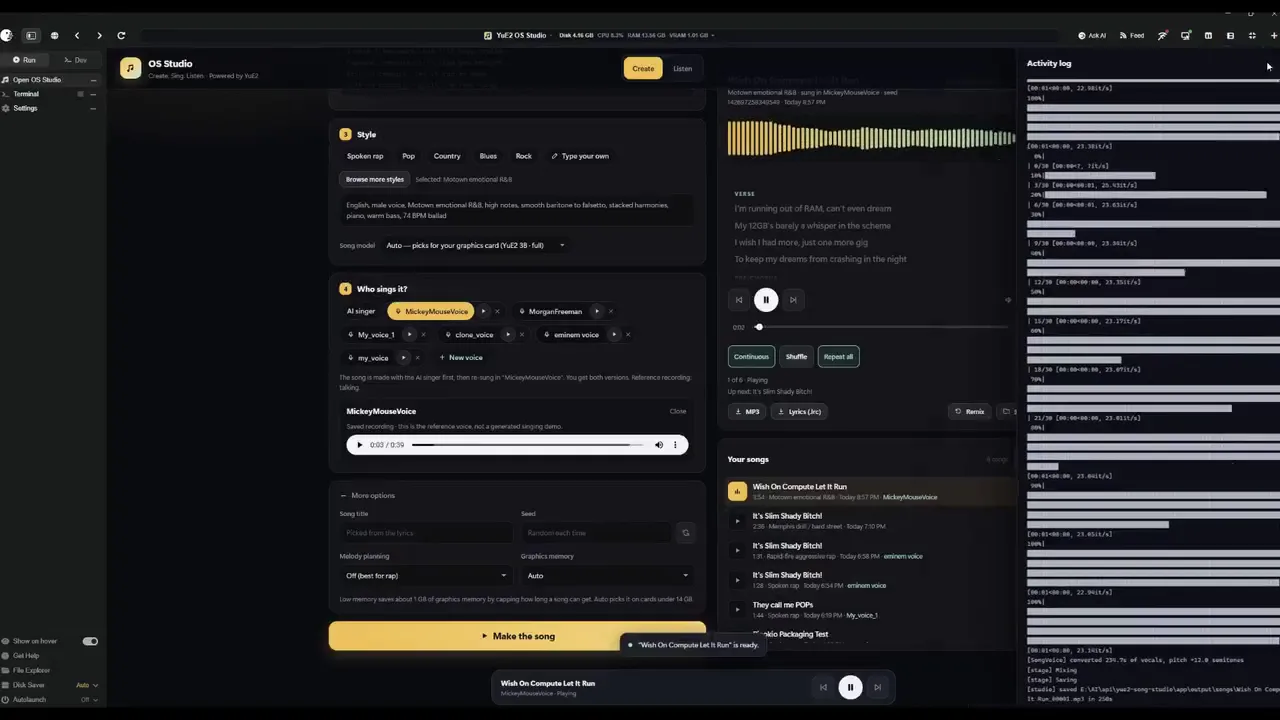
Ruach Studio 2.0.7: our own decoders, the Narrator and eight rooms2.0.7 is out, cut in honour of our own decoders. Press Update in Pinokio to get it. Our own decoders. YuE2-VAE-RS x3 v1, m-a-p's Standard grown three times and trained by us on music, now decodes every new take by default, with v2 beside it. A take you made earlier can be decoded again with either in seconds, without generating it again. Standard comes back with one tick in Engine → Defaults. The Narrator, a room for the spoken word: Fish Audio's Drama 3 through audio.cpp, on your card or the processor. Whisper hears every piece and reads again a word lost or added; a take is fixed piece by piece; a long text with [split] is read as a book, part by part in one voice. Built with Fish Audio. Eight rooms in a new order (Musician, Narrator, Writer, Refiner, Artist, Videographer, Trainer, Librarian), two transcribers (Heretical and Refined), every model download checked three times (pinned commit, size, SHA-256), and an AppImage that carries its own C library. Next, in 2.0.8: Higgs Audio v3 (Boson AI) as the Narrator's second engine, and the Videographer's own tracks with templates for titles and karaoke. The full article: https://github.com/igrbible/Ruach_Studio/wiki/Ruach-Studio-2.0.7 The study of our decoders: https://ruachstudio.art/#vae-study
Type:All
apipluginAll
Platform:All
AllmacOSWindowsLinux
GPU:All
AllNVIDIAAMDApple
Sort by
RecommendedLatestCheck-ins
#ai195#tts64#image-generation50#video-generation42#140#music35#utility35#video28
SageAttention
Quantized Attention that achieves speedups of 2.1-3.1x and 2.7-5.1x compared to FlashAttention2 and xformers, respectively, without lossing end-to-end metrics across various models.
deepbeepmeep/sageattentionupdated 1y ago
0 check-insNVIDIAAMDApple
docxpand
Synthetic identity documents dataset
QuickSign/docxpandupdated 1y ago
0 check-insNVIDIAAMDApple
deepl-translate-github-action
Github Action to translate text in dev projects
lyqht/deepl-translate-github-actionupdated 1y ago
0 check-insNVIDIAAMDApple
TikTokAIVideoGenerator
A Python tool that automates vertical video creation for TikTok, Instagram Reels, and YouTube Shorts. It generates scripts, images, voiceovers, and captions using AI, making professional video production quick and easy.
GabrielLaxy/TikTokAIVideoGeneratorupdated 1y ago
0 check-insNVIDIAAMDApple
SAM2-GUI
Contribute to YunxuanMao/SAM2-GUI development by creating an account on GitHub.
yunxuanmao/sam2-guiupdated 1y ago
0 check-insNVIDIAAMDApple
Text Generation WebUI
A Gradio web UI for Large Language Models https://github.com/oobabooga/text-generation-webui
cocktailpeanut/oobabooga.pinokioupdated 1y ago
@cocktailpeanut5 check-insNVIDIAAMDApple
YuE-for-windows
YuE: Open Full-song Generation Foundation Model, something similar to Suno.ai but open
sdbds/yue-for-windowsupdated 1y ago
0 check-insNVIDIAAMDApple
MatAnyone
[CVPR 2025] MatAnyone: Stable Video Matting with Consistent Memory Propagation
cocktailpeanut/matanyoneupdated 1y ago
@cocktailpeanut0 check-insNVIDIAAMDApple
Text2midi
Text2midi is the first end-to-end model for generating MIDI files from textual descriptions. By leveraging pretrained large language models and a powerful autoregressive transformer decoder, text2midi allows users to create symbolic music that aligns with detailed textual prompts, including musical attributes like chords, tempo, and style.
AMAAI-Lab/Text2midiupdated 1y ago
0 check-insNVIDIAAMDApple
Ford-Radio-Code
Contribute to Sebix599/Ford-Radio-Code development by creating an account on GitHub.
Sebix599/Ford-Radio-Codeupdated 1y ago
0 check-insNVIDIAAMDApple
py-reform
A Python library for dewarping/straightening/reformatting document images and PDFs
jsoma/py-reformupdated 1y ago
0 check-insNVIDIAAMDApple
StoryToolkitAI
An editing tool that uses AI to transcribe, understand content and search for anything in your footage, integrated with ChatGPT and other AI models
octimot/StoryToolkitAIupdated 1y ago
0 check-insNVIDIAAMDApple
ghost-2.0
A new one shot head swapping approach
ai-forever/ghost-2.0updated 1y ago
0 check-insNVIDIAAMDApple
IOPaint
Image inpainting tool powered by SOTA AI models. Remove any unwanted object, defect, or even people from your pictures, and replace (powered by stable diffusion) anything in your pictures. https://www.iopaint.com/
halr9000/iopaint-pinokiov2.0updated 1y ago
@halr90000 check-insNVIDIAAMDApple
kokoro-streamlit
Kokoro TTS Demo
tractorjuice/kokoro-streamlitupdated 1y ago
0 check-insNVIDIAAMDApple
LP-MusicCaps
LLM-Based Pseudo Music Captioning
cocktailpeanut/lp_music_caps.pinokioupdated 1y ago
@cocktailpeanut0 check-insNVIDIAAMDApple
Corte-autom-tico-v-deo-YouTube-
Contribute to Erisvaldo2/Corte-autom-tico-v-deo-YouTube- development by creating an account on GitHub.
Erisvaldo2/Corte-autom-tico-v-deo-YouTube-updated 1y ago
0 check-insNVIDIAAMDApple
FaceFusion 2.1.3
Next generation face swapper and enhancer
fnooub/facefusion-pinokioupdated 1y ago
0 check-insNVIDIAAMDApple
RFdiffusion Pinkio Installer
A one-click installer for setting up RFdiffusion using Pinokio.
Wolvend/RFDiffusion-Pinokio-Installer-v1.0updated 1y ago
0 check-insNVIDIAAMDApple
Perplexica-Search-Engine-AI
Perplexica is an AI-powered search engine. It is an Open source alternative to Perplexity AI
BunsDev/Perplexica-Search-Engine-AIupdated 1y ago
0 check-insNVIDIAAMDApple
Previous
1...270271272...303
NextPage 271 of 303

Get project updates

Pulse

View all

The latest posts from across Pinokio.

New on Pinokio
@cocktailpeanut · Haru
Automatically discovered via GitHub
From one image to a 4K textured tiger — Foundry + MCP
@mumblebox · Mumblebox 3D Asset Foundry
Face detail from the agate tiger reference. One picture of an agate tiger became a turnaround sheet, ...
Foundry Preview 27 — Orbit to Mesh and a head start in Blender
@mumblebox · Mumblebox 3D Asset Foundry
I joined Pinokio about a week ago, and the welcome has been incredible. Thanks to everyone who tried ...
Devin Cli available for Pinokio
@morpheus · Community
This is just a short update note for all with a Devin subscription and those who plan to get one. I a...
New on Pinokio
@cocktailpeanut · Demo Cut
Automatically discovered via GitHub

Radar

View all

Projects getting attention.

Followed·just now
instagram-reporting-bot
Bots are automated tools designed to streamline the process of submitting reports on Instagram accounts that may violate the platform’s Community Guidelines. They can assist with reporting issues such as spam, report reporter mass acc ban bot impersonation, fake profile account, or other policy violations. Depending on their functionality, tool
Followed·just now
Image to Prompt
Generate editable Ideogram JSON prompts from uploaded images.
Installable
Followed·4 min
Wan2GP
1-click WanGP Launcher. Super Optimized Gradio UI for AI video creation for GPU poor machines (6GB+ VRAM). Supports Wan 2.1/2.2, Qwen, Hunyuan Video, LTX Video and Flux. https://github.com/deepbeepmeep/Wan2GP
Installable
Followed·5 min
cube
Roblox Foundation Model for 3D Intelligence --- Cross Platform (Mac, Windows, Linux): Requires 16GB+ VRAM PC or 18GB+ Memory Macs https://github.com/Roblox/cube
Installable
Followed·5 min
ai-video-composer
The ultimate video editor powered by natural language and FFMPEG https://huggingface.co/spaces/huggingface-projects/ai-video-composer
Installable
Pinokio
PrivacyTerms
FeedAppsRemote

Explore the community

#showcase
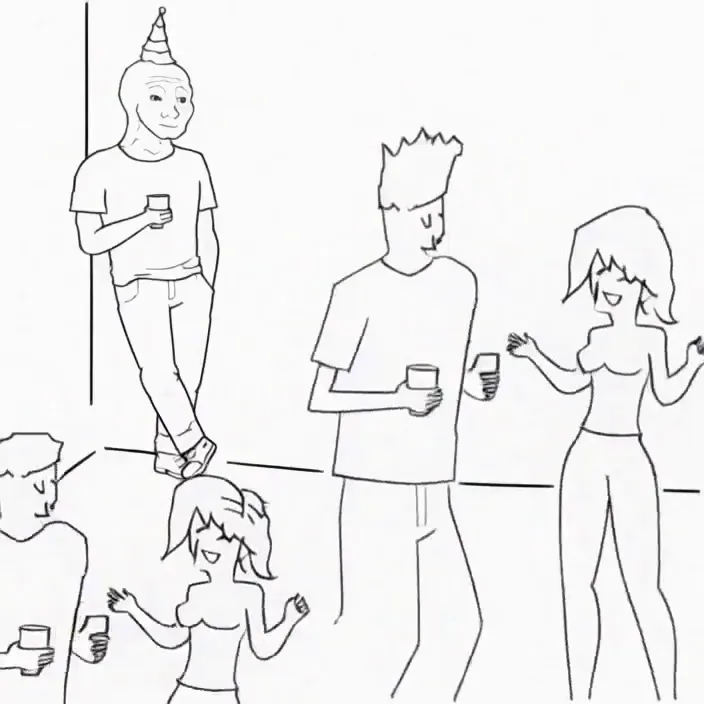
Minimax H3 Singularity 4 Step Generation Prompt: Use the provided image as the starting frame. Preserve the exact minimalist black-and-white Wojak meme drawing style, characters, and party setting. Static camera, no cuts, no zooms, no dialogue, no text. 0–3s: The man leans casually against the wall in the corner, legs crossed, one hand in his pocket, holding his drink. He has a faint, peaceful smile. Across the room, three extremely attractive adult women dancing at the party notice him. They exchange excited glances. 3–7s: The first woman confidently approaches him, flips her hair, gives h...
@cocktailpeanut·14d ago
#cool-project
Preview of my next project!
@theawakenone·23h ago
#guide
From one image to a 4K textured tiger — Foundry + MCP
@mumblebox·2h ago
#testers-wanted
For those of you brave enough to install... Thanks for trying it out. I am adding a bug report feature and fixing the workflows for objects/creatures/vehicles. I am also adding a coding agent driven headless Blender node. I will be looking to optimizes for low memory systems soon. There is alot to do on the Roadmap. Thanks for your interest.
@mumblebox·10d ago