Quick update on the experimental rigging in Mumblebox Foundry Preview 36. Local AI auto rigging is available, along with tools for refining joints, testing movement and exporting to Blender. But the rigging system and interface are still very basic, and I'm working hard on fleshing them out.
Sorry for the rough edges. I'm learning what makes a good rigging experience, and feedback from people who actually rig and animate characters is helping me see where it needs to improve.

Wood Man and the acorn from the latest demo. The assets were made in Foundry, Wood Man's rig was refined through its MCP, and the animation and rendering were done in Blender. The acorn's leaf was rigged in Blender too.
The interface and user experience are a big focus. I want familiar visual controls that an experienced rigger can pick up, with an approachable starting point for someone doing this for the first time. Go as deep as you want, without having every advanced setting in your face.
Some of the improvements I'm planning:
- Clearer bones and joints, better selection feedback and a more organized workspace.
- More complete inverse kinematics (IK) and forward kinematics (FK) controls, including switching between them.
- Better hand and palm controls, with clearer ways to check how the mesh bends.
- Useful sliders, dials and toggles, grouped around the part you're working on, with immediate visual feedback.
- Matching MCP tools so your agent can inspect, adjust and help refine the rig while you stay in control.
These are development goals, not features I'm claiming are all in the current release.
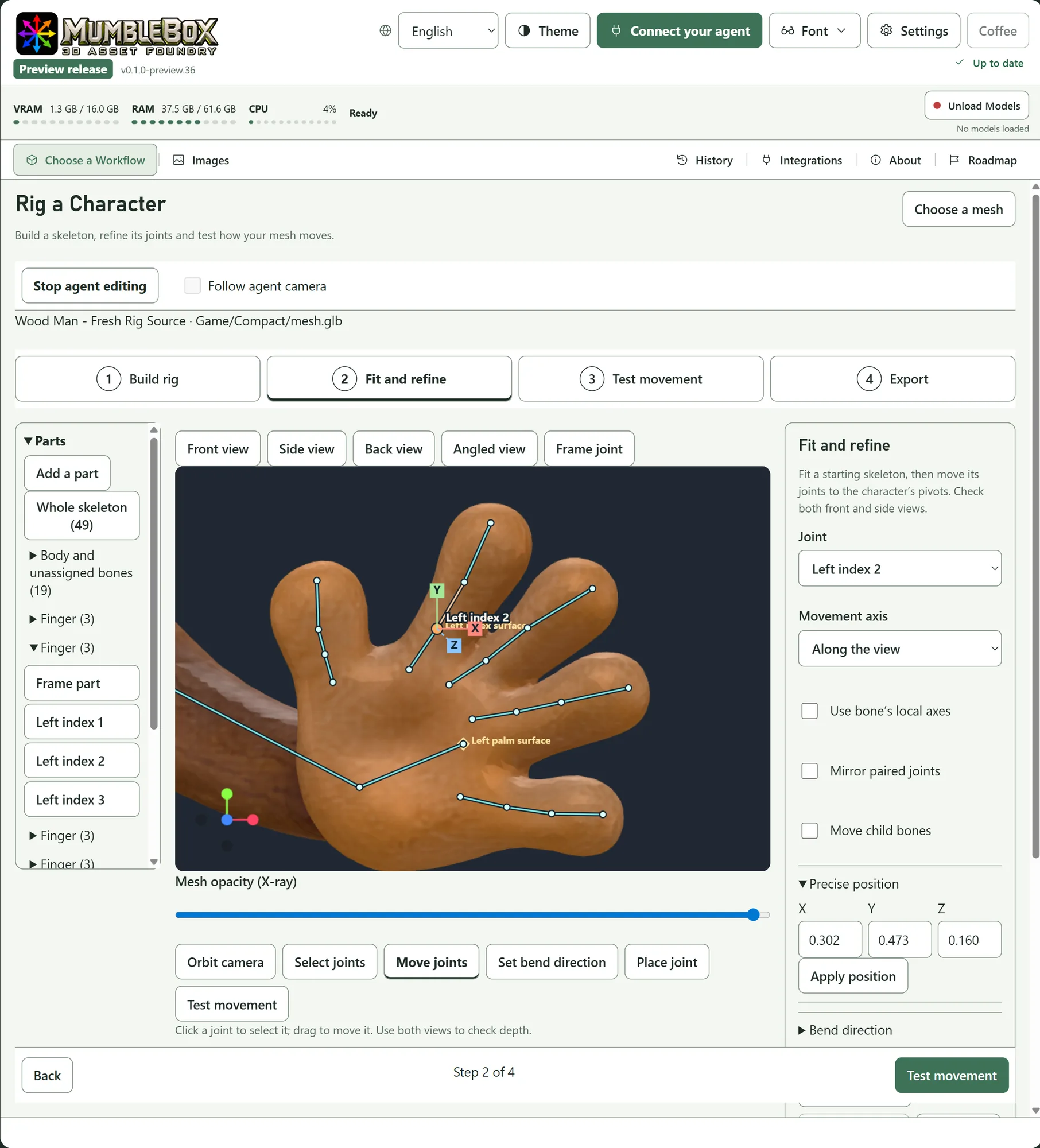
The current experimental editor in Preview 36. This is the starting point I'm working to improve.
The MCP side already gives agents tools for inspecting views, probing depth and making precise joint edits. I want the human interface to become just as useful and understandable.
If you use Maya, Houdini, Blender, Daz Studio or other rigging tools, I'd really appreciate your perspective:
- What is the biggest frustration you wish a rigging tool would solve?
- Which controls or visual cues would you expect to find immediately?
- Have you tried Foundry's rigging, or connected it to your agent? Where did it feel confusing or fall short?
I'm studying what works in those tools and where the experience can be better. Specific examples and screenshots would be especially helpful. Honest criticism is welcome.
Try Foundry through Pinokio · GitHub and setup instructions
Thank you for the patience, support and feedback. I want to make this a useful community tool, and hearing where it fails is part of getting it there.


Quick update on the experimental rigging in Mumblebox Foundry Preview 36. Local AI auto rigging is available, along with tools for refining joints, testing movement and exporting to Blender. But the rigging system and interface are still very basic, and I'm working hard on fleshing them out.
Sorry for the rough edges. I'm learning what makes a good rigging experience, and feedback from people who actually rig and animate characters is helping me see where it needs to improve.
Wood Man and the acorn from the latest demo. The assets were made in Foundry, Wood Man's rig was refined through its MCP, and the animation and rendering were done in Blender. The acorn's leaf was rigged in Blender too.
The interface and user experience are a big focus. I want familiar visual controls that an experienced rigger can pick up, with an approachable starting point for someone doing this for the first time. Go as deep as you want, without having every advanced setting in your face.
Some of the improvements I'm planning:
These are development goals, not features I'm claiming are all in the current release.
The current experimental editor in Preview 36. This is the starting point I'm working to improve.
The MCP side already gives agents tools for inspecting views, probing depth and making precise joint edits. I want the human interface to become just as useful and understandable.
If you use Maya, Houdini, Blender, Daz Studio or other rigging tools, I'd really appreciate your perspective:
I'm studying what works in those tools and where the experience can be better. Specific examples and screenshots would be especially helpful. Honest criticism is welcome.
Try Foundry through Pinokio · GitHub and setup instructions
Thank you for the patience, support and feedback. I want to make this a useful community tool, and hearing where it fails is part of getting it there.