Pinokio
FeedAppsRemote
Download Pinokio
Sign inCreate accountJoin

Apps

Announcements

View all

Official updates.

Mumblebox 3D Asset Foundry
@mumblebox•2 min ago
Foundry Preview 27 — Orbit to Mesh and a head start in BlenderI joined Pinokio about a week ago, and the welcome has been incredible. Thanks to everyone who tried Foundry, sent feedback, or offered to help. I’m glad to be part of this community. Orbit to Mesh is the new workflow I’m most excited about. Start with one image. Foundry makes a four-view sheet and a 360° orbit, then lets you review the frames before Pixal3D builds the mesh. Hi3D and TRELLIS.2 handle refinement and texturing. The jade guardian below shows the reference, the generated orbit, and the textured mesh from the same run. The orbit wizards now have named presets, Custom controls, and resets beside the settings. The view selector explains the tradeoffs, and Rocket Mode shows what it’ll run and export before you start. Virtual Turntable also gives you two photogrammetry engines to try, Meshroom / AliceVision and COLMAP + OpenMVS. Thanks to MiniMax, Pruna, Pablo Dawson, and the Pixal3D, Hi3D, and TRELLIS.2 teams for the tools behind these workflows. Working with a coding agent in Blender? Click Connect your agent in Foundry to copy a setup prompt for the local MCP and the bundled Mumblebox Assets skill. You can use the wizards yourself or have your agent start a local run while it works on something else, then bring the result into Blender for editing. The goal is to save time and tokens by giving your agent a solid starting asset. Thanks to EL4CTEO and 1Pio for the Blender skill collections you can optionally include in setup. French and Brazilian Portuguese are now available, alongside English, Simplified Chinese, and Latin American Spanish. Bonjour à toutes et à tous ! Vous pouvez maintenant utiliser Foundry en français. Si vous essayez De l’orbite au maillage, dites-moi quels réglages vous ont donné les meilleurs résultats. Oi, pessoal! Agora dá pra usar o Foundry em português do Brasil. Se vocês testarem Da órbita à malha, me contem quais configurações deram os melhores resultados. It’s still a preview. I’ll be spending more time tuning recipes and defaults for different subjects. If you make something, I’d love to see it and hear which preset, view count, or engine you used. The Roadmap tab shows what’s next. Preview 27 release and changelog · Foundry on Pinokio
RE-USE Speech Enhancement
@jmw_studio_film•4h ago
This may be going on a cool direction...I still have to do some work if I fully commit to this, but I needed to update the overall speed of this app, so... I added 5 new flavours to RE-USE, thanks to this awesome community we have on Hugginface! Props to the people who fine-tuned all of these options. (This also means that MLX support CAN be possible! I pin-pointed those models, but I don't have a Mac available, so if anyone wants to copy this one repo and do that version, feel free to do it). Added a bunch more of knobs to really tweak the output and overall speed of the recovered result (with an easy explanation to know what to tweak). Also added batch processing for people that need a "run-and-leave" solution for several broken audio. This may be a really small project for you to play with, but it is no more a "cheap clone". And maybe in the future it is much more...
PotionUI
@oroborus•6h ago
Fixed a bug in the Pinokio startup script that caused a blank white screen until you manually refreshed. The UI should now load immediately on launch! Let me know if you run into any issues—reach out here, on Discord, or on Reddit. I want to make sure this runs smoothly in Pinokio, so don't hesitate to ask for help! Cheers!
ZONOS3-Mini
@cocktailpeanut•6h ago
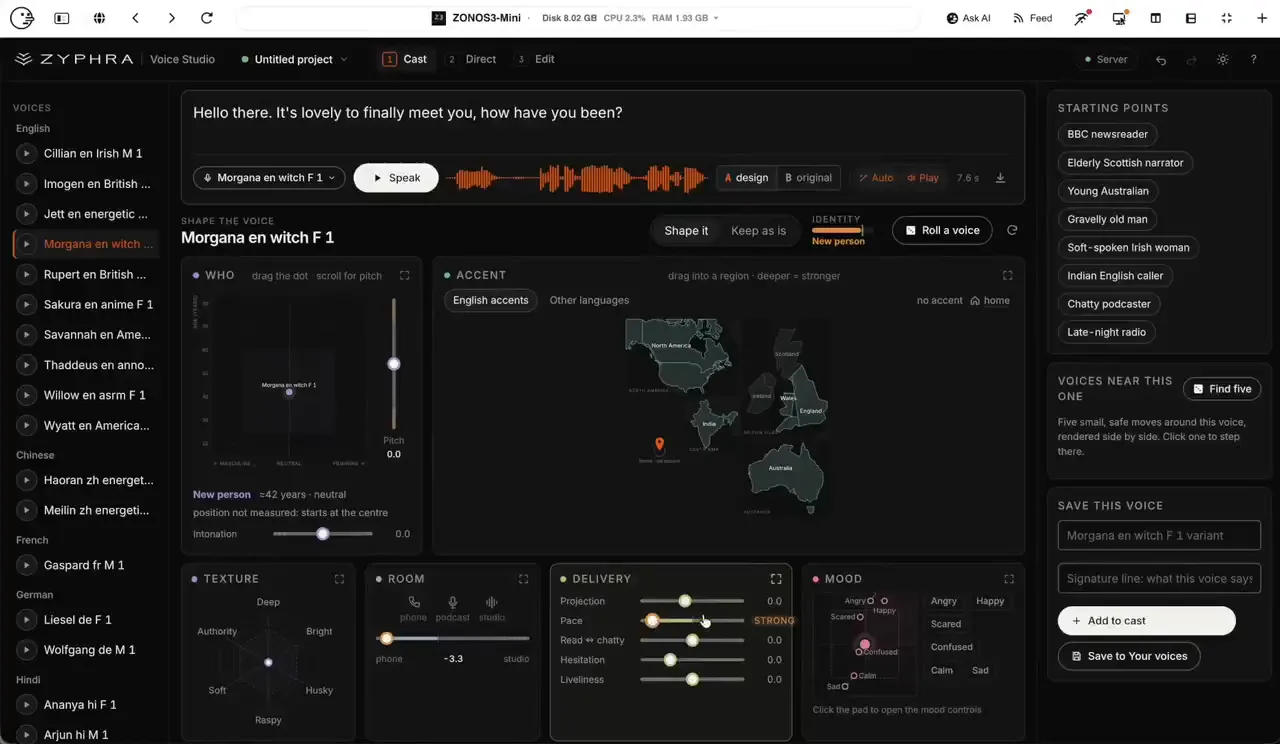
Zonos3-Mini Voice Studio: Realtime voice hacking studioVoice Studio Zonos Voice Studio lets you speak text in a chosen voice and shape how that voice sounds. Speak a line with one of 30 built-in voices, or clone a voice from a short recording or upload. Shape it: gender, age, pitch, intonation, accent, texture, room, pace, loudness, and mood. Start from a preset such as BBC newsreader, gravelly old man, or late-night radio, then compare the result with the original voice. Perform a script: a different voice per line, delivery painted onto words, several takes, then export one WAV. Save the voice, cast, and script in a project you can export and import. Zonos3-mini Model Performance Very fast generation: once you clone a voice, you just enter text and it almost instantly generates the speech and starts streaming High fidelity: I've tried to clone Christopher Walken's voice with all kinds of voice cloning models in the past but this one does it the best It has two modes: Basic mode Full mode Here's what the basic voice cloning mode looks like. I don't know how they did it but this thing generates voice in realtime. The following is on my Mac M1 Max 64G: Tested on Mac and NVIDIA A4500 (Both realtime generation)
EmberWriter
@grumpystrongman•10h ago
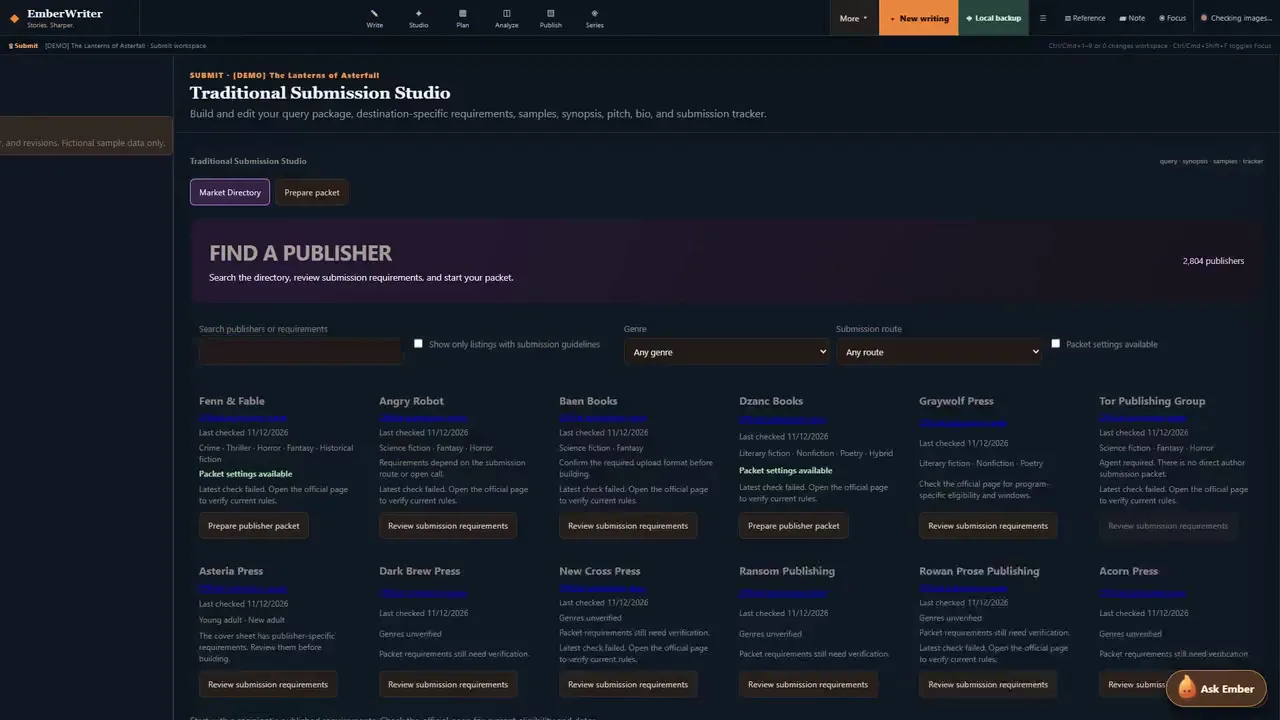
EmberWriter has come a long way since my last Pinokio post.I started building it because I wanted one place to write a novel, keep track of the world I was creating, and do something with the book when it was ready. The new feature tour follows one fictional project through that process, from a lantern going dark in the opening chapter to a submission packet you can download. Watch the updated EmberWriter feature tour (9:01, 1080p) Write the book and keep the world straight. The manuscript, character notes, and research live together. Story Atlas helps you work out whether a route or location makes sense in the next scene. Series tools help you carry established facts across books, and version history and the Recovery Center give you a way back when you need an earlier draft or a project backup. Direct the audiobook line by line. Audio Director gives you a separate performance manuscript where you can correct who’s speaking, assign character voices, and give a line its own delivery cue. You can audition a take, flag a pronunciation or performance issue, and listen again before approving it. The tour includes a multi-character excerpt rendered with EmberWriter’s Kokoro voices. Find a publisher and build the packet they ask for. The Market Directory includes 2,804 searchable book publisher records. Where we’ve researched the requirements, you can filter by genre, submission route, and packet availability. EmberWriter flags entries that still need research or require an agent, so you know where to check before spending time on a submission. In the tour, I use a publisher’s bundled settings to prepare a query and a Word attachment with the synopsis and opening chapters. Then I review the files and download the ZIP. The private authorship review lets you inspect matches against recorded AI wording, and that review stays outside the submission ZIP. Already using EmberWriter? Click Update in Pinokio, then choose DEMO to try it with fictional material. If you give it a spin, I’d like to hear which part of your writing, audiobook, or submission workflow it helped with and where you still had to reach for another tool. Install EmberWriter for Pinokio · Download all eight screenshots
Ruach Studio
@ruachstudio•11h ago
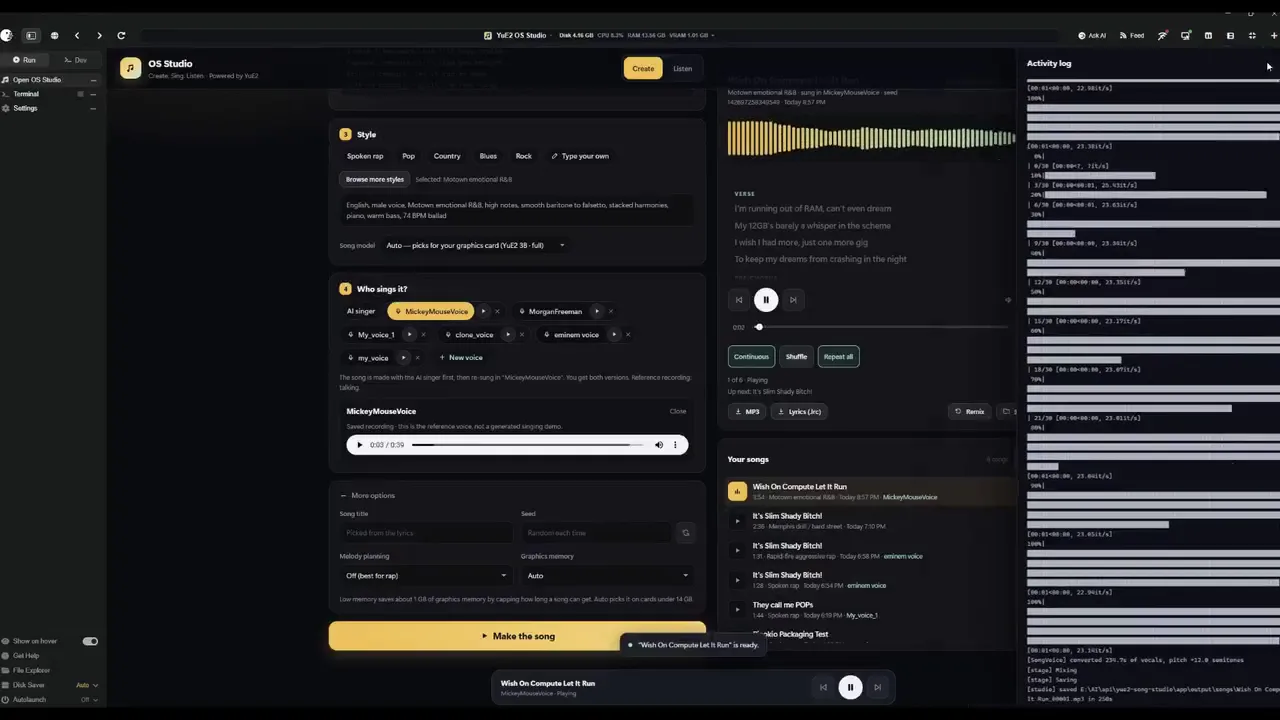
Ruach Studio 2.0.7: our own decoders, the Narrator and eight rooms2.0.7 is out, cut in honour of our own decoders. Press Update in Pinokio to get it. Our own decoders. YuE2-VAE-RS x3 v1, m-a-p's Standard grown three times and trained by us on music, now decodes every new take by default, with v2 beside it. A take you made earlier can be decoded again with either in seconds, without generating it again. Standard comes back with one tick in Engine → Defaults. The Narrator, a room for the spoken word: Fish Audio's Drama 3 through audio.cpp, on your card or the processor. Whisper hears every piece and reads again a word lost or added; a take is fixed piece by piece; a long text with [split] is read as a book, part by part in one voice. Built with Fish Audio. Eight rooms in a new order (Musician, Narrator, Writer, Refiner, Artist, Videographer, Trainer, Librarian), two transcribers (Heretical and Refined), every model download checked three times (pinned commit, size, SHA-256), and an AppImage that carries its own C library. Next, in 2.0.8: Higgs Audio v3 (Boson AI) as the Narrator's second engine, and the Videographer's own tracks with templates for titles and karaoke. The full article: https://github.com/igrbible/Ruach_Studio/wiki/Ruach-Studio-2.0.7 The study of our decoders: https://ruachstudio.art/#vae-study
Type:api
apipluginAll
Platform:All
AllmacOSWindowsLinux
GPU:NVIDIA
AllNVIDIAAMDApple
Sort by
RecommendedLatestCheck-ins
#ai195#tts64#image-generation50#video-generation42#140#music35#utility35#video28
lavieFeatured
Text-to-Video (T2V) generation framework from Vchitect https://github.com/Vchitect/LaVie
cocktailpeanut/lavie.pinokioupdated 3mo ago
#video#video-generation#ai
@cocktailpeanut7 check-insNVIDIAAMDApple
RVCFeatured
1 Click Installer for Retrieval-based-Voice-Conversion-WebUI (https://github.com/RVC-Project/Retrieval-based-Voice-Conversion-WebUI)
cocktailpeanut/rvc.pinokiov3.7updated 2mo ago
#rvc#voice-clone#voice
@cocktailpeanut23 check-insNVIDIAAMDApple
XTTSFeatured
clone voices into different languages by using just a quick 3-second audio clip. (a local version of https://huggingface.co/spaces/coqui/xtts)
cocktailpeanut/xtts.pinokiov3.0updated 1mo ago
#ai#tts
@cocktailpeanut10 check-insNVIDIAAMDApple
AudioSepFeatured
Separate Anything You Describe (https://huggingface.co/spaces/Audio-AGI/AudioSep)
cocktailpeanut/AudioSep.pinokiov2.0updated 1y ago
#ai#audio#audio-edit
@cocktailpeanut2 check-insNVIDIAAMDApple
MagicAnimate MiniFeatured
[NVIDIA GPU Only] An optimized version of MagicAnimate https://github.com/sdbds/magic-animate-for-windows
cocktailpeanut/MagicAnimateMiniv3.0updated 1y ago
#ai#video-generation
@cocktailpeanut2 check-insNVIDIAAMDApple
dreamtalkFeatured
When Expressive Talking Head Generation Meets Diffusion Probabilistic Models (https://github.com/ali-vilab/dreamtalk)
cocktailpeanutlabs/dreamtalkv3.7updated 6mo ago
#lipsync#ai#video-generation
3 check-insNVIDIAAMDApple
IP-Adapter-FaceIDFeatured
Enter a face image and transform it to any other image. Demo for the h94/IP-Adapter-FaceID model https://huggingface.co/spaces/multimodalart/Ip-Adapter-FaceID
cocktailpeanutlabs/faceidv3.0updated 5mo ago
#faceswap#face#ai
4 check-insNVIDIAAMDApple
OpenVoiceFeatured
Instantly clone any voice from any text to any speech, in any language https://huggingface.co/spaces/myshell-ai/OpenVoice
cocktailpeanutlabs/openvoicev1updated 4mo ago
#tts#voice-clone#ai
6 check-insNVIDIAAMDApple
MAGNeTFeatured
MAGNeT is a text-to-music and text-to-sound model capable of generating high-quality audio samples conditioned on text descriptions https://github.com/facebookresearch/audiocraft/blob/main/docs/MAGNET.md
cocktailpeanutlabs/magnetv3.0updated 1y ago
#ai#audio-generation#music
3 check-insNVIDIAAMDApple
PhotoMakerFeatured
Customizing Realistic Human Photos via Stacked ID Embedding https://github.com/TencentARC/PhotoMaker
cocktailpeanutlabs/photomakerv1updated 8mo ago
#image-generation#ai#face
5 check-insNVIDIAAMDApple
InstantIDFeatured
state-of-the-art tuning-free method to achieve ID-Preserving generation with only single image, supporting various downstream tasks. https://instantid.github.io/
cocktailpeanutlabs/instantidv3.0updated 4mo ago
#image-generation#ai
1 check-inNVIDIAAMDApple
VideoCrafter 2Featured
[Runs fast on NVIDIA GPUs. Works on M1/M2/M3 Macs but slow] VideoCrafter is an open-source video generation and editing toolbox for crafting video content. It currently includes the Text2Video and Image2Video models https://github.com/AILab-CVC/VideoCrafter
cocktailpeanutlabs/videocrafter2v3.0updated 26d ago
#ai#video-generation
19 check-insNVIDIAAMDApple
Bark Voice CloningFeatured
Upload a clean 20 seconds WAV file of the vocal persona you want to mimic, type your text-to-speech prompt and hit submit! A local version of https://huggingface.co/spaces/fffiloni/instant-TTS-Bark-cloning
cocktailpeanutlabs/barkv1.1updated 1y ago
#ai#voice#voice-clone
8 check-insNVIDIAAMDApple
MeloTTSFeatured
High-quality multi-lingual text-to-speech library by MyShell.ai. Support English, Spanish, French, Chinese, Japanese and Korean https://github.com/myshell-ai/MeloTTS
cocktailpeanutlabs/melottsv1.2updated 1y ago
#ai#tts
2 check-insNVIDIAAMDApple
remove-video-bgFeatured
Video background removal tool https://huggingface.co/spaces/amirgame197/Remove-Video-Background
cocktailpeanutlabs/remove-video-bgv1.2updated 6mo ago
#ai#video-edit
3 check-insNVIDIAAMDApple
Chatbot-OllamaFeatured
open source chat UI for Ollama https://github.com/ivanfioravanti/chatbot-ollama
cocktailpeanutlabs/chatbot-ollamav1.2updated 2mo ago
#llm#ai#ai-chat
18 check-insNVIDIAAMDApple
differential-diffusion-uiFeatured
Differential Diffusion modifies an image according to a text prompt, and according to a map that specifies the amount of change in each region https://differential-diffusion.github.io/
cocktailpeanutlabs/differential-diffusion-uiv1.2updated 9mo ago
#ai#image-edit#image-generation
3 check-insNVIDIAAMDApple
ZETAFeatured
Zero-Shot Text-Based Audio Editing Using DDPM Inversion https://huggingface.co/spaces/hilamanor/audioEditing
cocktailpeanutlabs/zetav1.2updated 1y ago
#ai#audio-edit#audio-generation
1 check-inNVIDIAAMDApple
supirFeatured
[NVIDIA ONLY] Text-driven, intelligent restoration, blending AI technology with creativity to give every image a brand new life https://supir.xpixel.group

cocktailpeanutlabs/supirv1.2updated 9mo ago
#ai
1 check-inNVIDIAAMDApple
Openvoice2Featured
Openvoice 2 Web UI - A local web UI for Openvoice2, a multilingual voice cloning TTS https://x.com/myshell_ai/status/1783161876052066793
cocktailpeanutlabs/openvoice2v3.0updated 1mo ago
#ai#tts
3 check-insNVIDIAAMDApple
Previous
1234567
NextPage 4 of 7

Get project updates

Pulse

View all

The latest posts from across Pinokio.

Foundry Preview 27 — Orbit to Mesh and a head start in Blender
@mumblebox · Mumblebox 3D Asset Foundry
I joined Pinokio about a week ago, and the welcome has been incredible. Thanks to everyone who tried ...
Devin Cli available for Pinokio
@morpheus · Community
This is just a short update note for all with a Devin subscription and those who plan to get one. I a...
New on Pinokio
@cocktailpeanut · Demo Cut
Automatically discovered via GitHub
Checked in to Wan2GP.
@ivan_dash · Community
New on Pinokio
@cocktailpeanut · Elevation Atlas
Automatically discovered via GitHub

Radar

View all

Projects getting attention.

Followed·just now
REAL-Video-Enhancer
Interpolate, Upscale, Decompress, and Denoise videos Locally on Linux/Windows/MacOS.
Installable
Followed·just now
ZONOS3-Mini
Local multilingual speech generation, voice cloning, and voice steering with Zonos Voice Studio. https://github.com/Zyphra/ZONOS3-Mini
Installable
Followed·2 min
Automated LoRA Studio
Video LoRA studio: NVIDIA CUDA and supported AMD ROCm on Windows/Linux; CPU dataset preparation on Apple Silicon macOS. Models download locally.
Installable
Followed·8 min
MiniMax H3 Studio
1-click MiniMax H3 video in ComfyUI plus H3 Studio: local T2V/I2V, references, continuation, Gallery, Director/Cinema and TR/EN. NVIDIA GPU.
Installable
Discovered·9 min
MMAudio — generating synchronized audio from video/text - a Hugging Face Space by hkchengrex
This app lets you add realistic sound to a short video or create a standalone audio clip just from a text description. Upload a video and write a prompt (you can also give a negative prompt) to rec...
Pinokio
PrivacyTerms
FeedAppsRemote

Explore the community

#showcase
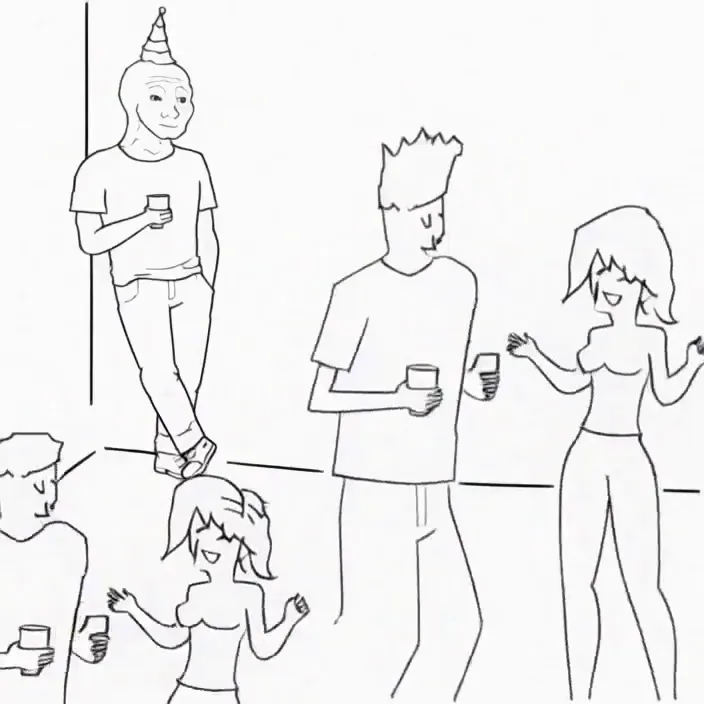
Minimax H3 Singularity 4 Step Generation Prompt: Use the provided image as the starting frame. Preserve the exact minimalist black-and-white Wojak meme drawing style, characters, and party setting. Static camera, no cuts, no zooms, no dialogue, no text. 0–3s: The man leans casually against the wall in the corner, legs crossed, one hand in his pocket, holding his drink. He has a faint, peaceful smile. Across the room, three extremely attractive adult women dancing at the party notice him. They exchange excited glances. 3–7s: The first woman confidently approaches him, flips her hair, gives h...
@cocktailpeanut·14d ago
#cool-project
Preview of my next project!
@theawakenone·19h ago
#guide
Zonos3-Mini Voice Studio: Realtime voice hacking studio
@cocktailpeanut·6h ago
#testers-wanted
For those of you brave enough to install... Thanks for trying it out. I am adding a bug report feature and fixing the workflows for objects/creatures/vehicles. I am also adding a coding agent driven headless Blender node. I will be looking to optimizes for low memory systems soon. There is alot to do on the Roadmap. Thanks for your interest.
@mumblebox·9d ago