Pinokio
FeedApps
Author@morpheus
Download Pinokio
Sign inCreate accountJoin

Morpheus

@morpheus

404 Error not found Don't hesitate to ask if you have questions. I'm here to help. Tag me if you can.

GitHubHugging FaceXDiscord

Joined January 2026

16 Following573 Followers75 Apps
PostsRepliesApps
More
ActivityCheckpointsFollowed appsGitHub creations

Published apps

  • Wan2GP - AMD[AMD ONLY] Super Optimized Gradio UI for AI video creation for GPU poor machines (6GB+ VRAM). Supports Wan 2.1/2.2, Qwen, Hunyuan Video, LTX Video, Flux and more. (On Windows supported by all dedicated AMD GPUs from RDNA 2 - RDNA 4)
  • Forge Neo[NVIDIA ONLY] Stable Diffusion WebUI Forge supporting Flux, Qwen, wan, nunchaku and more in a lightweight WebUI. https://github.com/Haoming02/sd-webui-forge-classic/tree/neo
  • Onetrainer[NVIDIA, ROCM] One app to train them all. LORA training and Model finetuning for Z-Image, Qwen Image, FLUX.1, Flux.2 Dev and Klein, Chroma, SD 1.5 - 3.5, SDXL, Würstchen-v2, Stable Cascade, PixArt-Alpha, PixArt-Sigma, Sana, Hunyuan Video and inpainting models.
  • Wan2GPSuper Optimized Gradio UI for AI video creation for GPU poor machines (6GB+ VRAM). Supports Wan 2.1/2.2, Qwen, Hunyuan Video, LTX Video and Flux. https://github.com/deepbeepmeep/Wan2GP
  • SongGeneration StudioAI Song Generation with Full Style Control - Generate complete songs with lyrics, vocals, and instrumental tracks using Tencent AI Lab's SongGeneration (LeVo) model. [NVIDIA ONLY]
  • SadTalkerFast Lipsync application for smaller GPU's.
View all apps
Replies · 149
@abdalwahabhey, ive been using wan2gp for the past 2 weeks and i have been try to create a video s 5sec long and i just cant i faces alot of error my pc specs gpu:RX6600XT 8GVRAM CPU: INTEL CORE I5-10400F RAM: 16gigs of ram
Morpheus@morpheus·19h
8GB VRAM and 16 GB RAM is the absolute minimum. I can understand that it's tough to generate something with it without getting out of memory errors. On the Configuration - Preferences page set all int 8, or 8 bit settings to 16-bit. Save the settings at the bottom. Try the LTX 2.5 distilled model. Try to generate the example prompt with a duration of max 5 sec. Use a small resolution. If your GPU can handle it you can try higher resolutions. If you get an error, please post the whole terminal output in your reply. Also let me know if that works please.

@shairazApplio: OSError: [WinError 127] The specified procedure could not be found App: Applio (applio.git) Repo: https://github.com/pinokiofactory/applio.git Generated: 2026-10-21T11:01:12.759Z Pinokio: 8.2.0 Platform: win32 x64 Node: v22.21.1 Summary System { "pinokio": { "version": "8.2.0", "node": "v22.21.1", "platform
Morpheus@morpheus·20h
in Applio
Thanks for reporting.🙂 This error happens because neither uv nor pip can resolve the right torch versions for torch-directml which results in a wrong torchaudio version. Many installer are still updated to fix this problem but Applio still needed it. I don't know if all functions of Applio will work on AMD but I updated the installer. It uses newer torch wheels now that should speed up Appli on aMD GPUs. Sadly they only support RDNA 1 - RDNA 4 AMD GPUs. However, I added a fallback for older AMD GPUs like yours. It still uses torch-directml but this time it will install the right torchaudio version for you. Please update Applio and click the install button after the update. After that Applio should be able to start. Please let me know if that works.
@boyd_101Hello, There is the output of the terminal.
Morpheus@morpheus·23hEdited
in Wan2GP

Alright. Since there is nowhere a visible error let's try to start it manually in CMD without pinokio. It may provide more information what's going wrong.
Type CMD into your windows taskbar and open it.
Execute the following commands in CMD:

  • cd C:\pinokio\api\wan.git\app
  • call venv\Scripts\activate
  • set GIT_PYTHON_GIT_EXECUTABLE=C:\pinokio\bin\miniforge\Library\cmd\git.exe
  • python wgp.py --multiple-images --advanced

Each dot is one command. Even if it renders on more than one line in here.

Please copy / paste all messages on the terminal if it starts or if you get an error.

@cocktailpeanutthis is wrong syntax. notice how on darwin it will only run DYLD_LIBRARY_PATH=$(echo ./env/lib/python*/site-packages/torch/lib) and nothing else. the code i originally pasted was not something i pasted randomly, i pasted from my local fix that worked
Morpheus@morpheus·23h
in FooocusPlus
Oh, that's true. But sadly it fails with your code on other systems. I copy /pasted your whole fix and it's not working on windows. If you want I can push your exact code and you can try it on windows. We would need a syntax that works on both systems. I'll ask an agent for first if there is a solution that works for both. Should be able to help.
@cocktailpeanutOk i tried the new version but had some trouble on mac with: OMP: Error #15: Initializing libomp.dylib, but found libomp.dylib already initialized. It worked after changing these red parts to green (see image). Full code here: https://gist.github.com/cocktailpeanut/e1e128f8d7b860101503b3ff96164850 There are two iss
Morpheus@morpheus·1d
in FooocusPlus

I think I found the problem. There was an error in this code. I think I fixed it. Now it's starting.
The message needs to be:
message: "{{platform === 'darwin' ? 'DYLD_LIBRARY_PATH=$(echo ./env/lib/python*/site-packages/torch/lib) ' : 'python entry_with_update.py --gpu-type none {{args.flags}} --language {{local.lang.language}}'}}",

@cocktailpeanutOk i tried the new version but had some trouble on mac with: OMP: Error #15: Initializing libomp.dylib, but found libomp.dylib already initialized. It worked after changing these red parts to green (see image). Full code here: https://gist.github.com/cocktailpeanut/e1e128f8d7b860101503b3ff96164850 There are two iss
Morpheus@morpheus·1dEdited
in FooocusPlus

Since it failed on first try, I copy / pasted your whole fixed start.js and also this fails.
The variables don't get resolved.

Microsoft Windows [Version 10.0.19045.7807]

(c) Microsoft Corporation. Alle Rechte vorbehalten.

C:\pinokio\api\FooocusPlus.git\app>conda_hook & conda deactivate & conda deactivate & conda deactivate & conda activate base & C:\pinokio\api\FooocusPlus.git\app\env\Scripts\activate C:\pinokio\api\FooocusPlus.git\app\env && {{platform === 'darwin' ? 'DYLD_LIBRARY_PATH=$(echo ./env/lib/python*/site-packages/torch/lib) ' : ''}}python entry_with_update.py --gpu-type none {{args.flags}} --language {{local.lang.language}}

Der Befehl "{{platform" ist entweder falsch geschrieben oder

konnte nicht gefunden werden.

(env) (base) C:\pinokio\api\FooocusPlus.git\app>

@cocktailpeanutOk i tried the new version but had some trouble on mac with: OMP: Error #15: Initializing libomp.dylib, but found libomp.dylib already initialized. It worked after changing these red parts to green (see image). Full code here: https://gist.github.com/cocktailpeanut/e1e128f8d7b860101503b3ff96164850 There are two iss
Morpheus@morpheus·1d
in FooocusPlus
Thanks a lot for looking into it and providing a fix! 😃 I applied the upper fix for macs but can't apply the second fix. I had to hardcode the URL because on first start when FooocusPlus installs the rest of the dependencies with pip, it doesn't print an URL. But it always prints "Comfy loading complete!" So I catch this message instead. The only other way would be to kill the process and restart. This fix seemed more convenient. It shouldn't affect the launch on Macs, right? I pushed the fix if you want to try. And thanks again.
@cocktailpeanutok here's what i got: Yes—FooocusPlus explicitly supports Apple Silicon Macs. Official requirements (https://github.com/DavidDragonsage/FooocusPlus#system-requirements) I reproduced a launcher bug: - FooocusPlus checks for NVIDIA’s nvidia-smi, which is absent on your Mac. - It catches that an
Morpheus@morpheus·1d
in FooocusPlus
I added the errno error handling and os specific dependencies. I don't know for sure this will still solve it. But if this was the only problem, it should work now. Please update and install again (to get the new dependencies for mac) Probably need to add gpu detection on first start but let's hope this still does the trick.
@cocktailpeanutok let me know and i'll test again
Morpheus@morpheus·1dEdited
in FooocusPlus
I think requirements_versions.txt should be fine. Can you narrow it down please? Is it during the installation with uv or when it starts and dependencies get installed with pip?
@cocktailpeanutThis is for NVIDIA GPU machines only, right? Just tried installing on my mac and it failed with: > This system does not use NVIDIA hardware or the NVIDIA driver has not been updated: NVIDIA driver or nvidia-smi not detected: [Errno 2] No such file or directory: 'nvidia-smi'
Morpheus@morpheus·1d
in FooocusPlus
Ahh, it's when installing from requirements_versions.txt There are nvidia dependencies in it. I'll try to fix that. Thanks for the heads up.
@cocktailpeanutThis is for NVIDIA GPU machines only, right? Just tried installing on my mac and it failed with: > This system does not use NVIDIA hardware or the NVIDIA driver has not been updated: NVIDIA driver or nvidia-smi not detected: [Errno 2] No such file or directory: 'nvidia-smi'
Morpheus@morpheus·1d
in FooocusPlus
Hmm, it's supposed to support all OS and GPUs. Could you post the full error please? I don't know where you get it exactly.
@pinviswhy fooocusPlus doesn't start the graph interface even been updated?
Morpheus@morpheus·1d
After FooocusPlus started you should see an Open Web UI button on the left side menu. If it doesn't appear please start FooocusPlus and after it launched click Terminal on the left side menu and copy / paste all messages or make a screenshot.
@dukevictorVideoCrafter 2: error: Failed to install: sympy-1.14.0-py3-none-any.whl (sympy==1.14.0) App: VideoCrafter 2 (videocrafter2.git) Repo: https://github.com/cocktailpeanutlabs/videocrafter2.git Generated: 2026-10-15T22:43:49.947Z Pinokio: 8.2.0 Platform: win32 x64 Node: v22.21.1 Summary System { "pinokio": { "version": "8.2.0",
Morpheus@morpheus·1dEdited
in VideoCrafter 2

Hard to tell what went wrong here. Maybe corrupted cache. You can try deleting the folder C:\pinokio\cache, restarting pinokio and try to install Video Crafter 2 again.
But with your system you can use wan2gp or Maestro. Both apps can generate videos with the newest and best models. You will get longer and better videos than with Video Crafter 2.

https://pinokio.co/apps/github-com-pinokiofactory-wan

https://pinokio.co/apps/github-com-blizaine-maestro

pinokio.coWan2GP on Pinokio1-click WanGP Launcher. Super Optimized Gradio UI for AI video creation for GPU poor machines (6GB+ VRAM). Supports Wan 2.1/2.2, Qwen, Hunyuan Video, LTX Video and Flux. https://github.com/deepbeepmeep/Wan2GP
@vinhproductionComfyUI: ERROR: Could not find a version that satisfies the requirement torch (from versions: none) App: ComfyUI (comfyui-pinokio.git) Repo: https://github.com/fakumax/comfyui-pinokio.git Generated: 2026-10-16T11:32:00.963Z Pinokio: 8.2.0 Platform: darwin x64 Node: v22.21.1 Summary System { "pinokio": { "version": "8.2.0", "node": "v22.21.1"
Morpheus@morpheus·1d
in ComfyUI
On an intel mac comfyui would be extremely slow. That wouldn't be any fun at all. A single image with a very small model would need around 10 min to generate. With an NVIDIA GPU it would need seconds. Even with an Apple mac it would need only around a minute. You need either an Apple Mac or a PC with a dedicated NVIDIA or AMD GPU to use Ai apps in an acceptable time.
@adityabWan 2.1: WARNING: Failed to find CUDA. App: Wan 2.1 (For-Gemini.git) Repo: https://github.com/remphanstar/For-Gemini.git Generated: 2026-10-18T05:45:30.193Z Pinokio: 8.2.0 Platform: win32 x64 Node: v22.21.1 Summary System { "pinokio": { "version": "8.2.0", "node": "v22.21.1", "p
Morpheus@morpheus·1d
in Wan 2.1
There is more than one problem. Your GPU can't be used properly. And there is a dependency conflict. It would be possible to troubleshoot this when you post your install logs. But there is another problem. You only have 4GB VRAM. wan2gp needs at least 6GB VRAM. Your GPU is sadly too small to generate videos.
@zakaiIssue report: God's Eye View App: God's Eye View (gods-eye-view.git) Repo: https://github.com/bilawalsidhu/gods-eye-view.git Generated: 2026-10-18T08:56:56.240Z Pinokio: 8.2.0 Platform: linux x64 Node: v22.21.1 Summary System { "pinokio": { "version": "8.2.0", "node":
Morpheus@morpheus·1d
in God's Eye View
I see no error. Start the app and have a look if you see an Open Web UI button on the left side menu after you see this URL. If there is none, copy the URL into your browser and see if you can open the UI there.
@absohelIssue report: roop App: roop (roop.pinokio.git) Repo: https://github.com/AmusedDiffuser/roop.pinokio.git Generated: 2026-10-18T19:57:37.058Z Pinokio: 8.2.0 Platform: win32 x64 Node: v22.21.1 Summary System { "pinokio": { "version": "8.2.0", "node": "v22.21.1
Morpheus@morpheus·1d
in roop

Not sure what's going wrong. I would need your install logs not the run logs to tell.
But the best Face Swap app locally is Facefusion. You could try that one instead.

https://pinokio.co/apps/github-com-facefusion-facefusion-pinokio

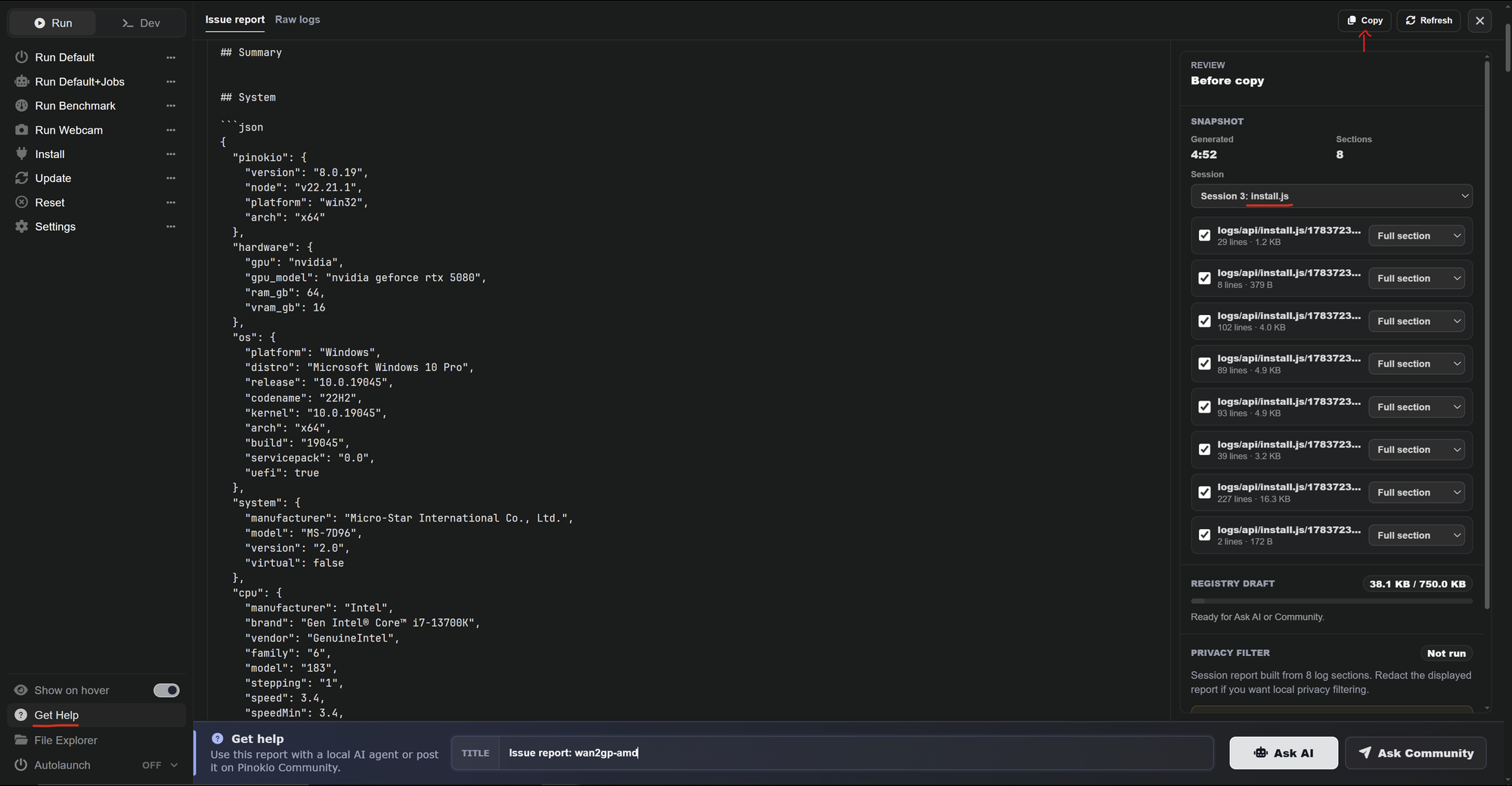
However if you want to try roop instead, please post your install logs:

  • Click the Get Help button on the left side menu of roop
  • Select the install.js session at the top right
  • Click the Copy button right above
  • Paste it in your reply

pinokio.coFaceFusion 3.9.1 on PinokioIndustry leading face manipulation platform
@yazan9292Issue report: TripoSR App: TripoSR (TripoSR-Pinokio.git) Repo: https://github.com/hoodtronik/TripoSR-Pinokio.git Generated: 2026-10-19T05:56:43.104Z Pinokio: 8.2.0 Platform: win32 x64 Node: v22.21.1 Summary System { "pinokio": { "version": "8.2.0", "node": "v22.
Morpheus@morpheus·1d
in TripoSR
TripoSR might be broke and the dev not answering. For 3D you could try hunyuan3D-2-lowVRAM pinokio.co/apps/github-com-pino…
pinokio.coHunyuan3D-2-LowVRAM on PinokioText/Image to 3D (Cross Platform: Mac + Windows + Linux): High-Resolution 3D Assets Generation with Large Scale Hunyuan3D Diffusion Models. https://github.com/deepbeepmeep/Hunyuan3D-2GP
@terryi59Issue report: Wan2GP App: Wan2GP (wan2gp.git) Repo: https://github.com/jillesmc/wan2gp.git Generated: 2026-10-19T15:28:34.424Z Pinokio: 8.2.0 Platform: win32 x64 Node: v22.21.1 Summary System { "pinokio": { "version": "8.2.0", "node": "v22.21.1", "platform": "win32",
Morpheus@morpheus·1d
in Wan2GP

Please delete the folder C:\pinokio\api\wan2gp.git\app\env and click the install button of wan2gp
If it still fails try the official version please.

https://pinokio.co/apps/github-com-pinokiofactory-wan

pinokio.coWan2GP on Pinokio1-click WanGP Launcher. Super Optimized Gradio UI for AI video creation for GPU poor machines (6GB+ VRAM). Supports Wan 2.1/2.2, Qwen, Hunyuan Video, LTX Video and Flux. https://github.com/deepbeepmeep/Wan2GP
@tomdm94Issue report: FaceFusion 3.9.1 App: FaceFusion 3.9.1 (facefusion-pinokio.git) Repo: https://github.com/facefusion/facefusion-pinokio.git Generated: 2026-10-19T17:16:12.124Z Pinokio: 8.2.0 Platform: darwin arm64 Node: v22.21.1 Summary: FaceFusion wono't run (macbook pro M5, mac os 27.0.1)
Morpheus@morpheus·1d
in FaceFusion 3.9.1

These logs don't show your error. You need to post the install logs.
Also please start Facefusion and when you see an error, click Terminal on the left side menu and copy / paste all messages in your reply.

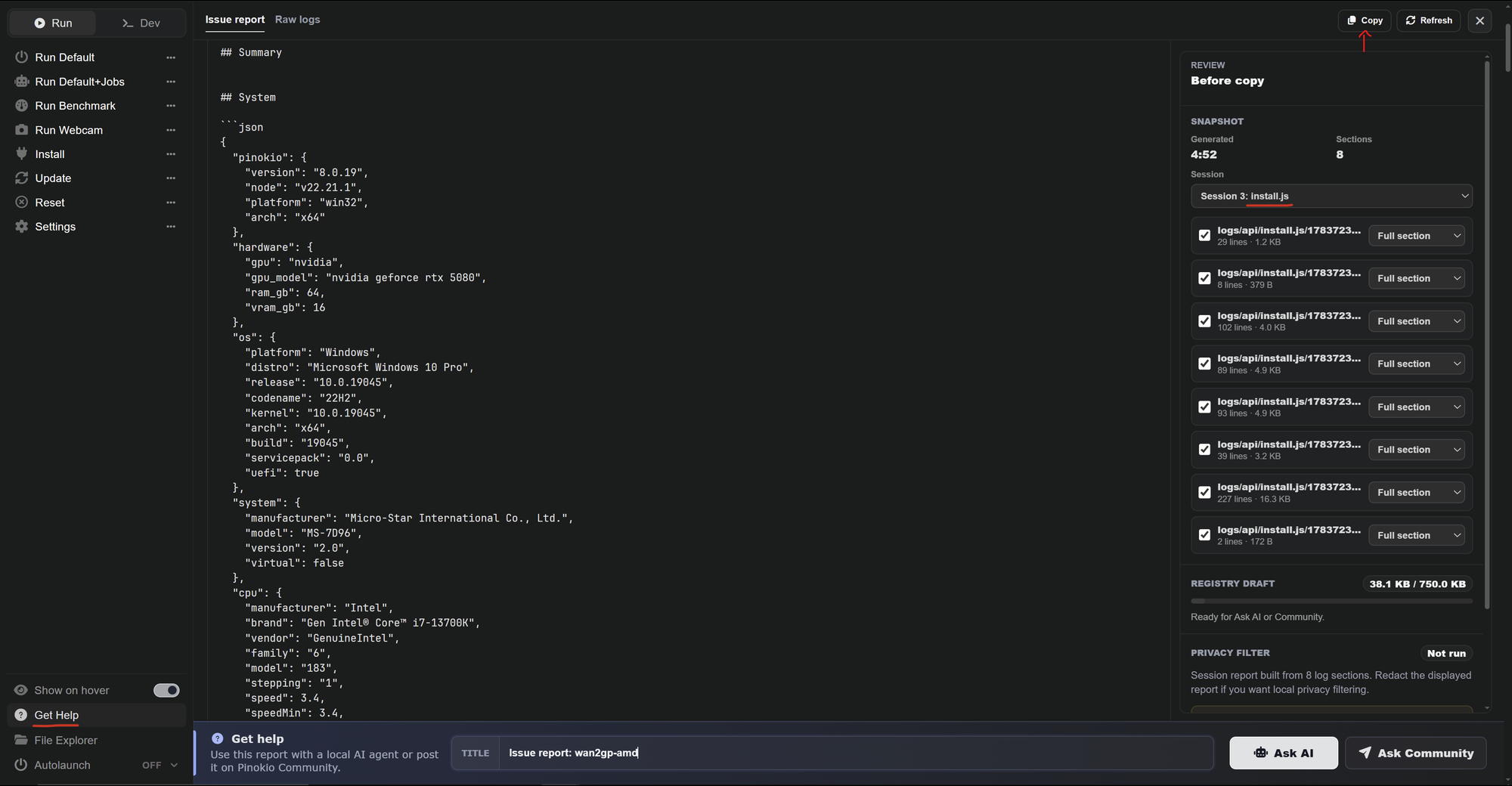
To get your install logs:

  • Click the Get Help button on the left side menu of Facefusion
  • Select the install.js session at the top right
  • Click the Copy button right above
  • Paste it in your reply

Pinokio
PrivacyTerms
FeedApps