Pinokio
FeedAppsRemoteCreate
Download Pinokio
Sign inCreate accountJoin

Apps

Announcements

View all

Official updates.

Pinned announcement from Pinokio
pinokio
@cocktailpeanut•3d ago
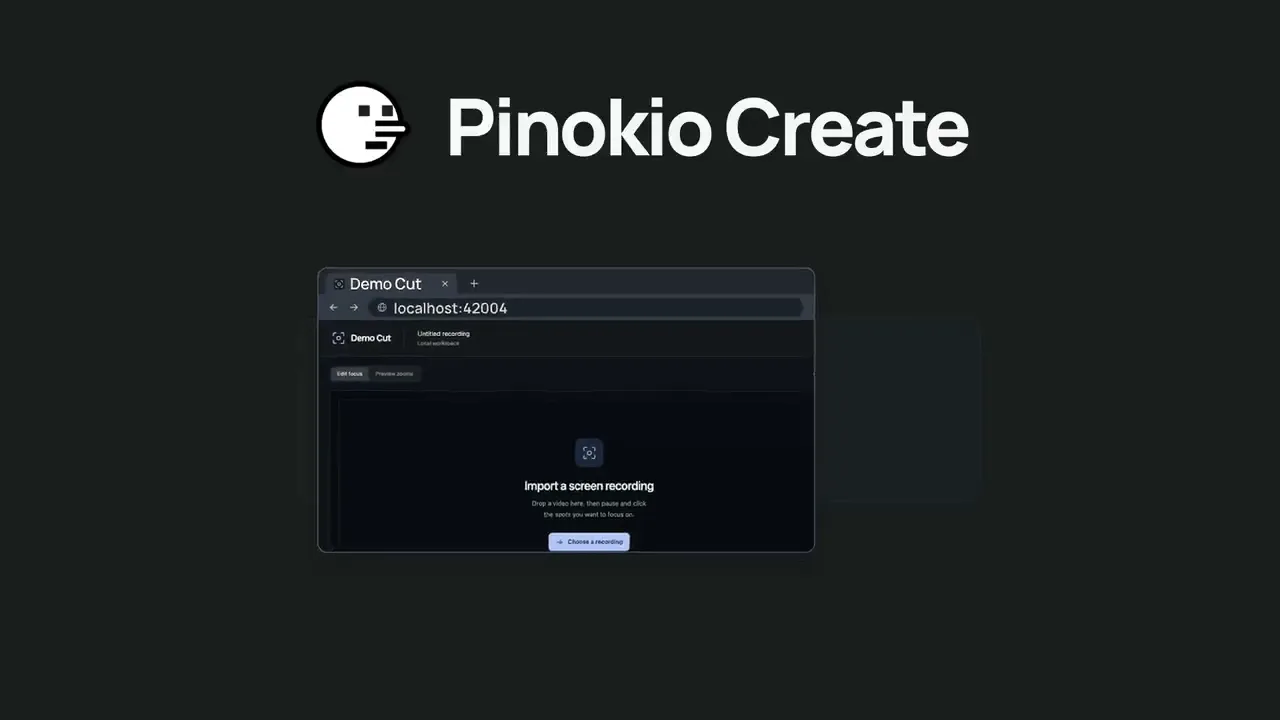
Pinokio Create: Turn Anything into a 1-Click Launcher, Automatically.Pinokio now talks to your AI agent to package anything into a 1-click launcher, publish to github, and list on pinokio, automatically. Just click the "Create" button at the top, select a template, enter what you want, and open in pinokio. Pinokio will hand off all the instructions needed to your own AI agent, and your agent will take it from there, taking care of everything automatically: Build a new app: Build a new app with 1-click launcher built-in, publish to github, and list to pinokio Publish your own app: Take your existing project, package it as a 1-click launcher, publish to github, and list to pinokio 1-Click Launcher for any existing project you want to try: Take any existing project you want to try out, package it as a 1-click launcher, publish to github and list on pinokio, all automatically.
Phosphene
@bizarro•6h ago
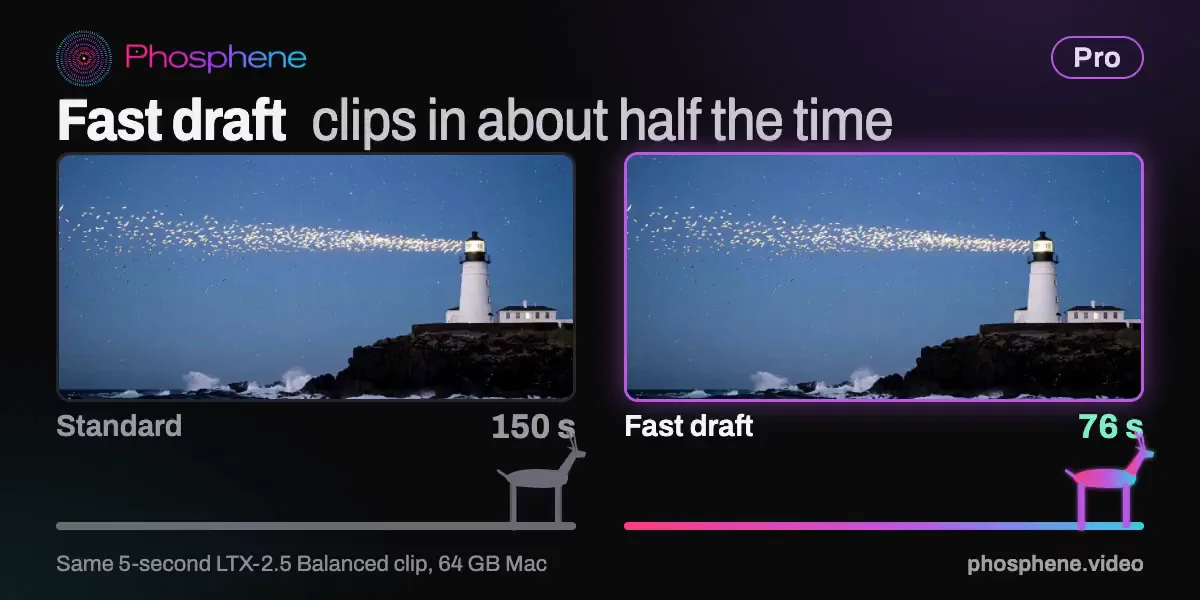
Phosphene 5.0.33 to 5.0.41: Fast draft for Pro, and a day of fixesFast draft is out for Pro, with a clearer What's new for everyone and a day of fixes. Fast draft (Pro): LTX-2.5 Balanced clips in about half the time, on any Mac with 16 GB or more. A 5-second clip took 76 s instead of 150 s on a 64 GB Mac, and 50 s instead of 98 s on a 16 GB Mac. Pick LTX-2.5, Balanced, then Fast draft on the Speed row. On Free, one quiet line after a render shows the time Fast draft would have taken on your own Mac. What's new now shows what the release gave you first, then what is new in Pro. Training keeps going when your captions don't name the trigger word. Song covers finish. Model files that can't be opened tell you what to do. The Pro window says "Best value · first 100 buyers" on Founding. Mac app: the crash count now counts real crashes only. On Pinokio, press Update, then restart. Release notes: https://phosphene.video/changelog/ Mac app: https://phosphene.video/
Mumblebox 3D Asset Foundry
@mumblebox•15h ago
Mumblebox Foundry — Powerful Local AI Auto-Rigging with Agent-Driven RefinementPreview 36 is out. Foundry has a new experimental rigging wizard with local AI fitting and a set of MCP tools that let an agent inspect the mesh, refine the rig, and show you what it changed. I wanted a little cartoon to demo it, so I talked to Codex from my phone using speech-to-text. My two main requests were to make a goofy wooden man with rubber-hose cartoon movement and to animate him with a giant acorn. I gave it feedback by voice along the way. Codex made the reference image, generated and refined the mesh in Foundry, fitted and tested the rig through Foundry’s MCP, and took it into Blender to animate and render it. I didn’t place a joint, paint a weight, or set a keyframe by hand. The Big Lift · Wood Man needs a second try. What the agent can do in Foundry MCP is the connection. The work behind it is giving the agent the same rigging session the wizard uses. Foundry gives each rig and bone a stable identity. A capture carries the source mesh, camera, coordinate frame, and rig revision. An edit targets a specific bone on a specific revision. The agent can preview a change, apply it once, and read the updated rig back from the open wizard. Preview 36 adds eight rigging calls to the local MCP. They cover capabilities, the current rig, viewport captures, depth probes, basic wizard edits, structured joint commands, previewable batches, and movement checks. Start from the asset you’re looking at. Open Rig a Character from Choose a Workflow or History, or use Rig this mesh at the end of a mesh export. Choose the exact saved GLB variant. Choose Guided Template or Local AI (TokenRig). The local AI runs on a compatible Windows NVIDIA GPU. Its pinned software and model files download on first use. Fit and binding have presets and Custom controls, and running work can be canceled. Keep the whole skeleton. Foundry preserves the predicted bones, branches, orientations, and learned weights. Use the part inspector, axis handles, exact XYZ controls, and bend direction to refine the fit. Add or adjust branches. Author fingers, hands, toes, tails, wings, and custom chains. Frame a part, mirror paired joints where appropriate, pin bones you want to preserve, or preview a scoped branch adjustment. Give the agent depth measurements. Capture front, side, back, angled, or close-up views. Probe from a pixel into the mesh to see surface hits and depth, check uncertain readings from another angle, and save useful anatomical landmarks. Inspect real movement. Bind the rig, bend a joint, and see which parts moved. Inspect weight findings and the heat map, make a targeted brush correction, and rebind. Supported rigs can use learned or conditioned binding, and Blender CPU binding is available. Keep control of the live session. Edits are revision-checked and share Undo with the wizard. Retrying the same edit applies it once. You can follow the agent’s camera, take the camera back, or click Stop agent editing. The agent can still inspect a stopped session. Take the rig into Blender. The separate ZIP contains a skinned GLB, editable skeleton data, source and binding details, a generated README, and applicable notices. History retains the source mesh and saved rig. Connect Codex or Claude Code. The bundled rigging skill explains how to inspect, adjust, test, and export. Claude Code connected to the staged server. Codex produced this demo. The experimental workflow card and wizard are available in all nine Foundry interface languages. Wood Man’s local AI fit started with 19 body bones. Codex added 30 finger bones, then checked the hands from both sides and corrected places where one finger pulled on another. The 49-bone rig carried its hierarchy and skin weights into Blender. The acorn was made in Foundry too. Codex rigged its oak leaf in Blender with three joints, so the leaf flexes while the nut, cap, and twig stay rigid. The Leaf Gag · That’s an unusually vindictive acorn. Try one joint edit Update to Preview 36 in Pinokio and open Foundry. In Connect your agent, follow the setup for your client. Make a mesh with Single Image or Text, or open Rig a Character and choose a static GLB from History. Start with Guided Template or Local AI (TokenRig). Open Fit and refine and ask your agent to check one elbow from the front and side, show you a proposed adjustment, and test the bend after binding. Watch the edit in Foundry. Use Undo or Stop agent editing if you want to take over. Save the rig and open the GLB in Blender when you’re happy with the movement. This is still in development. If you try it, I’d love to hear which agent and mesh you used, how the connection went, and where you had to step in. Thanks for trying Foundry and sharing what works. Foundry on Pinokio · Preview 36 on GitHub · MCP and rigging guide
EmberWriter
@grumpystrongman•1d ago
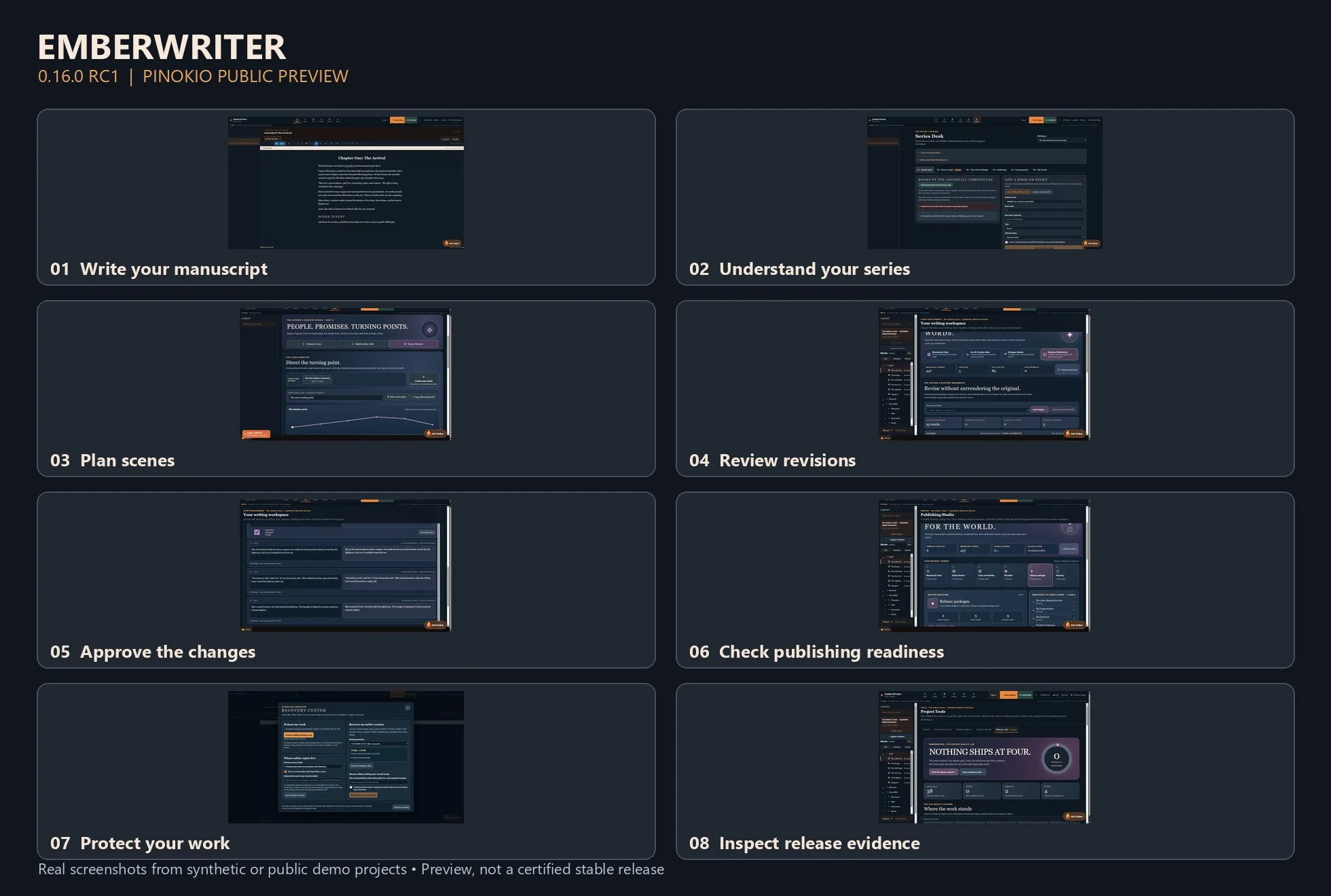
EmberWriter 0.16.0 RC1 — A Local AI Writing Studio for PinokioWriting a novel is more than generating paragraphs. It's keeping track of who knows what, what happened three chapters ago, which relationships have changed, and whether a new scene still makes sense in the larger story. I've been building EmberWriter around that challenge. It's a local-first fiction writing studio designed to help authors move from an idea to a complete manuscript while keeping creative decisions in their own hands. Version 0.16.0 RC1 is now available as a public preview through Pinokio. The writing desk is only one part of the experience. EmberWriter also includes series intelligence for tracking characters and continuity across books, a Scene Director for planning and structuring scenes, a Revision Workbench for examining proposed changes, and publishing tools for preparing exports. One principle has guided the development: AI should assist the author without silently rewriting their work or deciding what becomes canon. A suggested revision remains a suggestion. A planned scene doesn't overwrite a chapter just because a model generated something. The application includes local recovery tools, source-linked story evidence, and a Release Lab that makes technical readiness and outstanding issues visible. What's been tested? The latest engineering work includes backend and Windows recovery checks, an isolated end-to-end storyboard-to-writer test, and automated accessibility checks across desktop, tablet, and mobile layouts. RC1 is still a developer preview, not a fully certified production release. Security hardening, fresh-device installation testing, and additional real-model quality evaluation are continuing. I'd recommend starting with the isolated DEMO workspace and keeping backups of any important writing. Try EmberWriter with Pinokio: Open Pinokio on Windows x64. Choose Download from URL. Enter https://github.com/grumpystrongman/EmberWriter-Pinokio Select branch release/0.16.0-rc.1. Install and launch DEMO to explore the application. Application release: https://github.com/grumpystrongman/EmberWriter/releases/tag/preview-0.16.0-rc.1 Pinokio preview release: https://github.com/grumpystrongman/EmberWriter-Pinokio/releases/tag/preview-0.16.0-rc.1 I'd be interested in feedback from people actually writing longer fiction—particularly whether the transition from scene planning to drafting and reviewing changes feels natural. That's where I want the experience to improve most.
MiniMax H3 Studio
@mvrdvk•1d ago
Momo has a message for you!!! https://www.youtube.com/watch?v=0bFra725El4
Forge Studio
@shai7net•1d ago
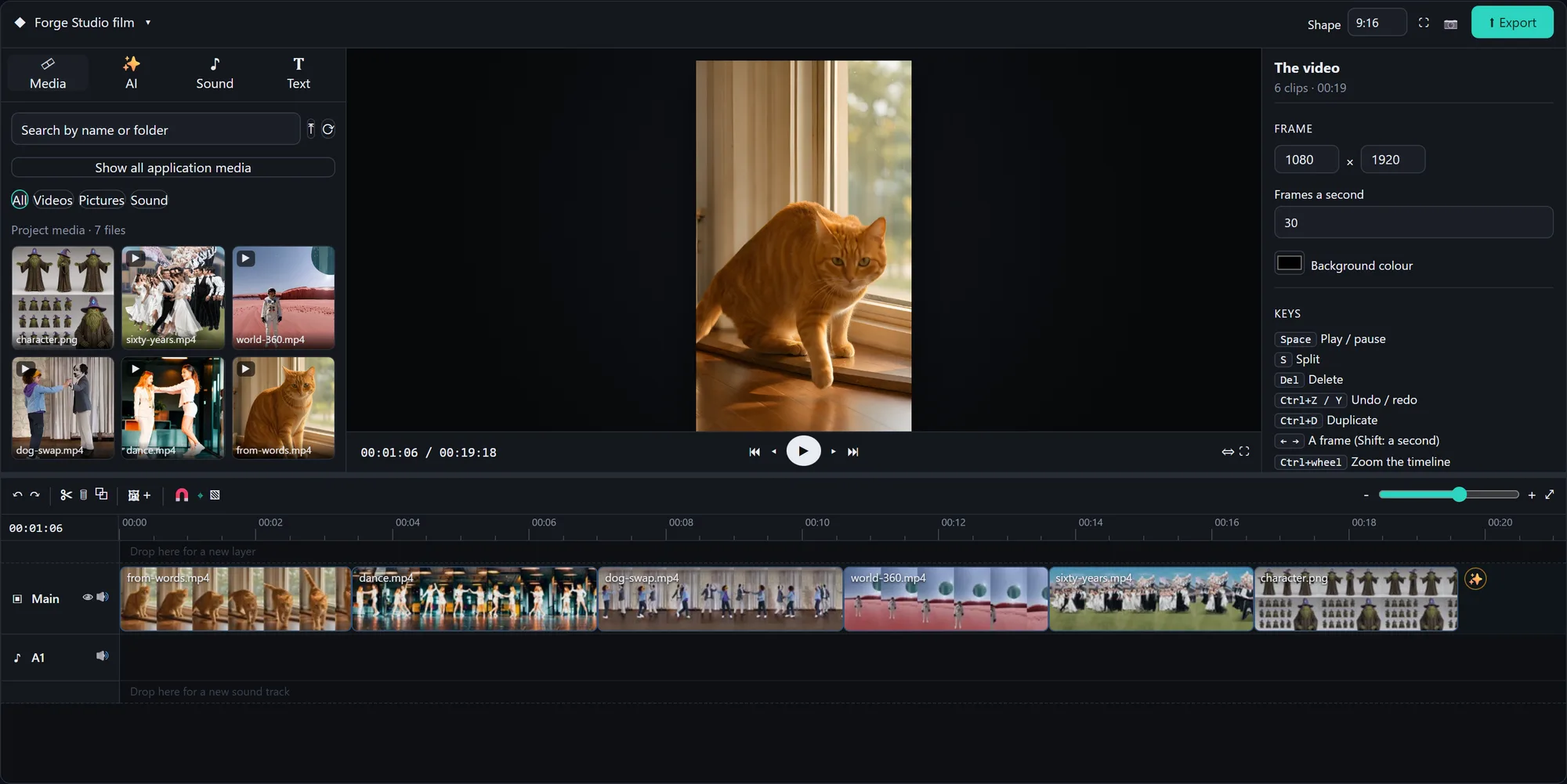
Forge Studio: a whole AI creative studio on one PC with an 8 GB card, now 1-click in Pinokio 🎬 Built on Stable Diffusion WebUI Forge: • Pictures: FLUX 3 Klein, FIBO 2.0, SDXL and SD 1.5 • Video Studio: Wan 2.2 video from text, a picture, first + last frame, "ingredients", or replacing a character in a video • AnimateDiff dance transfer, Deforum with music keyframes • Simulation 360 worlds, Time Strata, Characters (consistent character sheets → video → 3D) • Forge Studio: a timeline video editor that every tab can drop its results onto • A prompt writer that takes your idea in any language • UI skins: hold any button to restyle it, save and share skins Every shot in the video was made in it, and so was the music. Launcher: https://github.com/Shai7net/forge-studio-pinokio Project: https://github.com/Shai7net/forge-studio Windows + NVIDIA (8 GB or more). First versions, experimental: feedback is very welcome!
FeaturedAnnouncedUpdatedNew
Runs on:Windows
System
AnymacOSWindowsLinux
GPU
AnyNVIDIAAMDApple
Show:Launchers
LaunchersPluginsAll projects
#tts64#image-generation50#video-generation42#music35#utility35#video28#próba27#3d26
MatAnyoneFeatured
MatAnyone AI is a tool for editing videos by separating objects from their backgrounds. It is an AI to remove the background from videos effectively. Stable Video Matting with Consistent Memory Propagation: https://github.com/pq-yang/MatAnyone.git
pinokiofactory/MatAnyonev3.3updated 3mo ago
#edit#video-edit
2 check-insNVIDIAAMDApple
DiffRhythmFeatured
Generate songs with AI (up to 4 min 45 sec). Both with lyrics or instrumental https://github.com/ASLP-lab/DiffRhythm
pinokiofactory/diffrhythmv3.7updated 10mo ago
#musicgen#song#song-generation
2 check-insNVIDIAAMDApple
cubeFeatured
Roblox Foundation Model for 3D Intelligence --- Cross Platform (Mac, Windows, Linux): Requires 16GB+ VRAM PC or 18GB+ Memory Macs https://github.com/Roblox/cube
pinokiofactory/cubev3.7updated 11mo ago
#3d#3dgen#3d-generation
1 check-inNVIDIAAMDApple
HunyuanVideoFeatured
[NVIDIA ONLY] Super Optimized Gradio UI for Hunyuan Video Generator that works on GPU poor machines. Generate up to 10~14 sec videos https://github.com/deepbeepmeep/HunyuanVideoGP
pinokiofactory/hunyuanvideov3.7updated 1mo ago
#video-generation#video
25 check-insNVIDIAAMDApple
FramePackFeatured
[NVIDIA ONLY] Generate Video Progressively. FramePack is a next-frame (next-frame-section) prediction neural network structure that generates videos progressively. https://github.com/lllyasviel/FramePack
pinokiofactory/Frame-Packv3.7updated 1mo ago
#framepack#gradio#video
27 check-insNVIDIAAMDApple
FaceFusion 3.9.2Featured
Industry leading face manipulation platform
facefusion/facefusion-pinokiov5.0updated 4d ago
#faceswap#facefusion#face
265 check-insNVIDIAAMDApple
Ultimate-TTS-StudioFeatured
Kokoro, KittenTTS, Higgs audio, Chatterbox/Multi, Fish-Speech, F5 & index-tts & indextts2, VoxCPM and VibeVoice in one app
pinokiofactory/Ultimate-TTS-Studiov3.7updated 1mo ago
#tts#audio-generation#gradio
64 check-insNVIDIAAMDApple
WebUI for ML-Sharp (3DGS)Featured
One-click 3D Gaussian Splatting generation from a single image.
francescofugazzi/ml-sharp-pinokiov0.3updated 1mo ago
#3d#3dgs#gaussian
@franzipol5 check-insNVIDIAAMDApple
Qwen3-TTSFeatured
Qwen3-TTS is an open-source series of TTS models developed by the Qwen team
SUP3RMASS1VE/Qwen3-TTS-Pinokiov5.0updated 8d ago
#tts#voice#audio
@sup3rmass1ve53 check-insNVIDIAAMDApple
e2-f5-ttsFeatured
F5-TTS: A Fairytaler that Fakes Fluent and Faithful Speech with Flow Matching https://huggingface.co/spaces/mrfakename/E2-F5-TTS
pinokiofactory/e2-f5-ttsv8.0updated 11d ago
#tts#voice-clone#f5
34 check-insNVIDIAAMDApple
VibeVoice RealtimeFeatured
Realtime streaming TTS demo using microsoft/VibeVoice-Realtime-0.5B
pinokiofactory/vibevoice-realtimev5.0updated 2mo ago
#tts
6 check-insNVIDIAAMDApple
Hunyuan3D-2-LowVRAMFeatured
Text/Image to 3D (Cross Platform: Mac + Windows + Linux): High-Resolution 3D Assets Generation with Large Scale Hunyuan3D Diffusion Models. https://github.com/deepbeepmeep/Hunyuan3D-2GP
pinokiofactory/Hunyuan3d-2-lowvramv3.7updated 1mo ago
#3d#3dgen#mesh
12 check-insNVIDIAAMDApple
OpenAudioFeatured
Multilingual Text-to-Speech with Voice Cloning (Supports: English, Japanese, Korean, Chinese, French, German, Arabic, and Spanish) https://github.com/fishaudio/fish-speech
pinokiofactory/openaudiov3.7updated 6mo ago
#openaudio#audio#gradio
20 check-insNVIDIAAMDApple
ForgeFeatured
[NVIDIA ONLY] The most efficient way to run FLUX (Optimized to run even on low memory machines, as low as 3GB VRAM with 512x512 resolution) https://github.com/lllyasviel/stable-diffusion-webui-forge
pinokiofactory/stable-diffusion-webui-forgev2.0updated 1mo ago
#forge#image-generation#gradio
47 check-insNVIDIAAMDApple
Whisper-WebUIFeatured
A Web UI for easy subtitle using whisper model.
pinokiofactory/whisper-webuiv3.7updated 24d ago
#whisper#transcription#translation
13 check-insNVIDIAAMDApple
ComfyuiFeatured
The most powerful and modular diffusion model GUI, api and backend with a graph/nodes interface. https://github.com/comfyanonymous/ComfyUI
pinokiofactory/comfyv3.7updated 2mo ago
#comfyui#comfy#video
163 check-insNVIDIAAMDApple
MagicQuillFeatured
An intelligent, interactive Image Editing System. Easily erase and add objects on a user-friendly interface.
pinokiofactory/MagicQuillv3.7updated 5mo ago
#image#image-edit
10 check-insNVIDIAAMDApple
aura-sr-upscalerFeatured
AuraSR-v2 - An open reproduction of the GigaGAN Upscaler from fal.ai https://huggingface.co/spaces/gokaygokay/AuraSR-v2
pinokiofactory/aura-sr-upscalerv3.7updated 6mo ago
#image#upscaler
1 check-inNVIDIAAMDApple
Wan2GPFeatured
1-click WanGP Launcher. Super Optimized Gradio UI for AI video creation for GPU poor machines (6GB+ VRAM). Supports Wan 2.1/2.2, Qwen, Hunyuan Video, LTX Video and Flux. https://github.com/deepbeepmeep/Wan2GP

pinokiofactory/wanv8.0updated 2d ago
#wan2gp#video-generation#wan
746 check-insNVIDIAAMDApple
Previous
1234567
NextPage 7 of 7

Get project updates

Pulse

View all

The latest posts from across Pinokio.

error export MIDI file
@mdcom3 · MuScriptor
Checked in to ACE-Step UI.
@tnralicia_ · Community
Checked in to LatentSync.
@danielfv12366 · Community
Phosphene 5.0.33 to 5.0.41: Fast draft for Pro, and a day of fixes
@bizarro · Phosphene
Fast draft is out for Pro, with a clearer What's new for everyone and a day of fixes. Fast draft (Pro...
Checked in to God's Eye View.
@shubhamjadav · Community

Radar

View all

Projects getting attention.

Followed·4 min
Spaceship IDE
Steer a story in realtime, space pilot style, with Qwen3.5 2B running locally on llama.cpp. No API keys.
Installable
Followed·7 min
theDAW
Full-featured DAW, DJ, and VJ app interoperable w/Ableton, Reaper, Resolume & more. Stable Audio 3, Magenta RT2, Lyria 3 Pro, Suno API, Chimera track fusion, Demucs stems, MIDI generate/notate, rule-based composer (harmony, counterpoint, fugue), orchestra sound bank w/concert-hall reverb, VST3 instruments, MPE, native Audima Labs Sway support, img > spectrogram > music, drawing > music, VST3 & .gan plugins, automix & key-lock, GLSL shaders, volumetric video, Quest 3 XR interface, MIDI auto-map, RAG assistant, asset library with example projects
Installable
Followed·7 min
SadTalker
Fast Lipsync application for smaller GPU's.
Installable
Followed·8 min
ChatterBox
AI-Powered Text-to-Speech with Voice Cloning using Chatterbox TTS and a Gradio interface. Includes Turbo, Multilingual (23+ languages), and Original models. Runs locally; CUDA GPU recommended, CPU supported. Windows, Mac, and Linux.
Installable
Followed·9 min
God's Eye View
A live 3D intelligence console for planet Earth.
Installable
Pinokio
PrivacyTerms
FeedAppsCreateRemote

Explore the community

#showcase
Made with Maestro, I call it a masterpiece ... you can call it crap :-D ... but of course, I love the song, it´s not for everyone. https://youtu.be/0W9lx1gNgho
@auriodk·22h ago
#cool-project
Preview of my next project!
@theawakenone·5d ago
#guide
Pinokio Create: Turn Anything into a 1-Click Launcher, Automatically.
@cocktailpeanut·3d ago
#testers-wanted
For those of you brave enough to install... Thanks for trying it out. I am adding a bug report feature and fixing the workflows for objects/creatures/vehicles. I am also adding a coding agent driven headless Blender node. I will be looking to optimizes for low memory systems soon. There is alot to do on the Roadmap. Thanks for your interest.
@mumblebox·14d ago